
L'API inclusa con l'estensione Software Licensing ti consente di attivare da remoto le chiavi di licenza, verificare se le chiavi sono valide (e non scadute), e recuperare informazioni sulle ultime versioni del software. Questa API può essere implementata con la maggior parte del software, non solo con Plugin e Temi WordPress.
In Questo Articolo
Richieste API disponibili e parametri
Integrazione Plugin e Temi WordPress
Attiva una chiave di licenza
Verifica se una licenza è valida / attiva
Ottenere informazioni sulla versione
Recuperare le versioni per più prodotti contemporaneamente
Esempi API in altre lingue
FAQ / Risoluzione dei problemi
Sono disponibili quattro tipi di richieste API:
- activate_license – Utilizzato per attivare da remoto una chiave di licenza
- deactivate_license – Utilizzato per disattivare da remoto una chiave di licenza
- check_license – Utilizzato per verificare da remoto se una chiave di licenza è attivata, valida e non scaduta
- get_version – Utilizzato per recuperare da remoto le informazioni sull'ultima versione di un prodotto
Ciascuno dei metodi seguenti funziona allo stesso modo. L'URL del sito web su cui hai installato Easy Digital Download + Software Licensing fungerà da endpoint API. Tutte le richieste all'API vengono effettuate come richieste GET o POST e seguono questo formato:
https://YOURSITE.com/?edd_action={request type}&item_id={download ID here}&license=cc22c1ec86304b36883440e2e84cddff&url={url of the site being licensed}
La richiesta richiede tre parametri e ha un parametro opzionale:
- edd_action – Questo è il tipo di richiesta (vedi sotto)
- item_id – Utilizza l'ID del Download del tuo prodotto scaricabile. Questo è più accurato che usare item_name.
- Invece di item_id puoi anche usare item_name, che è il nome del download invece dell'ID. Passare item_id è preferibile, poiché è meno probabile che cambi. Se l'item_name cambia, il tuo software dovrà essere aggiornato e i riferimenti al vecchio nome non funzioneranno più.
- license – Questa è la chiave di licenza per cui stai eseguendo un'azione
- url – (opzionale) Questo è l'URL del sito da cui proviene la richiesta API
Suggerimento URL per Software Desktop:
Il parametro url non è limitato agli URL. Ad esempio, il software desktop potrebbe utilizzare il parametro url per un ID di sistema o qualsiasi testo univoco.
Chiavi di licenza:
- L'API delle chiavi di licenza supporta solo i seguenti caratteri [a-z, A-Z, 0-9, -, _].
- Le chiavi di licenza possono avere una lunghezza massima di 256 caratteri.
Integrazione Plugin e Temi WordPress:
Fare riferimento ai seguenti documenti sull'integrazione dell'API di gestione delle licenze software con Plugin e Temi WordPress:
Vedi la nostra documentazione su come integrare gli aggiornamenti automatici per i tuoi plugin WordPress.
Vedi la nostra documentazione su come integrare gli aggiornamenti automatici per i tuoi temi WordPress
Attiva una chiave di licenza
Per attivare una licenza da remoto, l'URL che utilizzerai è:
https://YOURSITE.com/?edd_action=activate_license&item_id=8&license=cc22c1ec86304b36883440e2e84cddff&url=https://licensedsite.com
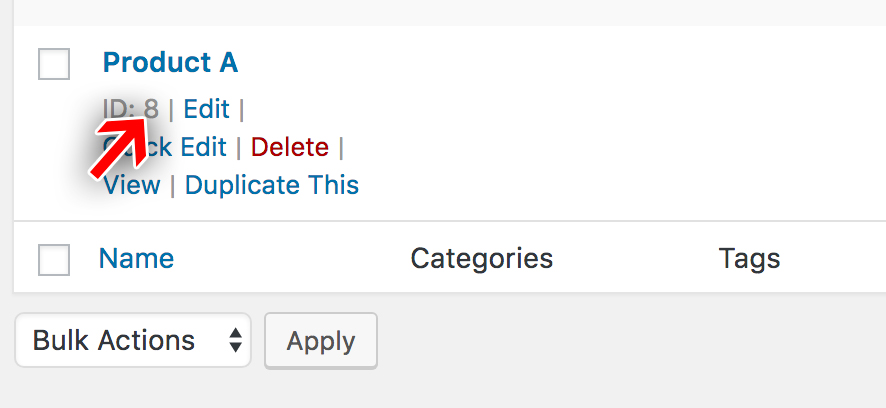
Il parametro item_id (item_id=8) verrà sostituito con l'ID effettivo del tuo prodotto. Puoi trovarlo nella tua dashboard accanto al prodotto:
Il parametro license è impostato sulla chiave di licenza che si desidera attivare.
La risposta per questa richiesta sarà un oggetto JSON. Se la licenza è stata attivata con successo, la risposta sarà:
{
    "success": true,
    "license": "valid",
    "item_id": false (or Item ID if passed)
    "item_name": "EDD Product Name",
    "license_limit": 0,
    "site_count": 2,
    "expires": "2020-06-30 23:59:59",
    "activations_left": "unlimited",
    "checksum": "<md5 checksum>",
    "payment_id": 12345,
    "customer_name": "John Doe",
    "customer_email": "[email protected]",
    "price_id": "2"
}
Se la licenza non è valida e non è stata attivata, la risposta sarà:
{
    "success": false,
    "license": "invalid",
    "item_id": false (or Item ID if passed)
    "item_name": "EDD Product Name",
    "error": "expired",
    "expires": "2020-04-28 23:59:59",
    "license_limit": 0,
    "site_count": 1,
    "activations_left": "unlimited",
    "checksum": "<md5 checksum>",
    "payment_id": 12345,
    "customer_name": "John Doe",
    "customer_email": "[email protected]",
    "price_id": "2"
  }
Possibili errori:
"missing" - License doesn't exist
"missing_url" - URL not provided
"license_not_activable" - Attempting to activate a bundle's parent license
"disabled" - License key revoked
"no_activations_left" - No activations left
"expired" - License has expired
"key_mismatch" - License is not valid for this product
"invalid_item_id" - Invalid Item ID
"item_name_mismatch" - License is not valid for this product
"site_inactive" - Site is not active for this license
"invalid" - License key does not match
"valid" - License is valid
Verifica se una licenza è valida / attiva
Verificare se una licenza è valida e non scaduta è molto simile all'attivazione. Questa richiesta viene solitamente effettuata se è necessario confermare che una licenza sia ancora valida dopo che è stata attivata. Le licenze scadono dopo un anno (per impostazione predefinita), quindi questo è ciò che userai per verificare se la licenza è scaduta.
Per verificare una licenza da remoto, l'URL che userai è:
https://YOURSITE.com/?edd_action=check_license&item_id=8&license=cc22c1ec86304b36883440e2e84cddff&url=https://licensedsite.com
Il parametro item_id (item_id=8) verrà sostituito con l'ID effettivo del tuo prodotto. Puoi trovarlo nella tua dashboard accanto al prodotto:
Il parametro license è impostato sulla chiave di licenza che si desidera verificare.
La risposta per questa richiesta sarà un oggetto JSON. Se la licenza è attiva e ancora valida, la risposta sarà:
{
    "success": true,
    "license": "valid",
    "item_id": false, (or Item ID if passed)
    "item_name": "EDD Product Name",
    "checksum": "",
    "expires": "2020-06-30 23:59:59",
    "payment_id": 12345,
    "customer_name": "John Doe",
    "customer_email": "[email protected]",
    "license_limit": 0,
    "site_count": 2,
    "activations_left": "unlimited",
    "price_id": "2"
}
Se la licenza non è valida, la risposta sarà:
{
    "success": false,
    "license": "invalid",
    "item_id": false, (or Item ID if passed)
    "item_name": "EDD Product Name",
    "expires": "2014-10-23 00:00:00",
    "license_limit": 0,
    "site_count": 1,
    "activations_left": "unlimited",
    "checksum": "checksum",
    "payment_id": 54224,
    "customer_name": "John Doe",
    "customer_email": "[email protected]",
    "price_id": "2"
}
Possibili stati della licenza:
"disabled" - License key revoked
"expired" - License has expired
"key_mismatch" - License is not valid for this product
"invalid_item_id" - Invalid Item ID
"item_name_mismatch" - License is not valid for this product
Ottenere informazioni sulla versione
Il recupero delle informazioni sulla versione ti consente di recuperare da remoto dati sul numero della versione più recente, inclusi i log delle modifiche e i link per il download dei file di aggiornamento.
Per ottenere informazioni sulla versione per una chiave di licenza:
https://YOURSITE.com/?edd_action=get_version&item_id=8&license=cc22c1ec86304b36883440e2e84cddff&url=https://licensedsite.com
Il parametro item_id (item_id=8) verrà sostituito con l'ID effettivo del tuo prodotto. Puoi trovarlo nella tua dashboard accanto al prodotto:
Note relative alla richiesta:
- Se si utilizza item_name invece di item_id, inserire il titolo del prodotto in Easy Digital Downloads esattamente. L'utilizzo di item_id è più accurato.
- I parametri license e url sono facoltativi. Se vengono omessi, verranno recuperate le informazioni sulla versione più recente, ma non verrà incluso alcun link per il download.
- A partire da Software Licensing 3.8, è possibile includere le versioni della piattaforma nella richiesta. Se la versione della piattaforma non soddisfa i requisiti minimi impostati per il prodotto in Easy Digital Downloads,
new_versionnella risposta saràfalseinvece del numero della nuova versione.php_versionewp_versionsono supportati per impostazione predefinita.
La risposta sarà un oggetto JSON che assomiglia a questo:
{
  "new_version": "2.0",
  "stable_version": "2.0",
  "name": "Restrict Content Pro",
  "slug": "restrict-content-pro",
  "url": "https://edd.com/downloads/restrict-content-pro/?changelog=1",
  "last_updated": "2017-01-03 11:59:46",
  "homepage": "https://edd.com/downloads/restrict-content-pro/",
  "package": "",
  "download_link": "",
  "sections": "a:2:{s:11:"description";s:793:"<p>Placerat porta in enim, urna cras, adipiscing augue dis lorem, pulvinar, natoque phasellus eu tincidunt, dictumst nunc ut dignissim turpis ac, pulvinar! Massa! Sed, enim, eu ac augue placerat scelerisque! Eu cursus, ridiculus cum nec lorem, natoque lorem dictumst amet! Nunc placerat dapibus enim dignissim, nunc mattis vel? Dolor nascetur placerat ridiculus augue massa porttitor turpis auctor, etiam et nisi pid ridiculus nisi duis ac. Turpis et non, dapibus diam! Placerat vel? Et, velit turpis mus sociis arcu, vel magna. Habitasse elementum elit cum nec est, eu, montes egestas est mattis lacus, turpis urna parturient, egestas, integer augue, penatibus natoque elit, rhoncus mid elementum, integer vut turpis. Et? Nisi pid. Nec, placerat ut tristique lorem a nunc velit nunc est.</p>n";s:9:"changelog";s:0:"";}",
  "banners": "a:2:{s:4:"high";s:0:"";s:3:"low";s:0:"";}"
}
Note relative alla risposta:
- Se nessuna chiave di licenza viene fornita nella richiesta get_version, le informazioni sulla versione vengono comunque restituite; tuttavia, i valori del pacchetto e del download saranno vuoti. Al contrario, se viene fornita una chiave di licenza ma non appartiene all'item_id o item_name nella richiesta, verrà restituita una risposta di errore con una motivazione come valore msg.
- Verrà incluso un download_link se esiste un file indipendentemente dallo stato della licenza. Tuttavia, il download non funzionerà a meno che la licenza non sia attiva. Ciò consente ai siti con una licenza scaduta di rinnovarla, ma di non dover attendere la cancellazione della cache di aggiornamento prima di ottenere l'aggiornamento.
- The sections property is a serialized array that includes the full product description and changelog. If using ReadMe.txt parsing for WordPress plugins, it will also include additional information provided through the readme file.
If you wish to retrieve information about a beta version, append &beta=1 to your API request URL, like so:
https://YOURSITE.com/?edd_action=get_version&item_id=8&license=cc22c1ec86304b36883440e2e84cddff&url=https://licensedsite.com&beta=1
Recuperare le versioni per più prodotti contemporaneamente
Retrieve versions for multiple products in one request, using the products argument. This argument accepts an array of items. Each item should contain the same arguments sent in a single request.
Here’s an example using cURL:
curl -d edd_action=get_version -d products[0][item_id]=356 -d products[0][license]=59cc77ea94a2d867069a9d96142a35b8 -d products[0][url]="https://licensedsite.com" -d products[1][item_id]=46 -d products[1][license]=5cdd12a966c498fc6e423e261fe05303 -d products[1][url]="https://licensedsite.com" https://YOURSITE.com
And here’s an example using the WordPresswp_remote_post() function:
$response = wp_remote_post( 'https://YOURSITE.com', array(
	'body' => array(
		'edd_action' => 'get_version',
		'products'   => array(
			'my-first-plugin' => array(
				'item_id' => 356,
				'license' => '59cc77ea94a2d867069a9d96142a35b8',
				'url'     => 'https://licensedsite.com'
			),
			'my-second-plugin' => array(
				'item_id' => 46,
				'license' => '5cdd12a966c498fc6e423e261fe05303',
				'url'     => 'https://licensedsite.com'
			)
		)
	)
) );
The response will be a JSON object containing results for each of the provided products. The product keys you provided in the request will be retained in the response. Here’s an example:
{
  "my-first-plugin": {
    "new_version": "2.0",
    "stable_version": "2.0",
    "name": "My First Plugin",
    "slug": "my-first-plugin",
    "url": "https://edd.com/downloads/my-first-plugin/?changelog=1",
    "last_updated": "2021-01-03 11:59:46",
    "homepage": "https://edd.com/downloads/my-first-plugin/",
    "package": "",
    "download_link": "",
    "sections": "a:2:{s:11:"description";s:793:"<p>Placerat porta in enim, urna cras, adipiscing augue dis lorem, pulvinar, natoque phasellus eu tincidunt, dictumst nunc ut dignissim turpis ac, pulvinar! Massa! Sed, enim, eu ac augue placerat scelerisque! Eu cursus, ridiculus cum nec lorem, natoque lorem dictumst amet! Nunc placerat dapibus enim dignissim, nunc mattis vel? Dolor nascetur placerat ridiculus augue massa porttitor turpis auctor, etiam et nisi pid ridiculus nisi duis ac. Turpis et non, dapibus diam! Placerat vel? Et, velit turpis mus sociis arcu, vel magna. Habitasse elementum elit cum nec est, eu, montes egestas est mattis lacus, turpis urna parturient, egestas, integer augue, penatibus natoque elit, rhoncus mid elementum, integer vut turpis. Et? Nisi pid. Nec, placerat ut tristique lorem a nunc velit nunc est.</p>n";s:9:"changelog";s:0:"";}",
    "banners": "a:2:{s:4:"high";s:0:"";s:3:"low";s:0:"";}"
  },
  "my-second-plugin": {
    "new_version": "1.3",
    "stable_version": "1.3",
    "name": "My Second Plugin",
    "slug": "my-second-plugin",
    "url": "https://edd.com/downloads/my-second-plugin/?changelog=1",
    "last_updated": "2021-03-08 11:59:46",
    "homepage": "https://edd.com/downloads/my-second-plugin/",
    "package": "",
    "download_link": "",
    "sections": "a:2:{s:11:"description";s:793:"<p>Placerat porta in enim, urna cras, adipiscing augue dis lorem, pulvinar, natoque phasellus eu tincidunt, dictumst nunc ut dignissim turpis ac, pulvinar! Massa! Sed, enim, eu ac augue placerat scelerisque! Eu cursus, ridiculus cum nec lorem, natoque lorem dictumst amet! Nunc placerat dapibus enim dignissim, nunc mattis vel? Dolor nascetur placerat ridiculus augue massa porttitor turpis auctor, etiam et nisi pid ridiculus nisi duis ac. Turpis et non, dapibus diam! Placerat vel? Et, velit turpis mus sociis arcu, vel magna. Habitasse elementum elit cum nec est, eu, montes egestas est mattis lacus, turpis urna parturient, egestas, integer augue, penatibus natoque elit, rhoncus mid elementum, integer vut turpis. Et? Nisi pid. Nec, placerat ut tristique lorem a nunc velit nunc est.</p>n";s:9:"changelog";s:0:"";}",
    "banners": "a:2:{s:4:"high";s:0:"";s:3:"low";s:0:"";}"
  }
}
Accessing the API in other languages
Because the API uses simple HTTP POST requests, it can be accessed in just about any language. Here are some examples.
- API licenze software – Esempio con cURL
- API per la gestione delle licenze software – Esempio con Perl
- API per la gestione delle licenze software – Esempio con Python
- API per la gestione delle licenze software – Esempio con Ruby
- API di licenza software – Esempio con C#
- API per le licenze software – Esempio con JavaScript
- API per la gestione delle licenze software – Esempio con jQuery
FAQ / Risoluzione dei problemi
Can I create Custom Formatted Keys?
The default key format is a simple md5 sum.
You may change that format to just about anything you want.
How do I prevent access to my software, plugin, or theme if the license is expired or disabled?
This license’s status does not affect the software, it merely indicates the status of the key. It’s up to the developer to read that status to do something. For example, if a key is Expired the software could choose to stop working or could choose to pop up a warning.
One exception to this is that when EDD sees an expired or disabled key attached to a download, download links, including the get_version link, will not work. Therefore, updates will no longer work via the get_version response.
If you are having trouble getting license keys to activate in your implementation of
Software Licensing, here are some tips to help resolve common issues.
Requests blocked by a security plugin
Security plugins for WordPress often have features that interfere with the license key API requests. These features tend to make the activation (and other API requests) return an unexpected response, causing the activation routine to fail.
For example, you might get a response like this from the server if you have a security plugin that is interfering:
[response] => Array
	(
		[code] => 403
		[message] => Forbidden
)
The iThemes Security plugin is known to have a setting that can cause this issue. The setting is called
Filter Suspicious Query Strings in the URL
To resolve the issue, simply disable the
Filter Suspicious Query Strings in the URL setting. If you’re not using iThemes Security, it will be named something different, though similar.
Richieste bloccate da regole speciali .htaccess
Alcuni siti aggiungono regole speciali al file .htaccess per bloccare determinati indirizzi IP o aggiungere ulteriore protezione al sito.
Se hai regole speciali .htaccess attive e le chiavi di licenza non sono attivate, prova a rimuovere le regole e poi ad attivare le chiavi di licenza. Se le chiavi di licenza si attivano correttamente ora, dovrai modificare le regole per consentire il funzionamento delle routine API di licenza.
Richieste bloccate da un plugin "coming soon" o di manutenzione
Se stai utilizzando un plugin "coming soon" o in modalità manutenzione, è probabile che le chiavi di licenza non possano essere attivate, poiché il plugin "coming soon" / modalità manutenzione bloccherà le richieste. Per risolvere il problema, disattiva semplicemente la modalità manutenzione o il plugin "coming soon". Se devi lasciarlo attivo, disattivalo temporaneamente per testare il processo di attivazione della chiave di licenza e poi riattiva il plugin.