

To prepare for Black Friday as a digital seller, start with last year’s sales. See what sold and who bought it, then set a discount you can afford. Test your checkout and file delivery, set up your codes and promos, and compare your results with a normal week after Cyber Monday.
Black Friday lands on November 27 this year, and Cyber Monday follows on November 30. That leaves about three weeks to get ready.
The good news? Your store already holds most of the answers. If you sell with Easy Digital Downloads (EDD) and connect an AI assistant, it can pull them for you while you make the decisions.
This checklist walks you through nine steps in four phases. Each one comes with a prompt you can copy and paste.
- Key Takeaways
- Why Black Friday Prep Looks Different for Digital Sellers
- Black Friday Prep Timeline
- Phase 1: Look Back Before You Plan Your Sale
- Phase 2: Fix Your Checkout Before Traffic Spikes
- Phase 3: Launch Your Black Friday Sale
- Phase 4: Read Your Results After Cyber Monday
- Black Friday Prep Questions, Answered
- When should I start preparing for Black Friday?
- How long should a Black Friday sale run?
- How big should a Black Friday discount be on digital products?
- Can AI plan my Black Friday sale for me?
- Should I give existing subscribers a Black Friday discount?
- How do I prepare for Cyber Monday separately?
- What should I do after Black Friday ends?
- Start Your Black Friday Prep With AI
Key Takeaways
| Look back first | Last year’s sales and customer list tell you what to discount and who should get the offer. |
| Protect your margin | Set the lowest price you’ll accept before you pick a discount, including fees and affiliate commissions. |
| Fix the path early | Test checkout, file delivery and upgrade paths two weeks out, before traffic spikes. |
| Launch with guardrails | Create codes as inactive, check them, then switch them on when the sale starts. |
| Read results honestly | Compare sale days with normal days, and count refunds and new buyers before you celebrate. |
Why Black Friday Prep Looks Different for Digital Sellers
You don’t have stock to count or boxes to ship. So your Black Friday prep is mostly about your data and your checkout.
That changes the risks too. A digital product costs nothing extra to deliver, so it’s tempting to slash prices. But a deep discount can eat your margin and teach buyers to wait for your next sale.
Good prep helps you avoid discounting people who would have bought anyway. It points your best offers at the buyers who need a nudge.
You also don’t need a team. Every step below works whether you run the store yourself or have someone helping.
How to Prepare for Black Friday With AI
You can do every step by hand in your WordPress dashboard. An AI assistant just makes the data steps faster.
Easy Digital Downloads has built-in AI abilities. Once you connect an AI assistant like Claude or ChatGPT through WPVibe, it can read your orders, customers, discounts and reports.
A few ground rules keep it safe:
- Reading works right away. Questions about sales, orders and customers don’t change anything.
- Changes need your OK. Creating a discount only works after you switch on Allow AI to Change Store Data. New codes start inactive.
- You make the calls. AI pulls and sums up the numbers. You set the prices. Check any total against Downloads » Reports before you act on it.
Each step below includes a prompt you can copy. Many also link to a ready-made WPVibe recipe that walks your assistant through the job. For the full list of what your assistant can do, see the AI abilities guide.
Black Friday Prep Timeline
Most digital sellers need about three weeks to prepare for Black Friday. Use this timeline to spread out the work so nothing piles up on sale week.
| When | Phase | What you’ll do | Steps |
|---|---|---|---|
| 3 weeks out | Look back | Review last year, set your discount floor, pick your customer groups | 1 to 3 |
| 2 weeks out | Fix the path | Test checkout and delivery, check upgrade paths, back up your site | 4 to 6 |
| Sale week | Launch | Create your codes and promote the sale | 7 and 8 |
| After Cyber Monday | Read the results | Compare your sale with a normal stretch of days | 9 |
Short on time? Do Steps 1, 4 and 7 first. They tell you what to sell, whether checkout works and how buyers get the discount.
Phase 1: Look Back Before You Plan Your Sale
The best Black Friday plan starts with what already happened in your store. These three steps tell you what to put on sale and who should see it first.
Step 1: Review How Last Year’s Black Friday Went
Start by comparing last year’s sale with a normal stretch of days. Look at earnings, order count, refunds and which products sold.
The normal days matter. Without them, you can’t tell whether the sale brought in new money or just moved purchases that would have happened anyway.
Look at your quiet products too. A product that barely sells on its own can make a great bundle add-on.
In Easy Digital Downloads, you’ll find these numbers under Downloads » Reports. Or ask your AI assistant:
Compare my store’s sales from November 28 to December 1, 2025 with November 3 to 6, 2025. Show earnings, orders, refunds and my top 5 products for each. Don’t change anything.
Both periods are four days long, so you’re comparing like with like.
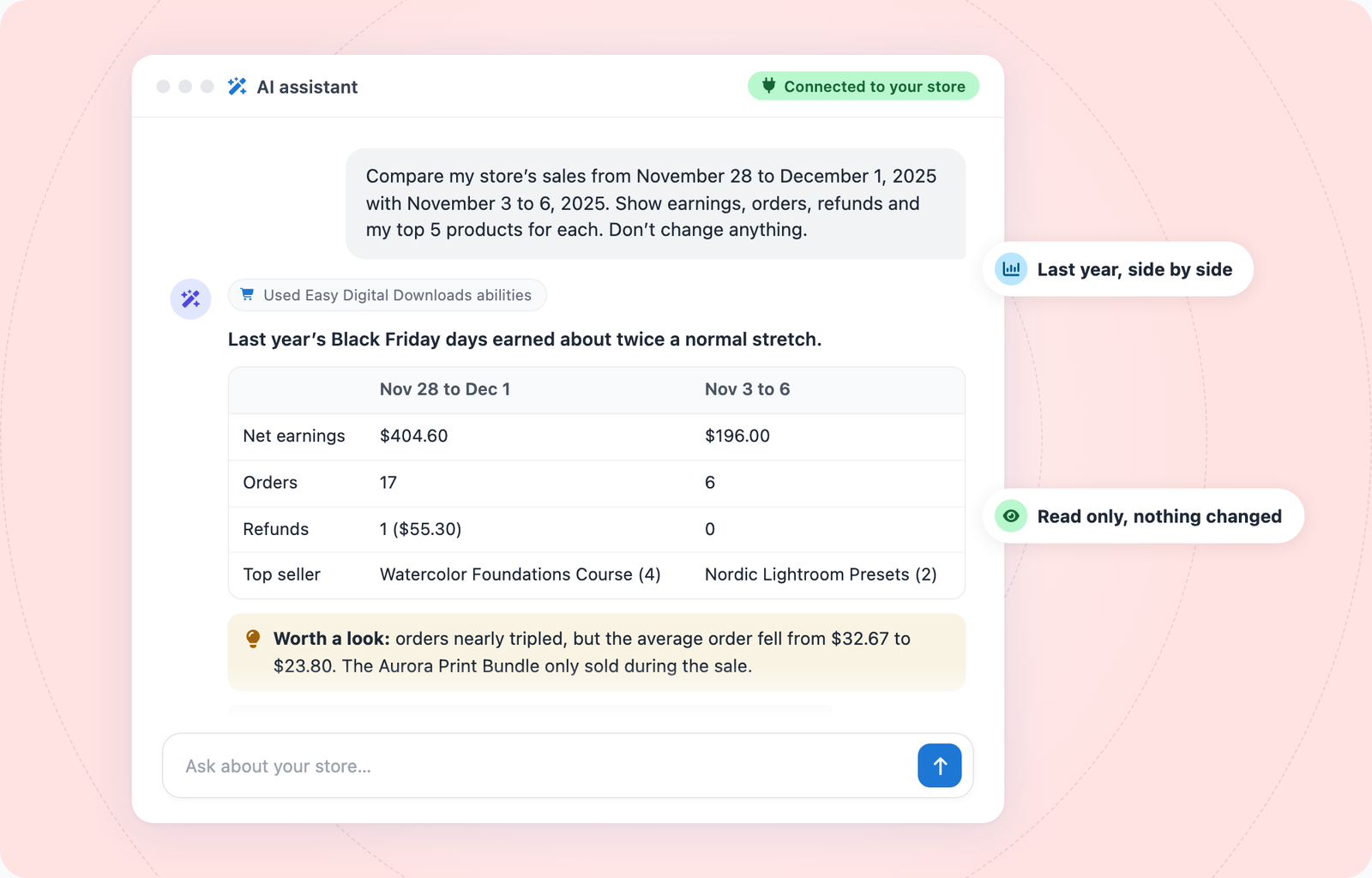
Didn’t run a sale last year? Compare your best month with an average one instead.
The Get Your Sales Report recipe walks your assistant through ranking your products by earnings. For a deeper dive, see our guide to planning a sale from your past sales data.
Step 2: Set a Goal and a Discount Floor
Next, pick one goal for the sale. You might want new buyers, upgrades from current customers, more sales of a quiet product, or past buyers coming back.
One goal keeps your offer simple. It also tells you what to measure in Step 9.
Then work out your discount floor. That’s the lowest price you’ll accept for each product.
A digital product has no shipping costs, but each sale still costs you something:
- Payment fees: what your payment gateway charges per transaction
- Affiliate commissions: if you run an affiliate program
- Plan or gateway fees: any extra transaction fee your setup adds
Do the math before you pick 30% or 50% off. Your assistant can run the numbers without touching your store:
My Course Bundle sells for $149. Payment fees are about 2.9% plus 30 cents, and affiliates earn 20%. How much do I keep at 20%, 30% and 40% off?
If a discount drops below your floor, try a bundle or a bonus product instead. You keep your price and still give buyers a reason to act now.
Step 3: Decide Who Gets Which Offer
Not every customer needs the same deal. Splitting your list into a few groups lets you aim each offer where it’ll do the most good.
These groups work well for digital sellers:
- Repeat buyers: Reward them with early access, like a 24 to 48 hour head start.
- Lapsed buyers: Send a win-back offer to people who haven’t bought in a year.
- Expiring licenses: If you sell software, offer a renewal or upgrade before the license runs out.
- Active subscribers: They already pay you. A deal on a new product may fit, but don’t cut their renewal price by accident.
- New email subscribers: Black Friday is a strong first reason for them to buy.
Your assistant can pull most of these groups for you:
- List customers who bought from me two or more times in the last 12 months, with their total spend.
- Which licenses expire in the next 60 days? Group them by product.
- How many active subscriptions do I have for each product?
The license question needs Software Licensing, and the subscription question needs Recurring Payments. See how each one works with AI in our guides to managing software licenses with AI and Recurring Payments with AI. The Find Expiring Licenses recipe is a good place to start.
Early access is also a simple way to keep loyal customers coming back.
Phase 2: Fix Your Checkout Before Traffic Spikes
About two weeks out, switch from planning to testing. Problems are easy to fix now and costly to fix on Black Friday.
Step 4: Test Your Checkout and File Delivery
Buy your own product the way a customer would. Use test mode, and try it on both your phone and your computer.
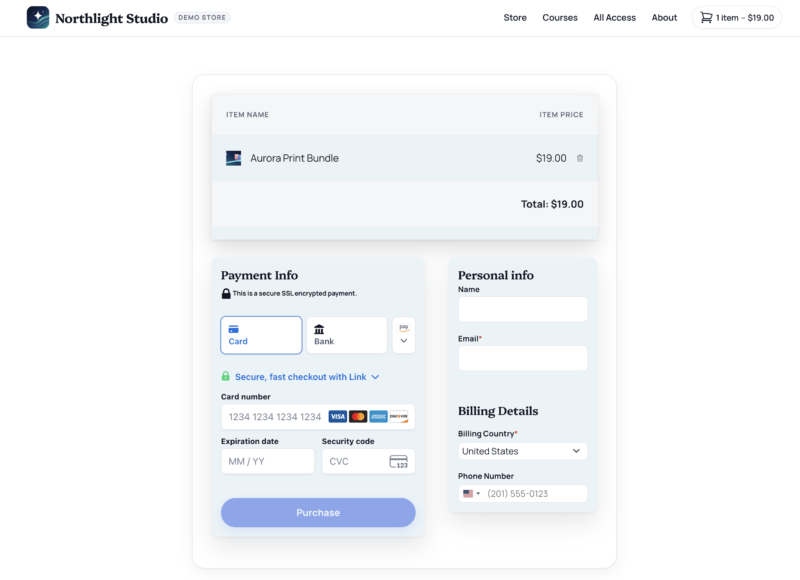
Check each part of the purchase to ensure that the:
- Checkout loads quickly and asks only for what you need
- Payment goes through
- Receipt email arrives
- Download link works and the file opens
That last one is easy to skip. For a digital seller, the file is the product, so test it for every product you plan to discount.
Your assistant can run a quick store check first:
Audit my store before Black Friday: test mode, payment gateways, checkout pages and taxes. Then tell me whether the receipt for my last test order went out.
The Audit Your Store Before Launch recipe covers the full check.
While you’re testing, look for quick checkout wins:
- Faster payments: Offer Apple Pay and Google Pay so mobile buyers skip typing card numbers.
- Fewer fields: Ask only for what you need. Our guide to optimizing your checkout covers more ideas.
- A clearer layout: EDD’s checkout inner blocks let you rearrange the checkout page without code.
Step 5: Check Your Upgrade Paths
Black Friday isn’t only for new buyers. It’s also a good time to move current customers up to a bigger plan.
If you sell software with Software Licensing, check your upgrade paths. Open a product and find the Upgrades section in Licensing Settings. Click Add New Upgrade Path to choose the product or price option a customer can move to.
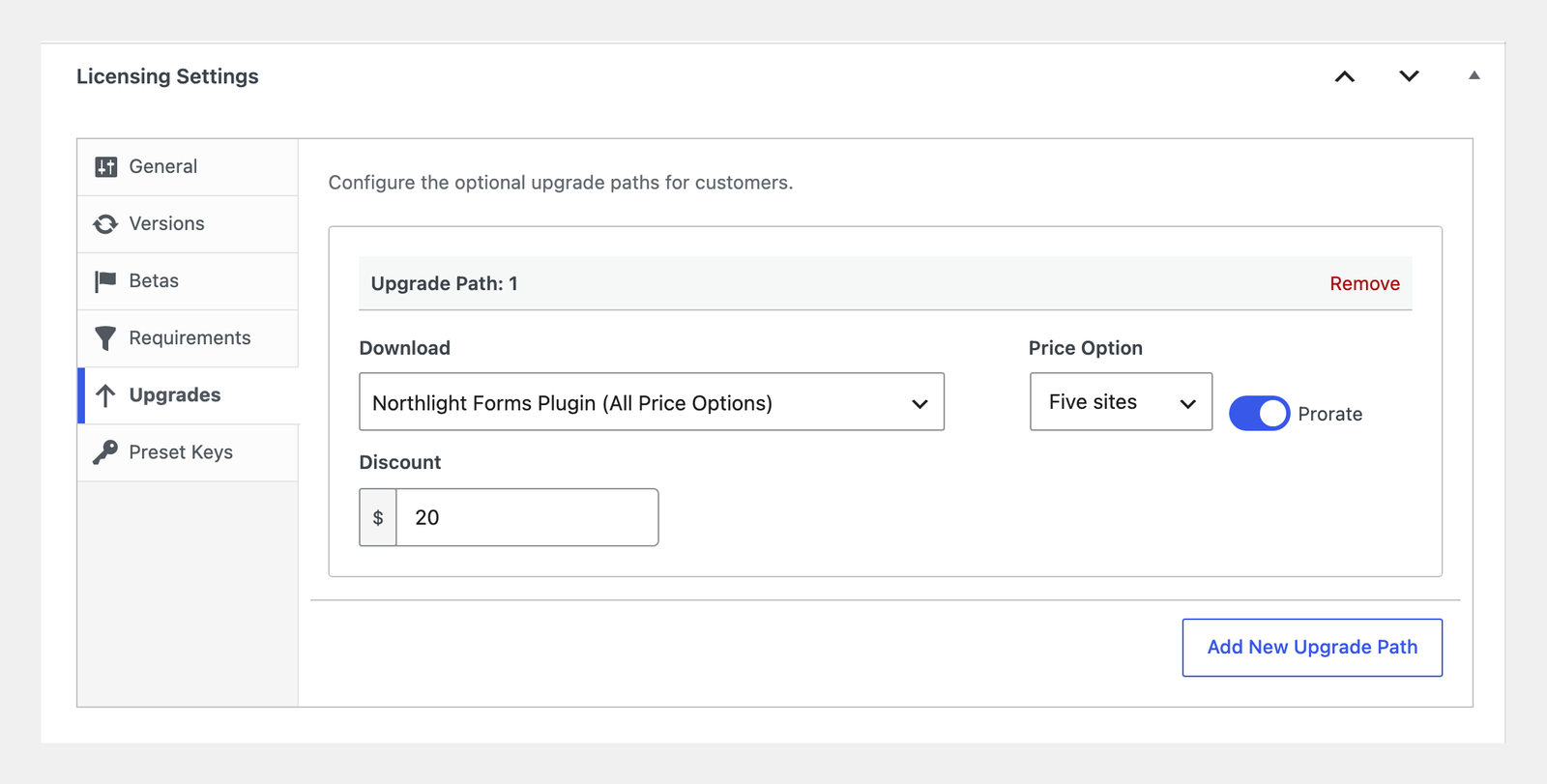
Each path has a Prorate option, so customers get credit for what they already paid. It also has its own Discount field, a flat amount off the upgrade price, which works well for a Black Friday upgrade offer. The Software Licensing docs walk through every setting.
One thing to watch: automatic discounts from Discounts Pro also apply to subscription renewals. Check how your offer affects subscribers before you switch it on.
Step 6: Back Up Your Store and Watch for Card Testing
Before you make any bulk changes, take a full backup of your site. If an edit breaks something during sale week, you can roll back to a working copy.
If you use Duplicator, your assistant can take the backup for you. The Take a Database Backup Before Bulk Edits recipe shows how.
Next, keep an eye out for card testing. That’s when fraudsters run lots of small payments with stolen card numbers to see which ones work. Busy sale weeks give them cover.
The warning sign is a burst of failed orders close together. Ask your assistant to check:
Show my failed orders from the last 7 days, grouped by day and hour.
If you see a spike, turn on the fraud tools in your payment gateway. For Stripe, see how to use Stripe early fraud warnings. EDD’s Fraud Monitor feature can also flag risky payments for review.
Phase 3: Launch Your Black Friday Sale
Sale week is about switching things on in the right order. Set everything up as inactive or paused, check it, then go live.
Step 7: Create Your Black Friday Discount Codes
Start by clearing out old codes. Expired and maxed-out codes clutter your list and make it easy to pick the wrong one. The Clean Up Old Discount Codes recipe sorts them for you before you archive anything.
Then create your new code. With AI, you can describe it in one sentence:
Create a discount called Black Friday 2026 with the code BF30 for 30% off. Make it start November 27 and end November 30. Keep it inactive until I check it.
Codes created this way start inactive. The dates follow your store’s time zone, and the code expires at the end of the last day. The Create a Sale Discount Code recipe has the full prompt.
Prefer to do it by hand? Go to Downloads » Discounts and click Add Discount. Then fill in:
- Name and Code: EDD Pro users can click Generate Code for a random one.
- Amount: a percentage or a flat amount.
- Download Requirements or Downloads Excluded: to limit which products it covers.
- Start date and Expiration date: when the sale opens and closes.
- Max Uses and Use Once Per Customer: optional limits.
- Discount Renewal Orders: if you sell subscriptions, choose whether the code also lowers renewals.
Leave the Status inactive while you test, then click Create Discount.
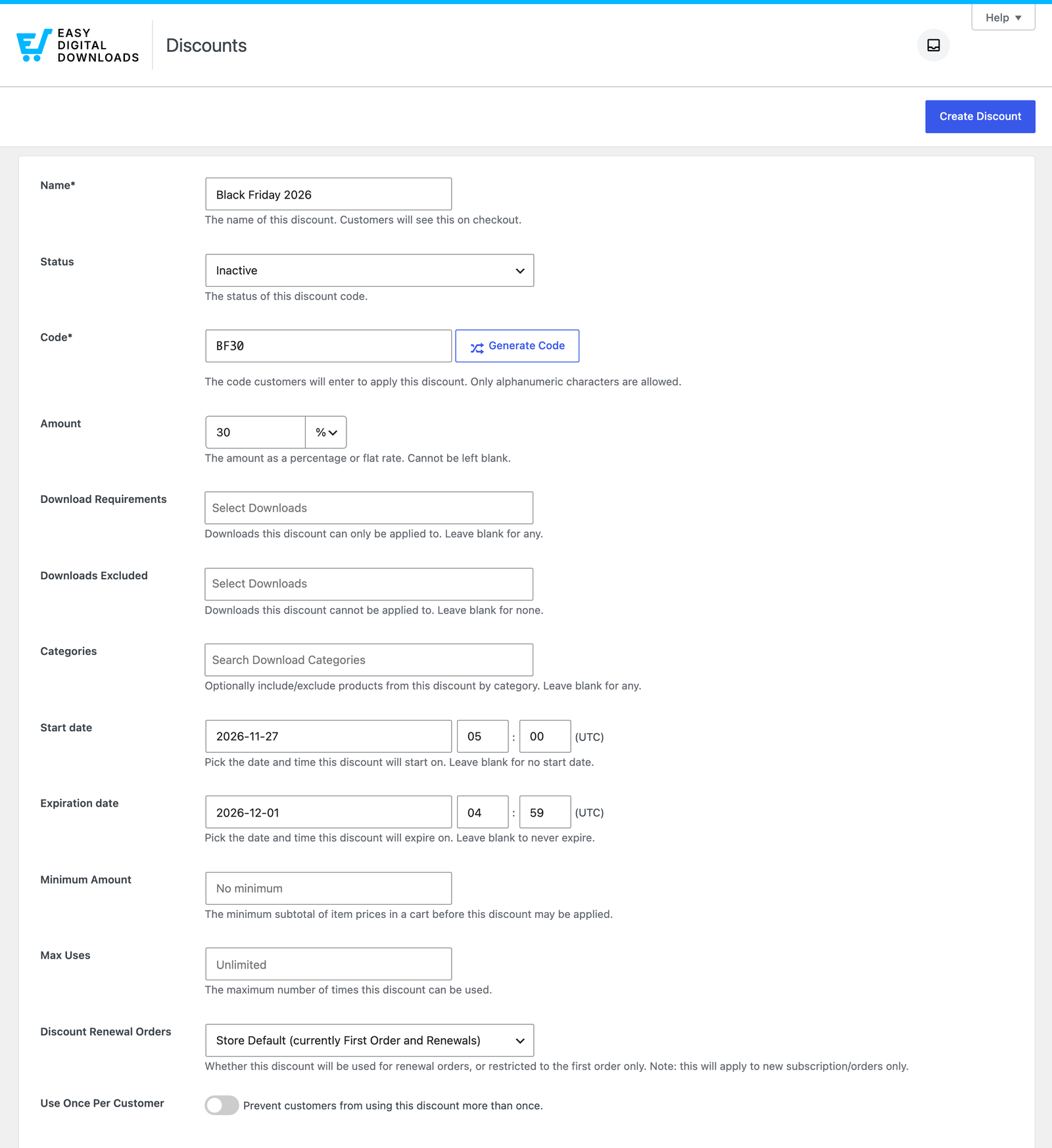
⏰ Heads up: the start and expiration times on this screen are in UTC. If you’re in New York, midnight on November 27 is 5:00 a.m. UTC.
Want buy-one-get-one or spend-more-save-more deals? Discounts Pro applies those automatically at checkout. Our guide to creating and managing discount codes covers every option.
Step 8: Promote Your Sale on Your Site and by Email
Now tell people. Start with the customer groups from Step 3, then open the sale to everyone.
On your site: A dedicated sale page gives every email and post one place to send people. SeedProd makes one easy to build, and OptinMonster can add a sale bar and an exit-intent popup. The Build a Sale Funnel recipe sets up all of it and leaves the campaigns paused until you say go.

Keep checkout clear: A popup on your checkout page can cost you the very sale it’s promoting. The Keep Popups Off Checkout recipe switches them off on checkout, login and confirmation pages.
By email: Keep the sequence short. Send an early-access email to your best buyers, a launch email, a last-chance reminder and a Cyber Monday note.
Phase 4: Read Your Results After Cyber Monday
The sale’s over. Before you plan the next one, take an honest look at what this one did.
Step 9: Compare Your Sale With a Normal Stretch of Days
A big total feels great, but it doesn’t tell you much on its own. Compare your sale days with the same number of normal days.
Look at these numbers:
- New vs returning buyers: Did the sale bring in new people, or mostly reward existing customers?
- Refunds: Some sale purchases come back as refunds, so check again two weeks later.
- Code use: Which discount codes did people actually use?
- Recovered carts: How many abandoned carts came back?
- Campaigns: Which emails or ads brought in sales?
Your assistant can pull most of this in one go:
Compare November 27 to 30 with November 2 to 5. How many buyers were new customers? What were total refunds? Which discount codes were used most?
With EDD Pro, you can also ask about Campaign Tracker results and recovered carts:
Which campaigns brought in sales this week, and how many abandoned carts came back?
Keep one thing in mind. One sale is a small sample. A slow year doesn’t mean your offer failed, and a big one doesn’t mean it’ll repeat.
Check the AI’s totals against Downloads » Reports before you plan next year around them.
Black Friday Prep Questions, Answered
Still have questions? These are the ones digital sellers ask most often.
When should I start preparing for Black Friday?
Start about three weeks before Black Friday. That gives you time to review last year’s sales, test your checkout and set up your codes without rushing. Short on time? Focus first on what to put on sale, whether checkout works and how buyers get the discount.
How long should a Black Friday sale run?
Most digital sellers run their sale from Black Friday through Cyber Monday, which is four days. Some add an early-access window for loyal buyers a day or two before. The longer a sale runs, the less urgent it feels, so set a clear end date and stick to it.
How big should a Black Friday discount be on digital products?
Start from your discount floor: the lowest price you’ll accept after payment fees and commissions. Then pick a discount that clears it with room to spare. If the discount you want falls below your floor, offer a bundle or a bonus product instead, so you keep your price.
Can AI plan my Black Friday sale for me?
AI can do a lot of the legwork. It can pull last year’s sales, list your repeat buyers, flag expiring licenses and set up discount codes as inactive. It shouldn’t make the final calls, though. You set the prices and dates, and you check its numbers against your store’s reports.
Should I give existing subscribers a Black Friday discount?
Usually not on their renewal price. Subscribers already pay you, so a lower renewal costs you money every billing cycle. Offer a deal on a different product or an upgrade instead. Check each code’s Discount Renewal Orders setting, and any automatic discounts, so they don’t lower renewals by accident.
How do I prepare for Cyber Monday separately?
Treat Cyber Monday as your last-chance day. Send a reminder to people who opened your Black Friday emails but didn’t buy, and make the final deadline clear. If you want a different offer, set up a second code ahead of time as inactive, so it’s ready to switch on.
What should I do after Black Friday ends?
Switch off your codes and popups, then compare your sale days with the same number of normal days. Look at new buyers, refunds and which codes and campaigns worked. Write down what you’d change while it’s fresh, and send a thank-you email to your new customers.
Start Your Black Friday Prep With AI
You don’t need to do all nine steps today to prepare for Black Friday. Start with Step 1 and ask your store how last year’s sale really went.
That answer shapes your whole plan, from the discount you pick to the buyers who hear about it first.
New to running your store with AI? Our guide to running Easy Digital Downloads with an AI assistant walks you through setup.
Don’t have EDD Pro yet? A pass adds features likeRecurring Payments and Campaign Tracker, so you can use every step in this checklist.
📣 P.S. Want more WordPress resources?
Get tips in your inbox, or follow along on your favorite platform.