


If every customer gets the same purchase receipt, regardless of what they purchase or whether they’re a first-time buyer or returning loyal customer, you’re missing an opportunity to connect.
Using EDD’s Conditional Email Tags, you can change how you communicate with your customers. 🎉
You can show different content to different customers, all within a single email template. A first-time buyer gets a warm welcome. A guest customer gets a nudge to create an account. A PayPal customer sees payment-specific confirmation details.
No extra templates. No manual segmentation. Just smarter emails that feel personal.
This feature is available exclusively for Easy Digital Downloads Pro users.
What You Can Do With Conditional Email Tags ⭐️
EDD conditional email tags give you precise control over what each customer sees. Here’s what’s possible.
Welcome First-Time Customers 👋
Your first purchase email is the best chance to make a lasting impression.
With conditional tags, you can automatically include a welcome message, a link to your getting started guide, or even a special discount code — but only for customers who are buying from you for the first time. Returning customers never see it.
Reach Guest Customers 👤
Customers who check out as a guest are a natural fit for a follow-up nudge.
Use the Guest Purchase condition to show a targeted message only to guest buyers. Invite them to create an account to access their purchase history, speed up future checkouts, and get more from what they bought.
Add Payment-Specific Confirmation Details 💳
Stripe and PayPal customers sometimes have different questions after checkout.
Conditional email tags let you show Stripe customers a PCI compliance note and a link to their Stripe dashboard, while PayPal customers see PayPal-specific confirmation details. Same email template, tailored content for each.
Chain Multiple Conditions With AND Logic 🔗
Need to get really specific? Combine conditions.
You can create content that only appears when two conditions are both true — for example, when a customer is both a first-time buyer AND used PayPal to check out. Use AND logic to craft highly targeted messages for precise customer segments.
How to Use EDD Conditional Email Tags
Setting up conditional tags takes just a few clicks in the email editor. Here’s how.
Step 1. Open the Email Editor
Go to Downloads » Emails in your WordPress dashboard and click the email you want to edit, such as your Purchase Receipt.
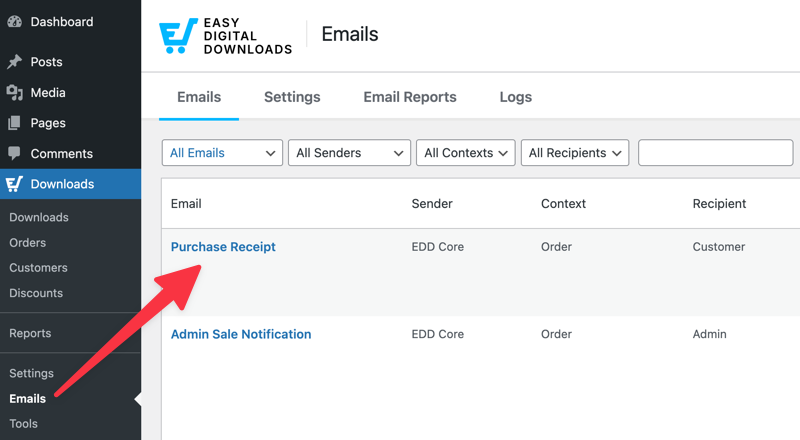
Step 2. Click the Condition Button
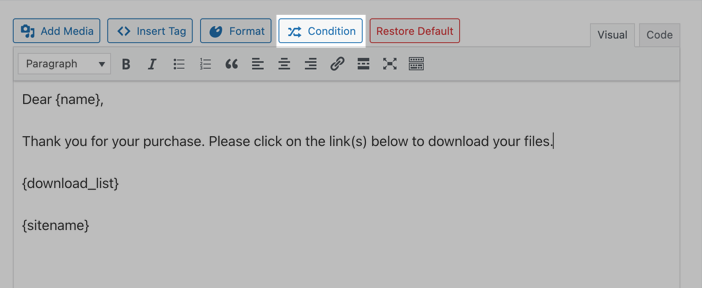
Place your cursor in the message body where you want the conditional content to appear. Then click the Condition button in the editor toolbar.
Step 3. Configure Your Condition
A modal will appear with the following options:
- Condition: Select what to evaluate. Options include User’s First Purchase, Payment Method, etc.
- Operator: Choose how to compare the condition: is, is not, greater than, less than, or contains.
- Value: Input the comparison value. For example, 250 for an order total threshold, or select Stripe for a specific payment gateway.
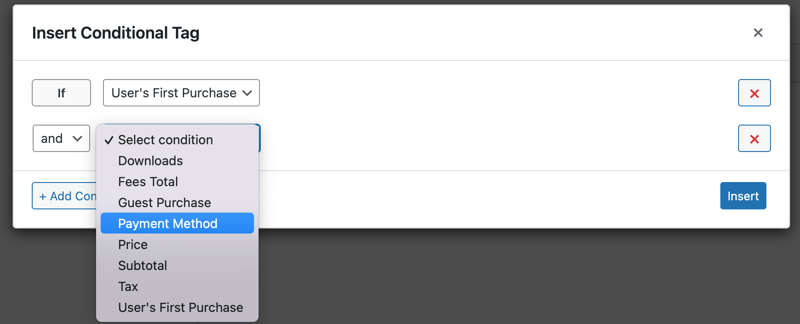
Select Add Condition to add more conditions if needed. Then you can choose from the and/or logic.
Step 4. Insert and Add Your Content
When you’re done adding the condition(s), click on Insert. This adds the conditional content (wrapped with {if} tags) to your email with the “content” placeholder.
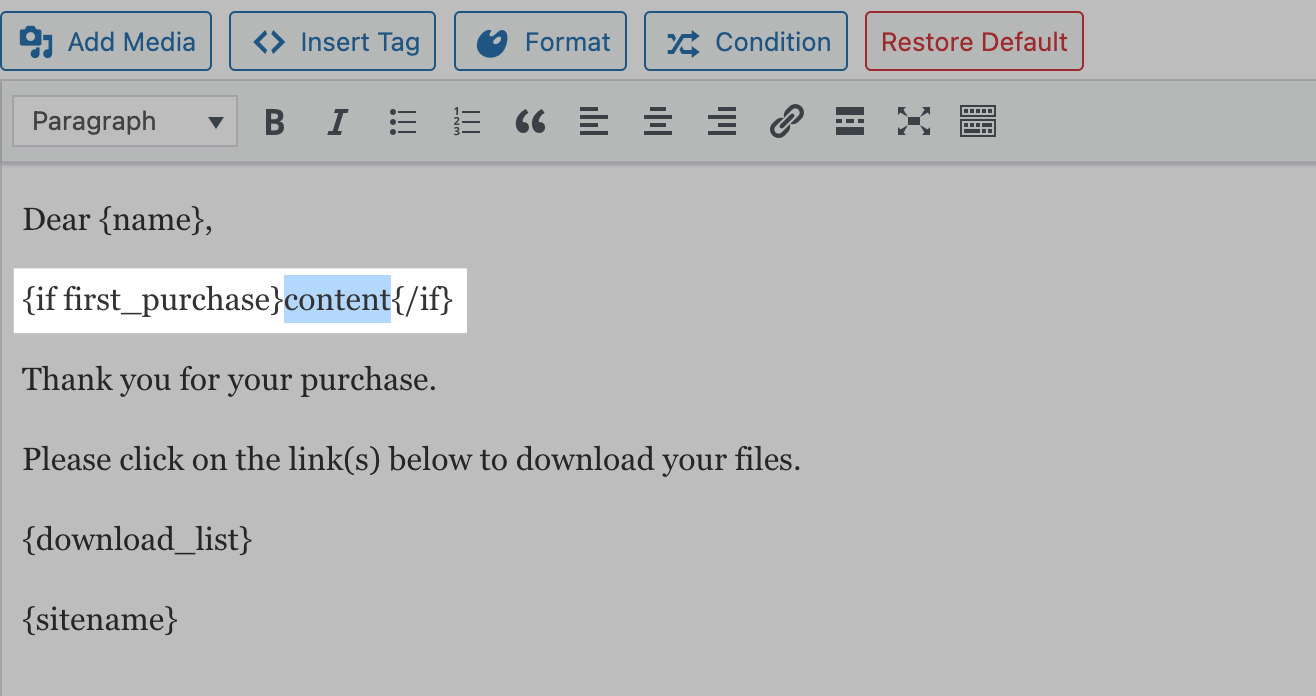
Here, you can type or paste the conditional message text you want to appear when the specified parameters are met.
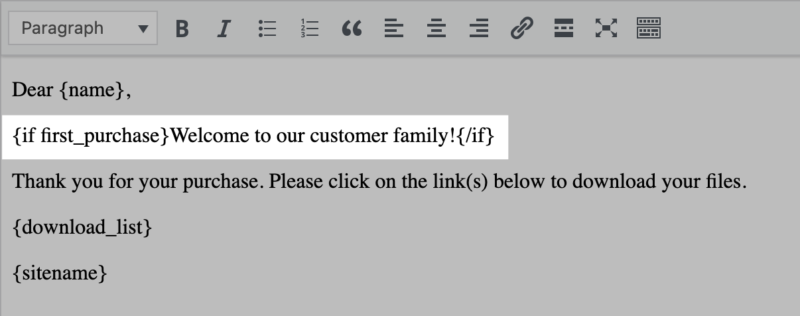
Step 5. Save and Test
Click Save to update your email. Then run a test purchase that matches your condition to confirm everything looks right.
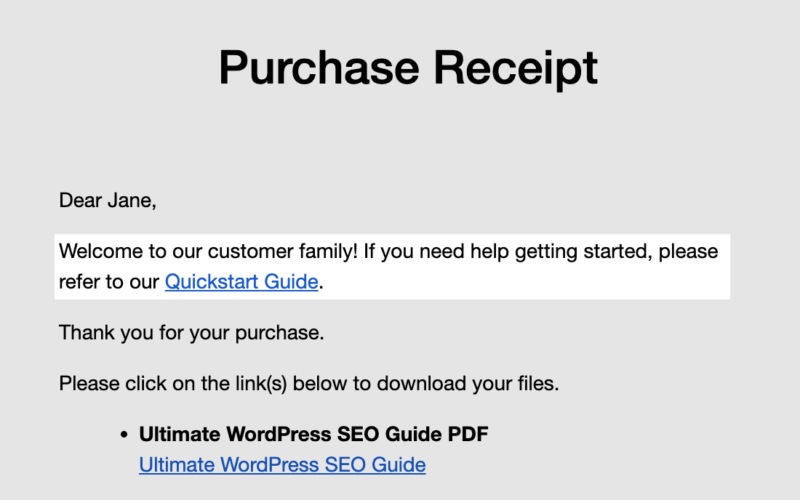
Repeat these steps for each conditional block you want to add to the email.
Tips for Getting the Most Out of Conditional Tags 💡
A few things that’ll make a difference as you build out your conditional email content.
Make personalization feel intentional. When customers see content that’s tailored to them, it lands better when it’s written that way on purpose. Own the personalization; don’t try to hide it.
Test every scenario before going live. Run a test purchase for each condition you’ve set up: a first-time buyer, a returning customer, different payment methods, an order above and below your threshold. Catch any issues before real customers see them.
Keep your conditions simple. One or two conditions per block is easier to manage and troubleshoot than a long chain of AND/OR operators. If your logic gets complex, break it into separate blocks.
Performance is not a concern. Conditional tags have minimal processing overhead. Even high-volume stores won’t notice any impact on email delivery speed.
FAQs About EDD Conditional Email Tags
Let’s wrap up by answering some frequently asked questions about EDD’s conditional email tags.
Is this feature available in the free version of Easy Digital Downloads?
No. EDD conditional email tags are a Pro feature. You’ll need an active Easy Digital Downloads Pro pass to access them.
Can I use more than one conditional block in the same email?
Yes. You can add as many {if} blocks as you need to a single email template. Each block is evaluated independently when the email is sent.
Can I use conditional tags alongside other EDD template tags?
Yes. Conditional tags work alongside all of EDD’s standard template tags. You can include tags like {name}, {receipt_id}, or {download_list}inside a conditional block.
Do conditional tags work with third-party email delivery services?
Yes. Conditional tags are processed by Easy Digital Downloads before the email is handed off to your mail server or delivery service. They’re fully compatible with WP Mail SMTP, SendGrid, Mailgun, and similar providers.
What happens if a condition isn’t met?
If the condition evaluates to false, the content inside the conditional block is simply not included in the email. The rest of the email renders as normal.
Start Sending Smarter Emails Today 🚀
EDD conditional email tags give you a powerful way to make every purchase receipt feel like it was written specifically for that customer without any extra work on your part after the initial setup.
Ready to put them to work? Check out the full EDD conditional email tags documentation for the complete conditions reference and syntax guide.
Don’t have Easy Digital Downloads Pro yet? Grab one today to unlock conditional email tags and everything else Pro has to offer.
You can also check out the release notes to see what other exciting updates are available.
📣 P.S. Be sure to subscribe to our newsletter and follow us on Facebook, Twitter/X, or LinkedIn for more WordPress resources!








