



You’ve spent months building a WordPress theme. It looks great, works well, and you’re ready to sell it. Then you upload it to ThemeForest and realize: for every $59 sale, you’re keeping less than half.
That’s the reality of selling WordPress themes through a marketplace. Platforms like ThemeForest, Gumroad, and Envato take 30-50% of every sale you make. The more successful you get, the more you give away.
There’s a better way to sell WordPress themes. You can build your own store on WordPress, keep 100% of your revenue, and still deliver a professional buying experience. Easy Digital Downloads (EDD) makes that possible.
This guide walks you through the whole process: setting up your store, managing license keys, delivering automatic theme updates, and marketing your theme without depending on a platform that takes a cut of everything you earn.
- Key Takeaways
- Why Sell WordPress Themes on Your Own Site?
- What You Need Before You Start
- How to Sell WordPress Themes Without Marketplace Fees
- How to Price Your WordPress Theme
- How to Market and Promote Your WordPress Theme
- FAQs About Selling WordPress Themes
- Is selling WordPress themes profitable?
- How much can you make selling WordPress themes?
- Do I need coding skills to create a WordPress theme?
- Can I sell themes in the WordPress.org directory?
- What is the difference between selling on a marketplace and selling on my own site?
- Can I offer subscription pricing for my WordPress theme?
- Start Selling Your WordPress Themes Today
Key Takeaways ⭐️
| Skip the marketplace cut | Platforms like ThemeForest take 30-50% per sale. Your own store keeps that money in your pocket. |
| You own the customer relationship | Marketplaces own your buyers. Your own store lets you build your email list and your brand. |
| EDD handles everything | File delivery, payments, license keys, and automatic theme updates, all in one plugin. |
| License keys protect your work | EDD’s Software Licensing feature lets you issue, manage, and auto-renew theme licenses. |
| Setup is faster than you think | With the right hosting, your theme store can be live the same day. |
Why Sell WordPress Themes on Your Own Site?
Marketplaces feel like the easy option. They already have traffic, a checkout process, and millions of buyers browsing every day.
But that convenience comes at a steep cost — and for most theme developers, it’s a cost that doesn’t make sense long-term.
The math works against you. And the fee is only part of the problem.
What Marketplace Fees Actually Cost You
Here’s what the major platforms actually take from each sale:
| Platform | What You Keep Per Sale |
|---|---|
| ThemeForest (non-exclusive) | ~45% |
| ThemeForest (exclusive) | ~62.5% |
| Creative Market | ~70% |
| Gumroad | ~87% (plus payment processing fees) |
| Your own site with EDD | 100% |
ThemeForest’s non-exclusive rate means you’re giving away more than half of every sale. At $59 per theme, that’s about $32 gone before you’ve covered a single hour of development time.
Easy Digital Downloads works differently. You pay one annual fee for the plugin. No per-sale cut, no commission, no platform tax on your success.
What You Keep When You Own Your Store
Beyond the revenue, selling on your own site gives you things no marketplace can offer.
You own your customer data. On a marketplace, your buyers are the platform’s customers. When you sell direct, you collect email addresses and build a relationship over time — repeat purchases, upgrade announcements, renewal reminders.
You control your pricing. Want to run a sale? Bundle two themes? Offer a developer license tier? On your own site, you make those calls. Marketplaces often lock you into their pricing structures.
Your product page isn’t surrounded by competitors. On ThemeForest, buyers can browse dozens of similar themes on the same page. On your own site, the only theme they’re looking at is yours.
You can upsell and cross-sell. Offer premium support packages, child themes, or setup services alongside your theme. Marketplaces don’t allow this.
👉 Learn more about selling on your own store vs a marketplace and the best marketplace alternatives for digital products.
What You Need Before You Start
Before setting up your store, make sure you have a few things ready:
- Completed WordPress theme packaged as a .zip file (PHP, CSS, JavaScript, and HTML files compressed together)
- Domain name and WordPress hosting (more on this in Step 1)
- An Easy Digital Downloads account (the free version is enough to start)
- A Stripe or PayPal account to accept payments
A quick note on block themes: if you’re building Full Site Editing (FSE) themes, you package and sell them exactly the same way as classic themes. The process below applies to both.
How to Sell WordPress Themes Without Marketplace Fees
Here’s how to get your theme store up and running in five steps.
Step 1: Set Up Your WordPress Site
Already have a WordPress site? Jump ahead to Step 2.
If you’re starting from scratch, you’ll need hosting. Levamo EDD Hosting is a great option.
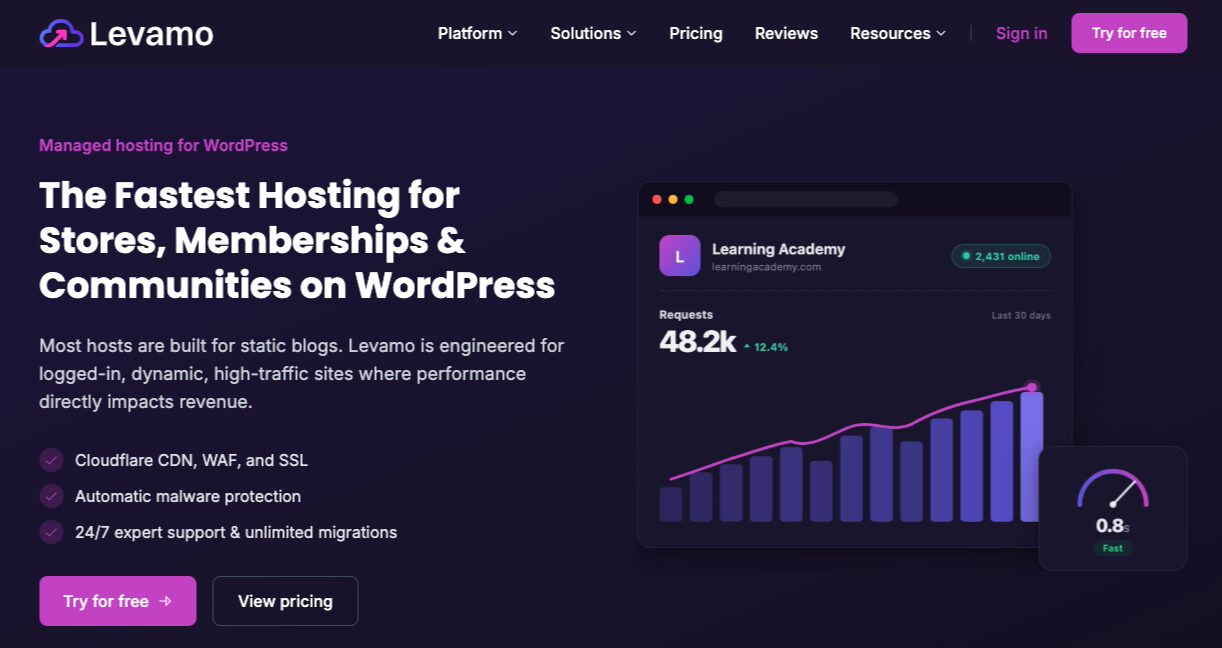
For more hosting options, refer to Recommended WordPress Hosting.
Step 2: Install Easy Digital Downloads
Easy Digital Downloads is trusted by over 50,000 businesses and developers to sell digital products directly from WordPress. It handles everything: file delivery, payment processing, customer management, license keys, and automatic theme updates.
The free version is enough to start selling. You can upload your theme .zip file, set a price, and accept payments right away.
The Professional Pass unlocks two features that most theme developers will want:
- Software Licensing: issues license keys at checkout, sets activation limits per key, and enables automatic theme updates for paying customers
- Recurring Payments: lets you charge annual or monthly renewal fees for continued access to updates and support
Visit the EDD pricing page to choose your plan. Once you have your account, download the plugin from the Downloads tab of your account dashboard.
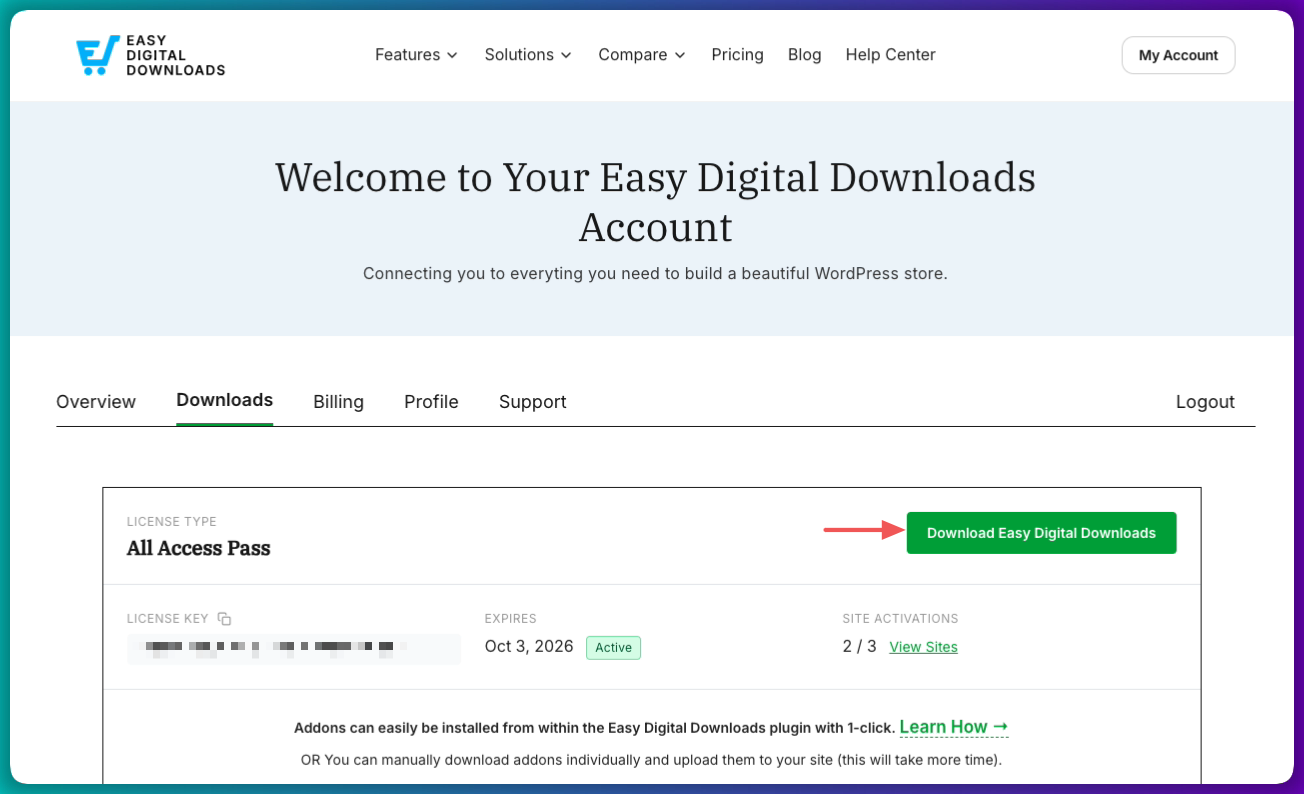
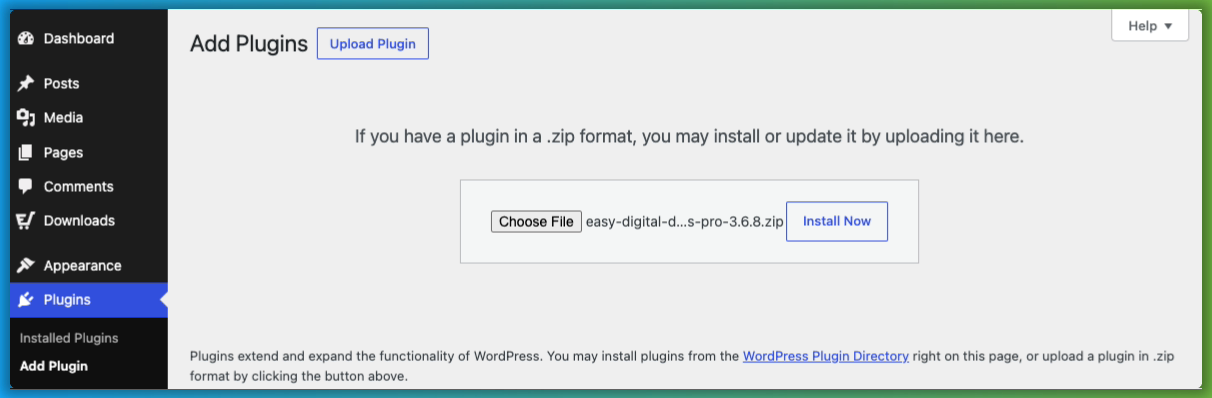
Then go to Plugins » Add Plugin » Upload Plugin in your WordPress dashboard, upload the .zip file, and click Activate Plugin.
Once activated, a Downloads menu item appears in your WordPress sidebar. Go to Downloads » Setup and select Get Started to launch the setup wizard.
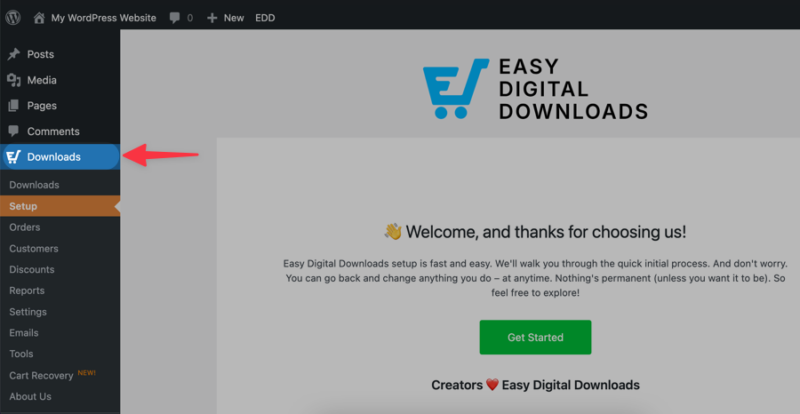
Alternatively, head to Downloads » Settings to add your business details and connect your payment gateway.
For more guidance, check out our Getting Started, Creating Products, and EDD Introduction guides.
Step 3: Add Your WordPress Theme as a Download
With your store configured, it’s time to add your theme.
WordPress themes are sold as downloadable .zip files — a compressed package containing the PHP, CSS, JavaScript, and HTML files that make up the theme. If you need help with that step, check out our guide on how and why to make a ZIP file for digital selling.
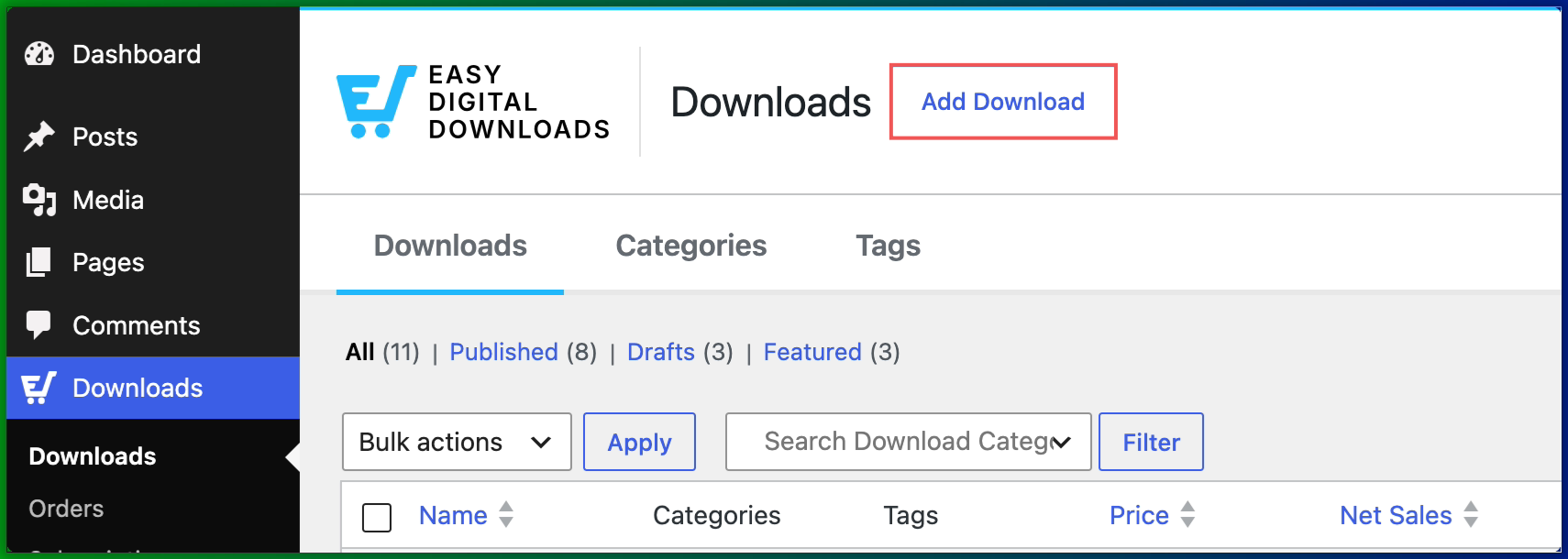
To add your theme, go to Downloads » Add Download in your WordPress dashboard.
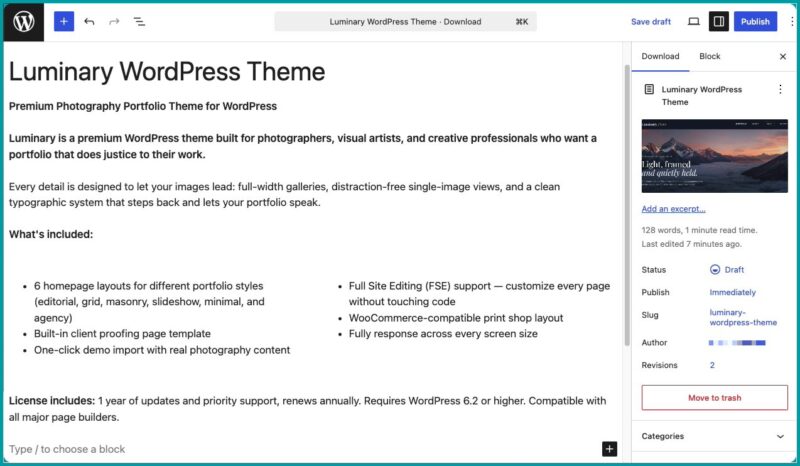
Give your theme a name and write a strong product description. This is your sales page. Explain what the theme does, who it’s for, and what sets it apart.
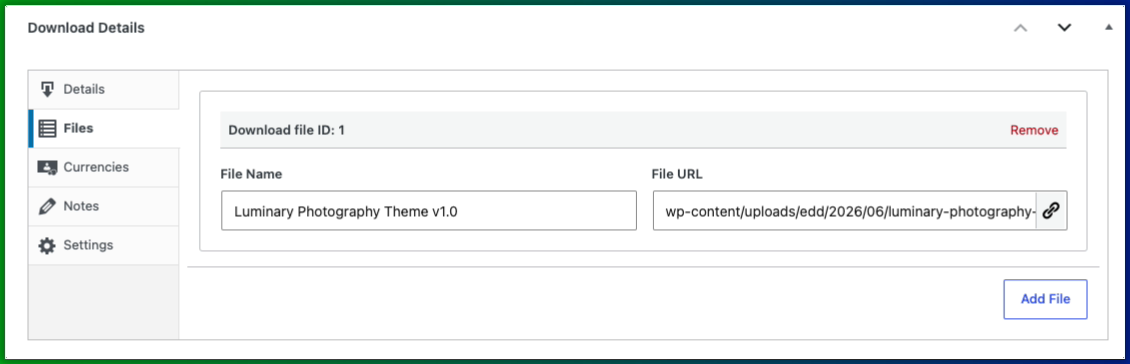
Under Download Details, go to the Files tab (we’ll cover pricing in the next step).
In the File Name field, enter a clear, recognizable file name. Under File URL, click the link icon to upload your theme file.
Within the right-side panel, click Set Download Image to add a product image. A clean screenshot of your theme in action works best.
Step 4: Set Your Pricing and Configure License Keys
Now let’s talk about pricing and license keys.
Pricing Your Theme
Under the Details tab, enter a Price. Premium WordPress themes typically sell for $30-$100. Niche or highly specialized themes can command $100-$200 or more.
A few things to consider when setting your price:
- What do similar themes in your niche cost?
- What features does your theme include compared to theirs?
- Does your theme serve a general audience or a specific one?
Tiered licensing is worth considering regardless of your base price. A common structure:
- Single Site License: $49
- 5-Site License: $99
- Unlimited License: $199
This lets agencies and developers self-select a higher tier without raising the barrier for individual buyers. It increases your average order value without any extra product development.
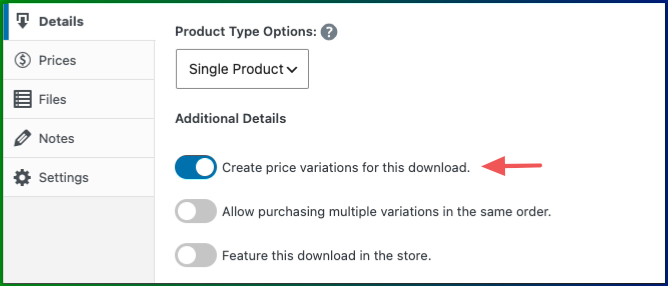
Enable this by toggling the option Create price variations for this download. Then under the Prices tab, configure your variations/tiers.
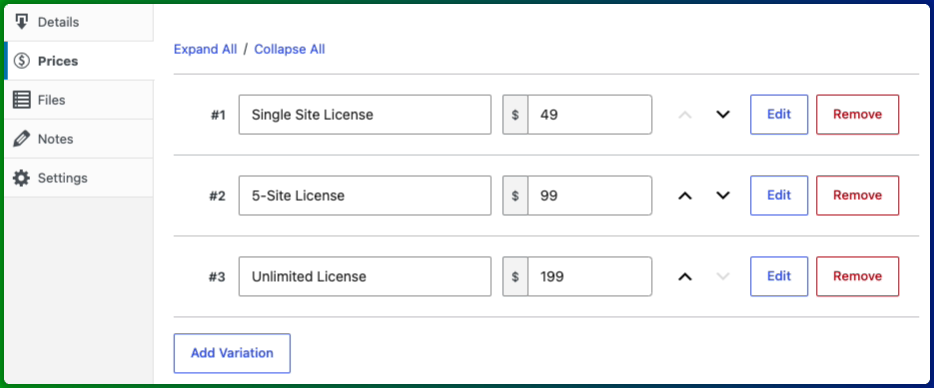
💫 Pro Tip: Use IsItWP to see what theme any website is running, then check what that theme charges. It’s a fast way to benchmark against what real buyers are already paying.
⚙️ Learn more about setting up Variable Pricing.
Setting Up License Keys
If you have the Software Licensing feature, here’s where it earns its place.
Every customer who purchases your theme receives a unique license key at checkout. You control how many sites each key can activate and when it expires.
To enable it, toggle the Create licenses for this product option (beneath the option for creating price variations). Once enabled, you can configure the feature within the Licensing Settings box.
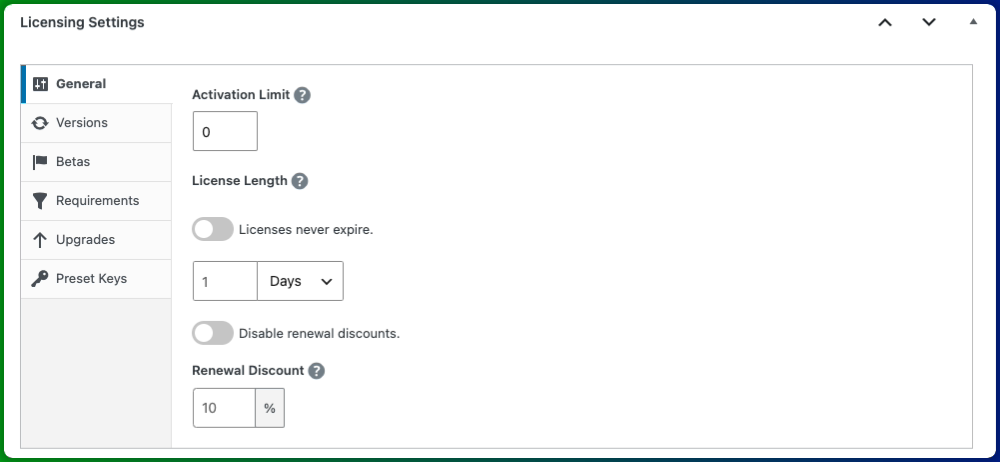
Pair it with the Recurring Payments feature to automatically charge customers a renewal fee when their license expires, turning a one-time sale into predictable recurring revenue.
Software Licensing also powers something no marketplace automatically gives you when you sell direct: automatic theme updates. Once you implement the EDD Software Licensing SDK into your theme’s code, customers with an active license can update directly from their WordPress dashboard — no manual file delivery needed. If you’re building themes to sell long-term, it’s worth setting up.
🔑 Learn more in our How to License and Sell Software in WordPress guide.
Step 5: Preview and Publish Your WordPress Theme
Before you hit publish, preview your theme’s product page to make sure everything looks right.
In EDD, click Save Draft then Preview to see how the product page appears to buyers. Check that the theme name, description, pricing, and product image all display correctly.
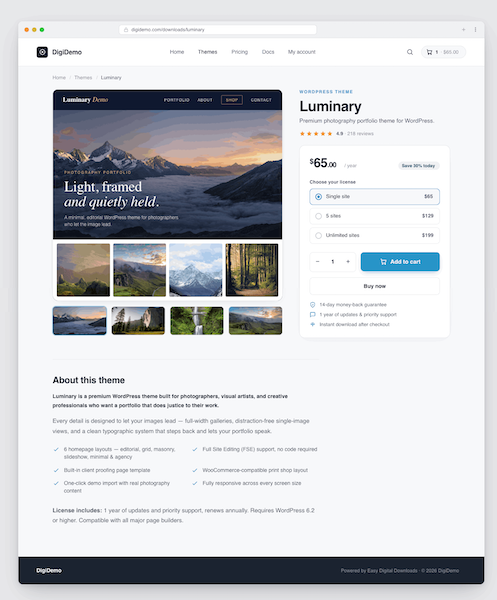
When you’re happy with how it looks, click Publish. Your theme is now live and available to purchase.
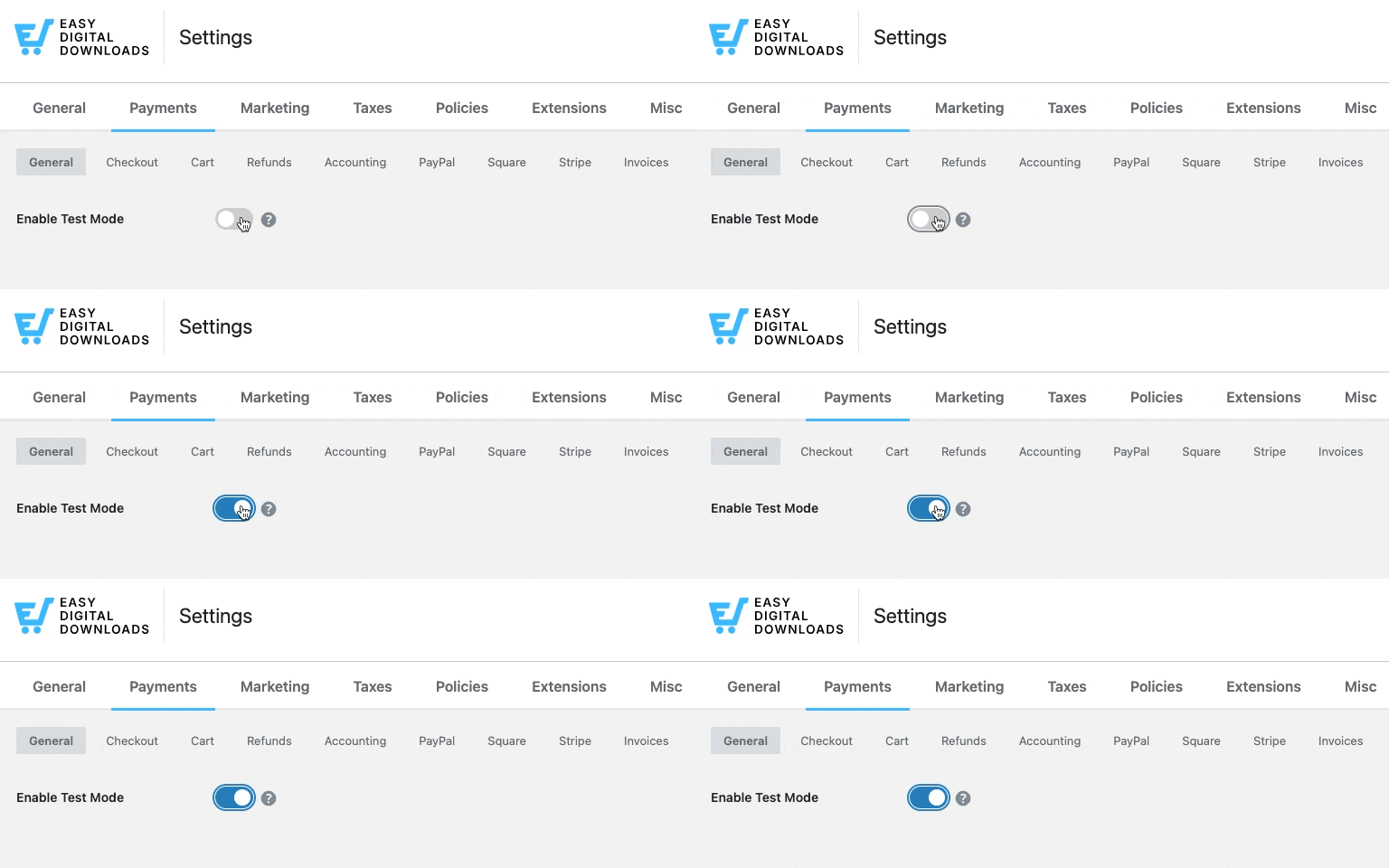
Before your first real sale, it’s worth running a test transaction in EDD’s test mode to confirm the checkout, file delivery, and license key generation all work as expected.
Go to Downloads » Settings » Payments and enable Test Mode to do a dry run without processing a real payment.
How to Price Your WordPress Theme
Pricing a WordPress theme isn’t an exact science, but there are clear patterns in what works.
Standard premium themes typically sell for $30-$100. That’s the range buyers expect for general-purpose themes sold outside of marketplaces.
Niche themes (built for photographers, restaurants, law firms, or fitness coaches) can command $100-$200 or more. Buyers in specialized niches pay more for something that feels built exactly for their use case.
Tiered licensing works well at any price point. A single-site license, a multi-site license, and an agency or developer license at progressively higher prices lets you capture more value from professional buyers without making your base price feel out of reach.
One thing worth keeping in mind: when you sell on your own site with Easy Digital Downloads, there’s no commission being deducted. A $59 sale on your own site earns you $59 (minus payment processing fees). The same $59 sale on ThemeForest nets you roughly $27. That changes how you think about pricing and margins.
💰 For more guidance, check out our Best Pricing Models & Strategies for Digital Products.
How to Market and Promote Your WordPress Theme
Getting your theme in front of buyers takes consistent effort, but you have more options than you might think.
Build a Live Demo Site
A live demo is your single most effective sales tool. Buyers want to see exactly what they’re getting before they spend money.
Your demo should show the full theme in action: multiple page templates, real-looking demo content, and any standout customization options. Desktop, tablet, and mobile views are worth including — responsive design is a baseline expectation for any premium theme.
For a detailed guide on building a demo that converts, check out our post on creating a digital product demo.
List a Free Version on WordPress.org
The WordPress.org theme directory gets millions of visitors. You can’t sell a theme there as all listings must be free. But you can list a lite version and use it as a top-of-funnel channel.
Offer enough in the free version that users can see the quality of your work. Make the most compelling features (advanced customization, premium templates, priority support)available only in the paid version on your own site. This freemium strategy is well-established among successful WordPress theme developers.
Use Content Marketing to Get Found
The buyers most likely to purchase your theme are searching for help right now. Content marketing helps them find you.
Write about your theme’s niche on your blog. Built a theme for photographers? Write about WordPress tips for photography sites, the best plugins for photographers, or how to build a portfolio with WordPress. You’re creating the content your ideal customer is already looking for.
An email list is worth building from day one. On a marketplace, the platform owns your customers. On your own site, you collect email addresses at checkout: new releases, renewal reminders, and upgrade offers go straight to people who already know your work.
For optimization tips, check out how to get products found by AI search.
Launch an Affiliate Program
An affiliate program lets other people promote your theme in exchange for a commission. For WordPress themes, this works well: bloggers, YouTube creators, and newsletter writers who cover WordPress are always looking for quality products to recommend to their audiences.
AffiliateWP integrates directly with Easy Digital Downloads and makes it straightforward to recruit affiliates, set commission rates, and track referral sales. A 30-50% commission is competitive enough to attract quality affiliates, since you’re keeping 100% of every direct sale, there’s healthy margin to work with.
FAQs About Selling WordPress Themes
Here are answers to the most common questions about selling WordPress themes online. Whether you’re just getting started or moving away from a marketplace, these cover what you need to know.
Is selling WordPress themes profitable?
Ye. Every WordPress site needs a theme, and the market spans millions of websites across every industry. Profitability depends largely on how you sell. Selling direct through your own site, where you keep 100% of each sale, is significantly more profitable than splitting revenue with a marketplace at 30-55% per transaction. Anyone can enter the market with relatively low upfront costs, even as a beginner.
How much can you make selling WordPress themes?
Earnings vary widely, but the math is clear. A theme priced at $59 selling 10 copies a month generates around $7,000 per year in direct sales, before annual license renewal revenue. Add tiered licensing and an affiliate channel, and that number grows. Top independent theme developers earn significantly more, particularly once they’ve built a direct customer base and recurring renewal income.
Do I need coding skills to create a WordPress theme?
Classic WordPress themes require PHP, CSS, and HTML knowledge. However, WordPress’s Full Site Editing (FSE) system has made it possible to build block themes with little to no coding, using the Create Block Theme plugin and the built-in site editor. Either type of theme (classic or block) is packaged as a .zip file and sold through Easy Digital Downloads the same way.
Can I sell themes in the WordPress.org directory?
No. All themes in the WordPress.org directory must be free. You can list a free or lite version of your theme there to tap into the directory’s traffic, then sell the full version with premium features on your own site. This freemium strategy is well-established among successful WordPress theme developers.
What is the difference between selling on a marketplace and selling on my own site?
Marketplaces offer existing traffic and a ready-made checkout process, but they take 30-55% of every sale, restrict your pricing options, and own the customer relationship. Selling on your own site takes more upfront setup and marketing, but you keep 100% of your revenue, own your customer data, set your own prices, and can offer things marketplaces don’t allow — tiered licensing, renewal subscriptions, and direct customer communication.
Can I offer subscription pricing for my WordPress theme?
Yes. With Easy Digital Downloads’ Recurring Payments feature, you can charge customers an annual or monthly renewal fee to maintain access to updates and support. This is a common model for premium theme developers. It creates predictable recurring revenue and gives customers a clear incentive to keep their license active.
Start Selling Your WordPress Themes Today
Selling on a marketplace made sense when alternatives were limited. Today, there’s no good reason to give away 30-50% of every sale.
With your own WordPress store and Easy Digital Downloads, you keep your revenue, own your customer relationships, and deliver a professional buying experience — license keys, automatic updates, and all.
Ready to get started?
🔌 If you also sell plugins, check out our guide on how to sell WordPress plugins for the same step-by-step approach.
📣 P.S. Be sure to subscribe to our newsletter and follow us on Facebook, Twitter/X, or LinkedIn for more WordPress resources!








