


If you’ve been selling your graphics or digital art on Etsy, Creative Market, or Gumroad, you already know the downside: fees on every sale, rules you didn’t write, and a customer list you don’t own.
Selling graphics and artwork on WordPress changes all of that. You set the prices, you keep the revenue, and you own the relationship with your buyers.
This guide walks you through everything you need to get started — from installing the right plugin to setting up licensing, pricing your work, and making your first sale.
Key Takeaways
- Sell on your own terms: WordPress lets you sell graphics and digital art without paying marketplace commissions.
- Free to start: Easy Digital Downloads has a free plan that handles product listings, file delivery, and checkout.
- Keep 100% of your revenue: You only pay standard payment processing fees (no platform cut).
- Offer multiple license types: Charge more for commercial use and protect your work with clear licensing.
- Own your customers: Build your own email list and customer base instead of renting access from a platform.
- Why Sell Graphics on WordPress Instead of a Marketplace?
- What You Need to Sell Digital Art on WordPress
- Step 1: Install Easy Digital Downloads
- Step 2: Add Your First Graphic or Artwork as a Product
- Step 3: Set Up Licensing for Your Graphics
- Step 4: Connect a Payment Method
- Step 5: Test Your Store Before You Launch
- How to Price Your Digital Graphics
- What File Formats Should You Offer?
- What Graphics and Digital Art Can You Sell?
- How to Market and Sell More Digital Art
- FAQs on Selling Graphics and Art on WordPress
Why Sell Graphics on WordPress Instead of a Marketplace?
Marketplaces like Etsy and Creative Market make it easy to list your work. But easy comes with a cost.
Etsy charges a 6.5% transaction fee on every sale. Creative Market takes a cut too. And on top of fees, you’re building an audience for their platform — not yours. If they change their algorithm or terms, your income takes the hit.
WordPress is different. You own the site, the store, and the customer data.
Here’s how the options stack up:
| WordPress/EDD | Etsy | Gumroad | Creative Market | |
|---|---|---|---|---|
| Transaction fee | $0 (+ payment processing) | 6.5% | Up to 10% | 30–40% |
| Own your customer list | ✓ | ✗ | Partial | ✗ |
| Full brand control | ✓ | Limited | Limited | ✗ |
| File delivery | ✓ | ✓ | ✓ | ✓ |
| Custom licensing | ✓ | Limited | Limited | Limited |
| Free to start | ✓ | Listing fees | Free tier | ✗ |
The tradeoff is that you’re responsible for driving your own traffic. But the tools to do that — SEO, email marketing, social media — are all in your control too.
What You Need to Sell Digital Art on WordPress
Before you dive into setup, here’s what you’ll need:
- A self-hosted WordPress.org site (not WordPress.com — you need full plugin access)
- A hosting plan and domain name
- The Easy Digital Downloads plugin
- Your digital files ready to upload
That’s it!
How Much Does It Cost to Start?
Hosting typically runs $3–10/month, and a domain name costs around $12/year. Easy Digital Downloads is free to install.
Compare that to Etsy’s 6.5% fee. If you sell $500/month in graphics, that’s $32.50 going to Etsy every month — more than three months of hosting.
Step 1: Install Easy Digital Downloads
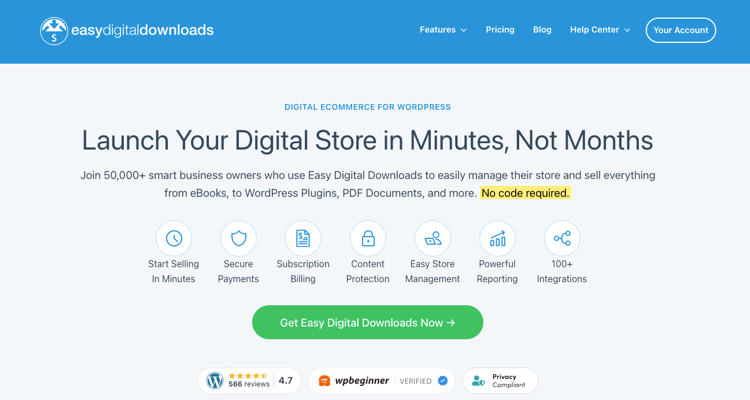
Easy Digital Downloads (EDD) is the plugin that powers your store. It handles product listings, secure file delivery, checkout, and customer management — all built specifically for digital products.
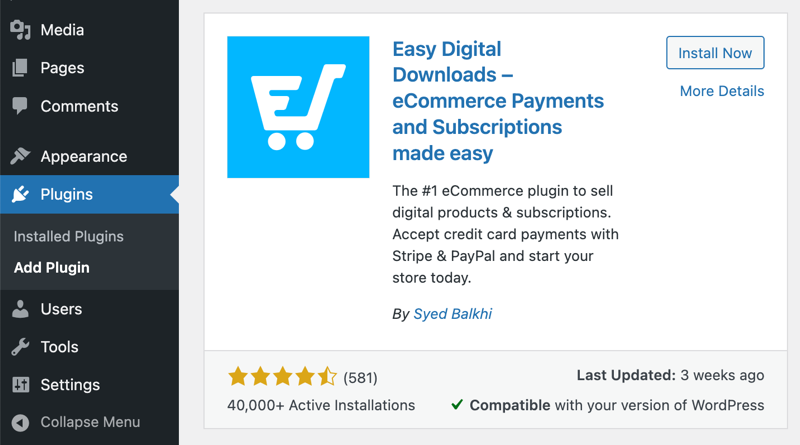
To install it, go to your WordPress dashboard and navigate to Plugins » Add New. Search for Easy Digital Downloads, click Install Now, then Activate.
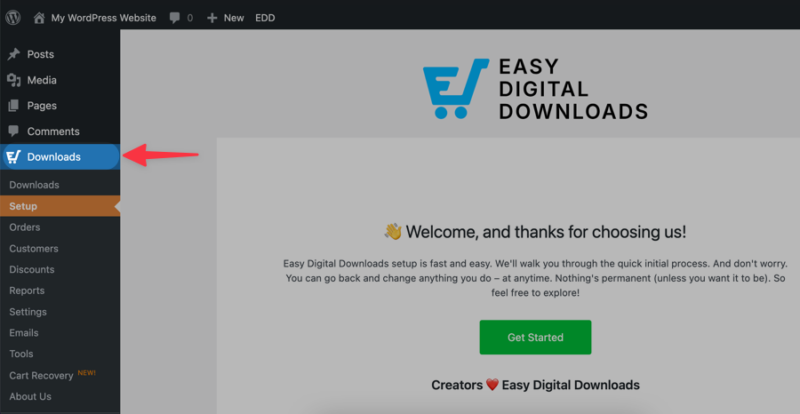
Once activated, EDD adds a Downloads menu to your dashboard. That’s where you’ll manage everything.
EDD’s free plan covers everything you need to start selling. Premium plans, which I highly recommend, are available if you want features like subscriptions, software licensing, or advanced reporting — but they’re optional.
Step 2: Add Your First Graphic or Artwork as a Product
With EDD active, go to Downloads » Add Download. This is where you create your first product.
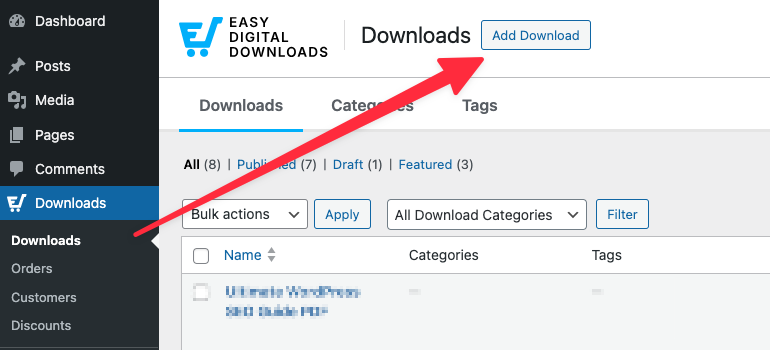
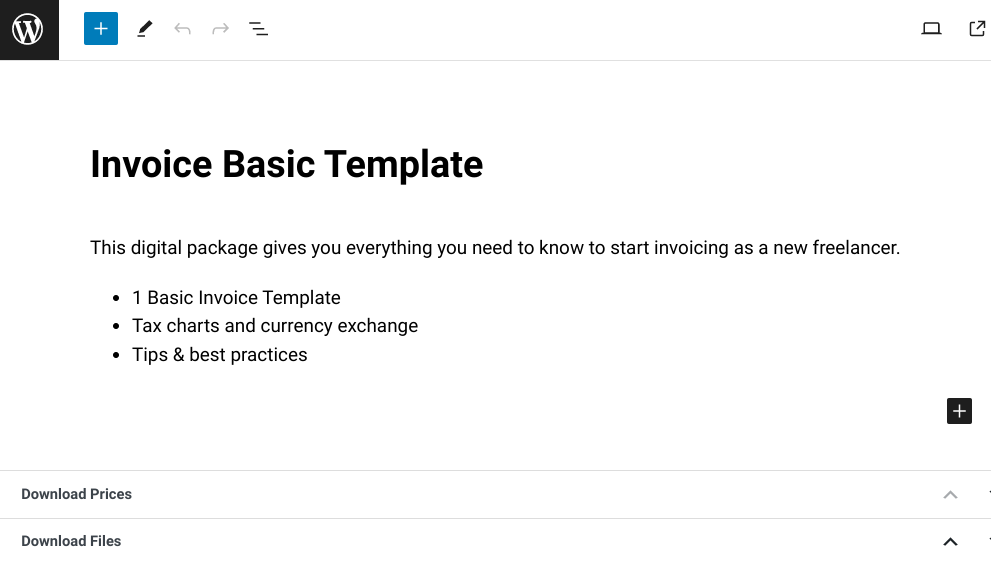
Give your product a clear, descriptive name. Think about how a buyer would search for it: “Minimalist Resume Template – Google Docs & Word” tells them exactly what they’re getting.
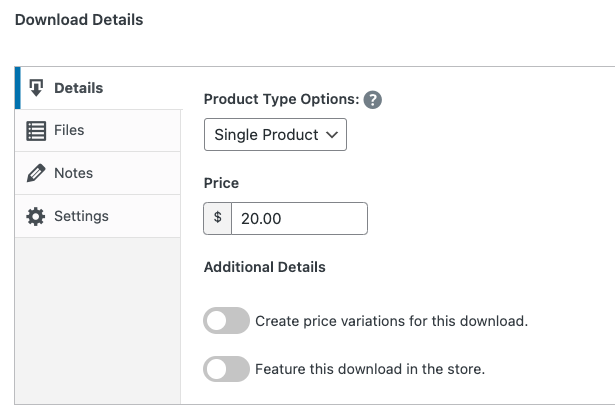
Add a price within the Download Details box. You can also set up variable pricing here if you want to offer multiple license tiers (more on that in the next section).
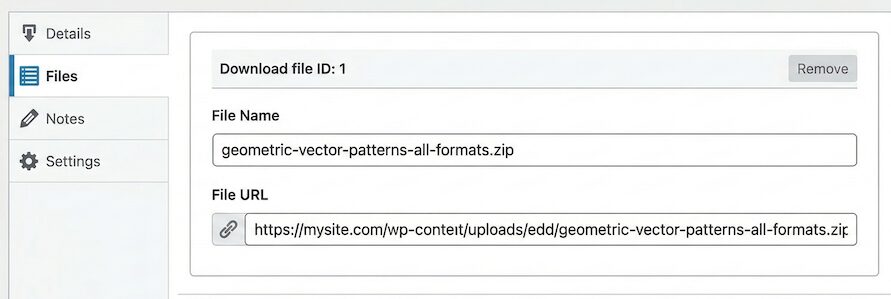
Upload your file under Files. Give it a clean filename — your buyers will see this when they download.
Write a Product Description That Converts
Your description should answer three questions: What is it? What formats are included? What can the buyer do with it?
Keep it short and specific. “A set of 20 minimalist social media templates in Canva format. Includes square, portrait, and story sizes. Fully editable.” That’s more useful than a paragraph of adjectives.
Protect Your Artwork with a Preview Image
Don’t use your full-resolution file as the product image. Use a watermarked version or a low-res preview instead.
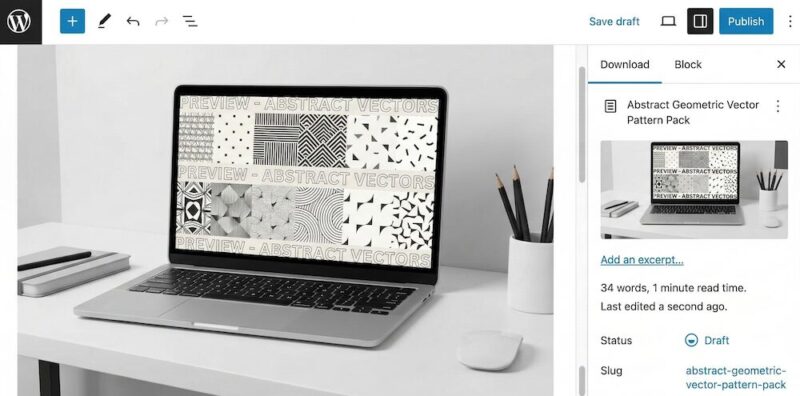
This gives buyers a clear look at what they’re purchasing without giving away the actual file.
Step 3: Set Up Licensing for Your Graphics
Licensing is something most sellers skip — and it’s a mistake. A license tells your buyer exactly what they can and can’t do with your work. It also lets you charge different prices for different uses.
Personal Use vs. Commercial Use: What’s the Difference?
A personal use license lets the buyer use your graphic for non-commercial purposes: personal projects, gifts, home printing, and so on. A commercial use license allows them to use it in work they sell or profit from, like a client project, a product they resell, or a business’s marketing materials.
Commercial licenses are worth more. It’s completely normal to charge 2–5x more for commercial rights than for personal use.
Set Up License Tiers in EDD
EDD’s variable pricing lets you offer multiple price points for the same product. You can create a “Personal Use” option and a “Commercial Use” option, each with its own price.
Go to your product and enable Variable Pricing. Add a row for each license tier, name it clearly, and set the price.
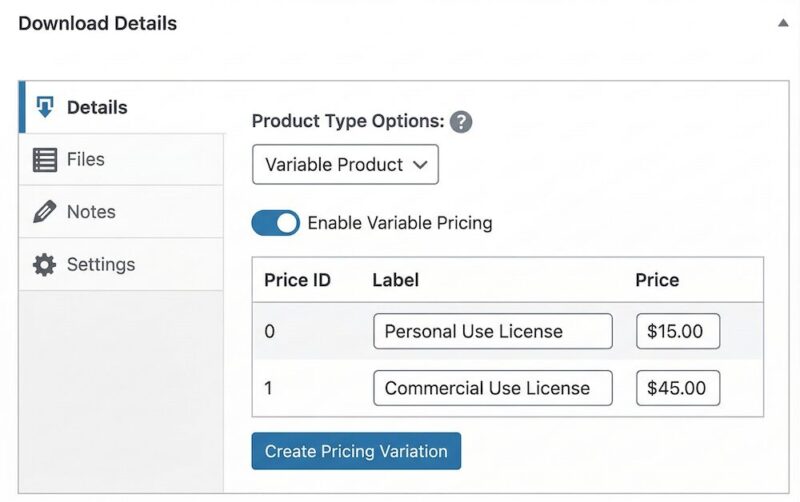
Make sure your product description — or a simple license note on the product page — explains what each tier covers. Buyers appreciate clarity, and it reduces refund requests and misunderstandings.
Selling WordPress themes, plugins, or templates? Variable pricing works for usage tiers, but EDD’s Software Licensing is worth a look. It generates license keys, enforces site activation limits, and handles renewals — things that matter for software but aren’t needed for graphics or artwork.
Step 4: Connect a Payment Method
EDD supports Stripe and PayPal out of the box.
Stripe is the better choice for most sellers. It supports more payment methods (credit cards, Apple Pay, Google Pay) and has a cleaner checkout experience.
Go to Downloads » Settings » Payments to connect your gateway.
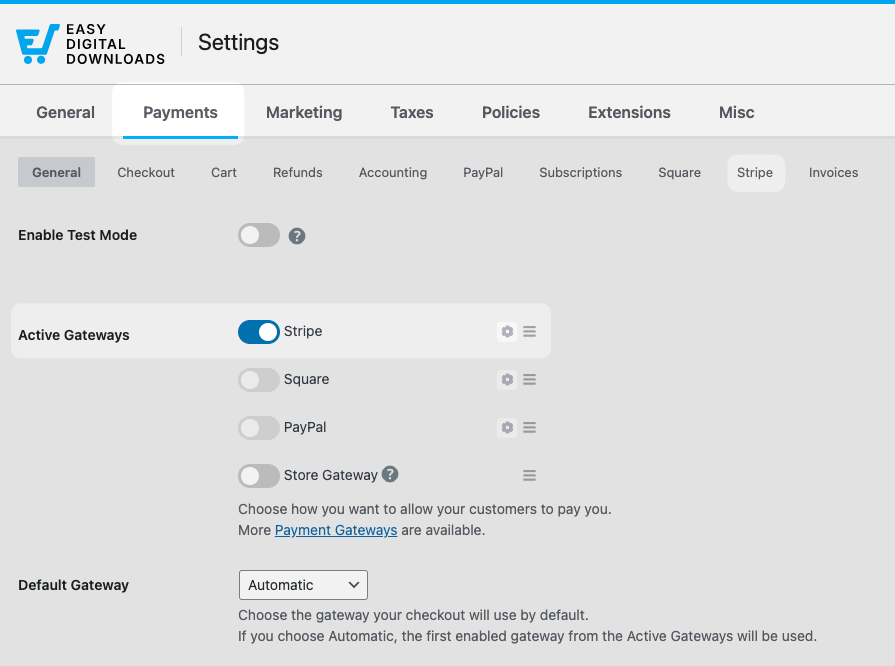
If you’re using Stripe, you’ll connect your account through EDD’s Stripe setup wizard. It takes a few minutes and walks you through everything.
A quick note on payment processing fees: Stripe charges 2.9% + $0.30 per transaction. PayPal’s rates are similar. These are standard fees — EDD doesn’t add anything on top of them.
⚙️ How to set up Stripe with Easy Digital Downloads.
Step 5: Test Your Store Before You Launch
Don’t skip this step. Run a test purchase before you send anyone to your store.
Go to Downloads » Settings » Payments and enable Test Mode.
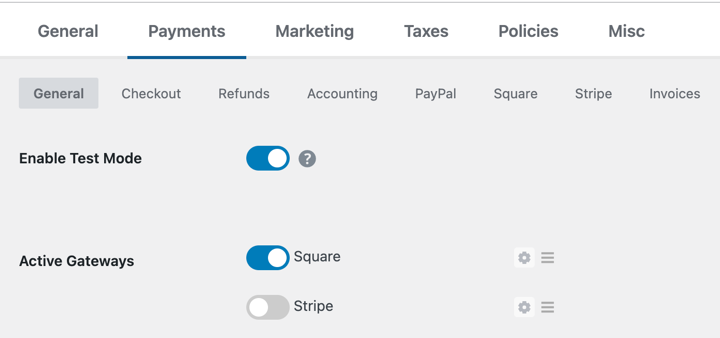
Save your changes.
Then visit your site, add your product to the cart, and complete a purchase using the test payment option.
Check that:
- The checkout completes without errors
- You receive a purchase confirmation email
- The download link in the email works
- The file the buyer receives is the correct one
Once everything checks out, turn off test mode and you’re ready to go live.
How to Price Your Digital Graphics
Pricing digital graphics is part science, part feel. Here are the models that work.
Pricing Models for Digital Graphics
Flat-rate pricing is the simplest. One product, one price. Works well for individual assets like icons, fonts, or illustrations.
License-based pricing (as covered above) charges different amounts for personal vs. commercial use. This is standard practice for templates, clip art, and stock illustrations.
Bundle pricing groups related products at a discount. A social media template pack, a logo kit, or a font family with alternates all work well as bundles. Buyers feel like they’re getting more value, and your average order value goes up.
Introductory pricing means launching at a lower price to build reviews and social proof, then raising it once you have traction. This works well for new shops with no audience yet.
Should You Offer Bundles?
Yes — and EDD makes it easy with the Bundled Products extension. A bundle of 5 related templates at 30% off the individual price is a strong conversion lever, especially for first-time buyers.
Start simple: one bundle, clearly positioned as the best value option.
What File Formats Should You Offer?
The right file formats depend on what you’re selling and who’s buying. Here’s how to think about it.
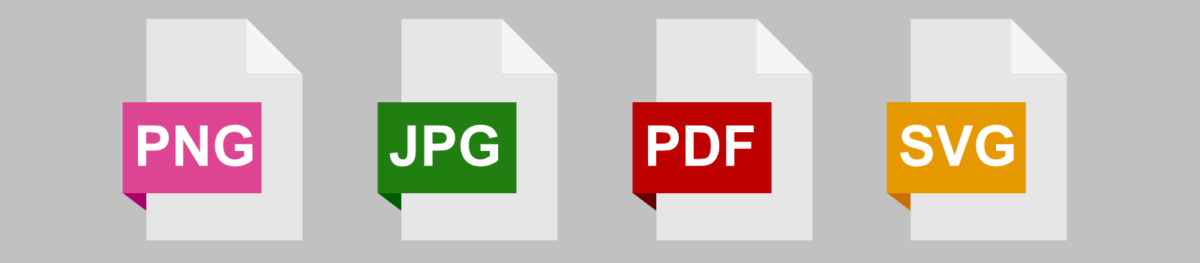
Output Formats (What Buyers Receive)
These are the final, ready-to-use files:
- PNG — Best for graphics with transparency. Ideal for logos, icons, stickers, and illustrations. For web use, 72 DPI and 1000–3000px wide is standard. For print, use 300 DPI.
- JPEG — Best for photography and graphics without transparency. Web use: 72 DPI. Print use: 300 DPI at final print size.
- PDF — Best for printable products like planners, worksheets, and art prints. Export at 300 DPI with bleed if the design goes edge-to-edge.
- SVG — Best for vector graphics that need to scale infinitely. Great for cut files, logos, and illustrations used in design tools.
When in doubt, include multiple formats. A buyer purchasing a logo should get PNG, SVG, and PDF — not just one.
Editable Source Files (Layered/Template Files)
Source files let buyers customize the design. Offering them at a higher price point (or as part of a commercial license) adds significant value.
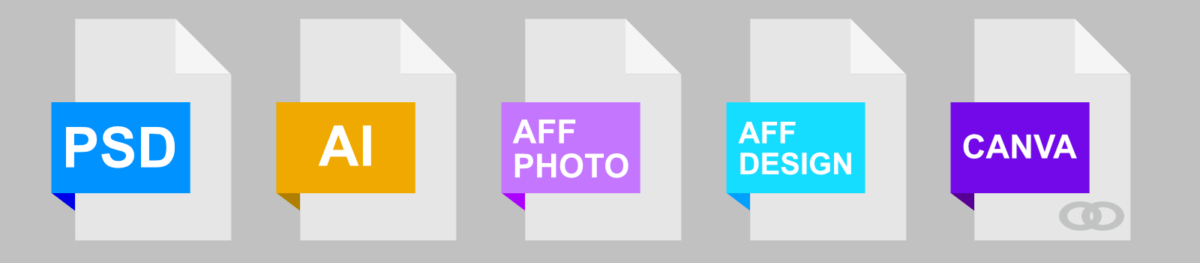
Common editable formats:
- PSD — Adobe Photoshop. Widely used for photo composites, mockups, and digital illustrations.
- AI — Adobe Illustrator. Standard for vector work and professional design assets.
- Canva — Share as a Canva template link. Extremely popular with non-designer buyers. Great for social media templates, presentations, and printables.
- Affinity (AFPHOTO / AFDESIGN) — Growing user base, especially among buyers who’ve moved away from Adobe subscriptions.
Not everyone needs source files. But if your buyers are designers or business owners who want to customize your work, offering editable files at a premium is a straightforward way to charge more.
How to Package Files as a ZIP
If your product includes multiple files, compress them into a ZIP before uploading.
- On Windows: Select all your files, right-click, and choose Compress to ZIP file.
- On Mac: Select all your files, right-click (or Control-click), and choose Compress [n] Items.
Name the ZIP something descriptive: resume-template-minimalist-edd.zip is cleaner than files.zip. Your buyer sees the filename when they download.
What Graphics and Digital Art Can You Sell?
If you can save it as a file, you can sell it. Here are the most popular categories:
Templates
Resume templates, business card templates, social media kits, presentation decks, email headers, Canva templates, Notion dashboards.
Printable art and stationery
Wall art, planners, journals, worksheets, coloring pages, party printables, certificates.
Design assets
Fonts, icon sets, brush packs, textures, patterns, mockups, stock illustrations, UI kits.
Fine art and illustrations
Digital paintings, character illustrations, surface pattern designs, clip art sets.
Other digital products
Logos, brand identity kits, infographics, ebook covers, LUTs and presets.
The more specific your niche, the easier it is to attract the right buyers. A shop focused entirely on Canva templates for wedding stationery will convert better than a shop selling everything.
internal link: how to sell Canva templates with Easy Digital Downloads
How to Market and Sell More Digital Art
Getting your store set up is the first step. Getting sales is the ongoing work.
Build an Email List from Day One
Your email list is the most valuable asset your store has. Unlike social media followers, you own it.
The easiest way to start: offer a free download in exchange for an email address. A free icon set, a sample template, or a single printable gives buyers a taste of your work and gets them on your list.
EDD integrates with Mailchimp, ConvertKit, and other email platforms so new customers are added to your list automatically at checkout.
For more ideas, check out how to build your email list with lead magnets.
Use Discount Codes to Drive First Sales
EDD has built-in discount code support. A launch discount of 20–30% off is a low-friction way to get your first buyers and reviews.
Go to Downloads » Discount Codes » Add New to create one. Set an expiration date to create urgency.
Pinterest and Instagram for Visual Art Discovery
Visual products sell on visual platforms. Pinterest is particularly strong for digital art, printables, and templates — pins have a long shelf life and drive consistent search traffic.
Create a pin for each product that links directly to your EDD product page. Use clear, keyword-rich pin descriptions. Instagram works well for building an audience, but Pinterest drives more direct purchase intent.
Collaborate with Other Artists and Creators
Find creators in adjacent niches (not direct competitiors) and look for ways to promote each other.
A font designer and an illustration seller share the same buyers. A simple shoutout or bundle collab can send warm, pre-qualified traffic to your store.
FAQs on Selling Graphics and Art on WordPress
Let’s wrap up with some frequently asked questions users have when learning how to sell graphics and digital art on WordPress sites.
Which is better for selling digital art: WooCommerce or Easy Digital Downloads?
Easy Digital Downloads is the better choice for selling digital-only products like graphics and artwork. It’s built specifically for digital downloads, so the setup is simpler and the checkout is optimized for file delivery. WooCommerce is worth considering if you also sell physical products, but for a pure digital art store, EDD is faster to set up and easier to manage.
Can I sell graphics on WordPress for free?
Yes. Easy Digital Downloads has a free plan that includes product listings, secure file delivery, and checkout. You’ll pay standard payment processing fees (around 2.9% + $0.30 per transaction through Stripe or PayPal), but there are no monthly platform fees and no commission on sales.
Can I sell both digital and physical art on the same WordPress site?
Yes. Easy Digital Downloads handles digital downloads, and you can add WooCommerce alongside it for physical products like prints or originals. Alternatively, EDD’s Simple Shipping feature might be a suitable option.
How do I protect my digital art from being downloaded without paying?
Easy Digital Downloads delivers files through secure, expiring download links — buyers only get access after a completed purchase, and links expire after a set number of uses or a time limit. For product preview images, always use a watermarked or low-resolution version rather than the full file.
What’s the best way to price digital graphics for the first time?
Start by looking at what similar products sell for on Creative Market and Etsy. Then position your pricing based on format: personal use licenses typically run $5–25 for individual assets, commercial licenses 2–5x higher, and bundles can go from $20–75 depending on how much is included. Don’t undervalue your work — buyers associate low prices with low quality.
Do I need a business license to sell digital art online?
Requirements vary by country and state. In many places, you can start selling as a sole proprietor without formal registration. But once you’re earning consistent income, it’s worth consulting a local accountant or business attorney — especially if you’re selling to international customers, where VAT and digital goods tax rules can apply. This isn’t legal advice; requirements vary significantly based on where you live.
Use EDD to Sell Graphics and Digital Art on WordPress
You don’t need a marketplace to sell your graphics and digital art. You need a WordPress site, Easy Digital Downloads, and your files.
You keep the revenue. You own the customer relationships. And you’re not at the mercy of a platform’s algorithm or policy changes.
Grab your Easy Digital Downloads pass and set up your first product today.
📣 P.S. Be sure to subscribe to our newsletter and follow us on Facebook, Twitter/X, or LinkedIn for more WordPress resources!








