


Every sale on your WordPress store costs you a percentage. Payment processors take a cut on every transaction.
And if you’re on the free version of Easy Digital Downloads, you’re also paying an extra platform fee on top of Stripe’s standard rate.
The good news: one of those fees is completely avoidable. The other you can significantly cut.
In this guide, you’ll learn two proven strategies to reduce credit card processing fees on your WordPress store.
- Key Takeaways
- What You're Actually Paying Per Sale
- Strategy 1: Eliminate the EDD Platform Fee
- Strategy 2: Lower Your Base Rate With ACH Payments
- What About Passing Fees to Customers?
- FAQs About Reducing Credit Card Processing Fees
- Can you completely remove credit card processing fees in WordPress?
- Does upgrading to EDD Pro remove Stripe's transaction fees?
- Is ACH available on the free version of Easy Digital Downloads?
- How can upgrading from EDD Lite to Pro reduce costs?
- Are credit card processing fees tax deductible for digital sellers?
- Start Keeping More of Every Sale in WordPress
📋 Key Takeaways
| Key Takeaway | What to Know |
|---|---|
| EDD platform fee | The free version of Easy Digital Downloads adds a 3% fee to every Stripe transaction. Upgrading to Pro removes it entirely. |
| Stripe’s base rate | Stripe charges 2.9% + 30¢ per card transaction on all plans. ACH bank transfers lower this to 0.8%, capped at $5. |
| Annual savings | On $2,000 in monthly sales, cutting the 3% EDD platform fee alone saves $720 a year. |
| Fee passing | EDD’s Gateway Fees feature lets you add a surcharge at checkout. Legal restrictions apply in some regions. |
What You’re Actually Paying Per Sale
There are two separate fees on every Stripe sale:
- Stripe’s standard processing fee: 2.9% + 30¢ per successful card transaction. This applies to every Stripe user, regardless of which WordPress plugin you’re on. You can’t remove this fee. You can reduce it for certain transaction types: more on that in Strategy 2.
- EDD platform fee: Additional 3% charge. This fee exists on the free plan and Personal plan only. Upgrading to an EDD Extended Pass or higher removes it entirely on every future sale.
✅ Upgrading to EDD Pro (Extended or higher) eliminates the additional fee on sales.
✅ You can reduce the Stripe rate by switching to ACH bank transfers.
Here’s what both fees look like on a $50 sale:
| EDD Free Plan | EDD Pro Pass | |
|---|---|---|
| Stripe fee | $1.75 (2.9% + $0.30) | $1.75 (2.9% + $0.30) |
| EDD platform fee | $1.50 (3%) | $0.00 |
| Total cost per sale | $3.25 | $1.75 |
Across 40 sales a month at $50 each, that’s $60 in platform fees going out the door. Over a year, that’s $720. Upgrading to EDD Pro eliminates that cost on every transaction going forward.
🔎 For more on how payment gateways work before diving into the setup, see What is a Payment Gateway?.
Strategy 1: Eliminate the EDD Platform Fee
The fastest way to reduce what you’re paying per sale is removing the EDD platform fee. Upgrading and activating your Pro Pass license takes care of it permanently. Here’s how.
Before you start:
- Already on EDD Pro? Your platform fee is already removed. Skip to Strategy 2 to lower your base Stripe rate.
- On the free version of Easy Digital Downloads? You’ll need to upgrade to an EDD Extended Pass or higher to remove the platform fee. [See EDD plans →]
- Using WooCommerce or another ecommerce plugin? Easy Digital Downloads offers so many features that are purpose-built for digital product sellers. [Compare EDD vs Woo →]
Step 1: Get Your EDD Pro Plan
Head to Easy Digital Downloads pricing page and choose a pass. Stripe with the platform fee removed is available on the Extended and all higher-tier plans.
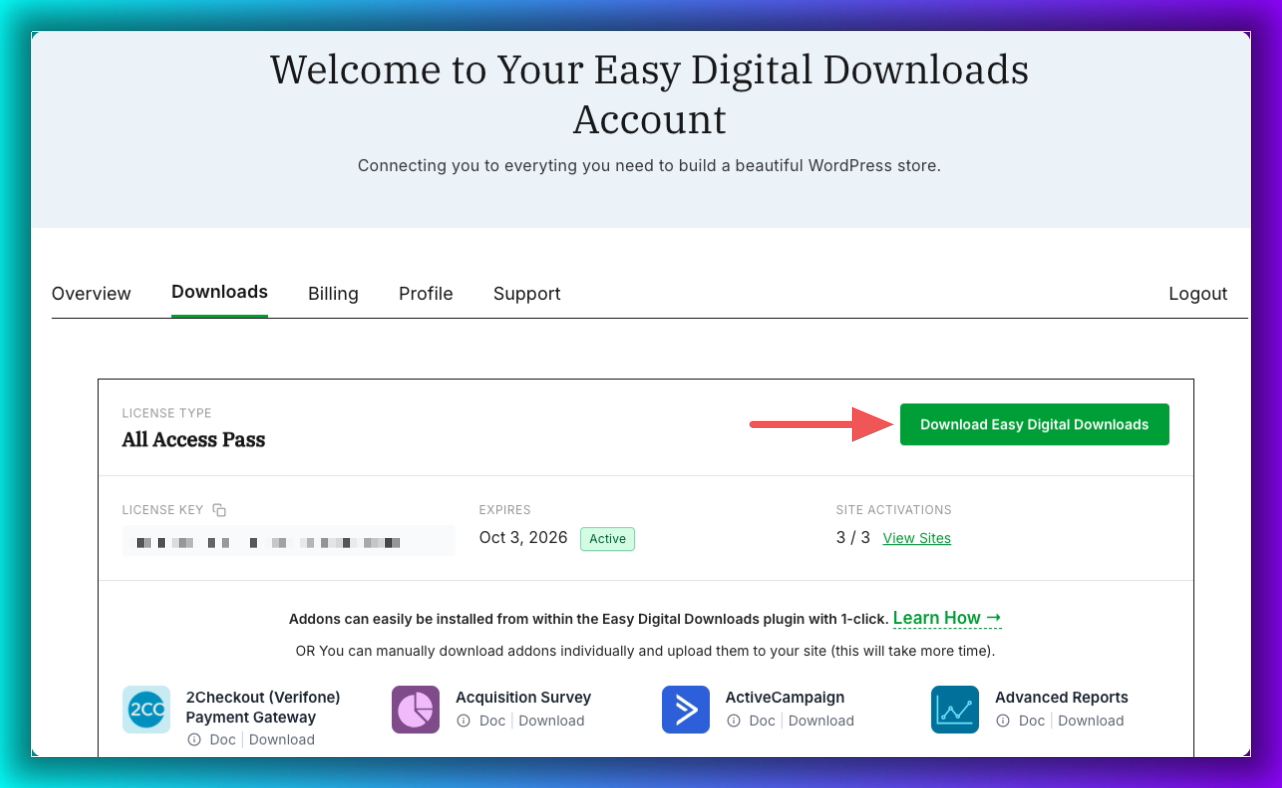
Once you’ve purchased, log into your EDD account dashboard and go to Downloads » Download Easy Digital Downloads. The EDD (Pro) plugin zip file downloads automatically.
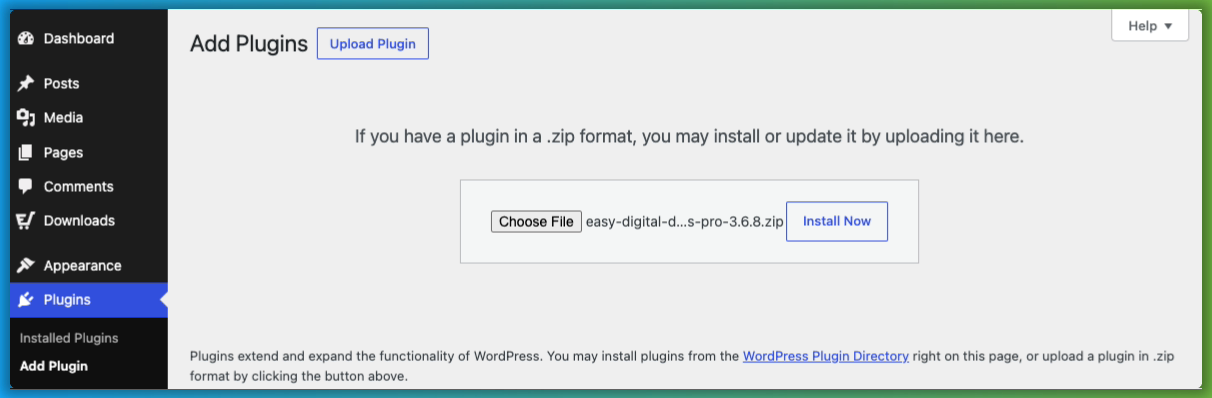
Install and activate it on your WordPress site under Plugins » Add Plugin » Upload Plugin.
Activating your EDD Pro license key removes the 3% platform fee from your Stripe transactions. No separate plugin or setting is needed. Just an active license.
Once EDD is installed on your site, copy your license key from your EDD account dashboard. Then go to Downloads » Settings » General. Paste your license key into the field and select Activate License.
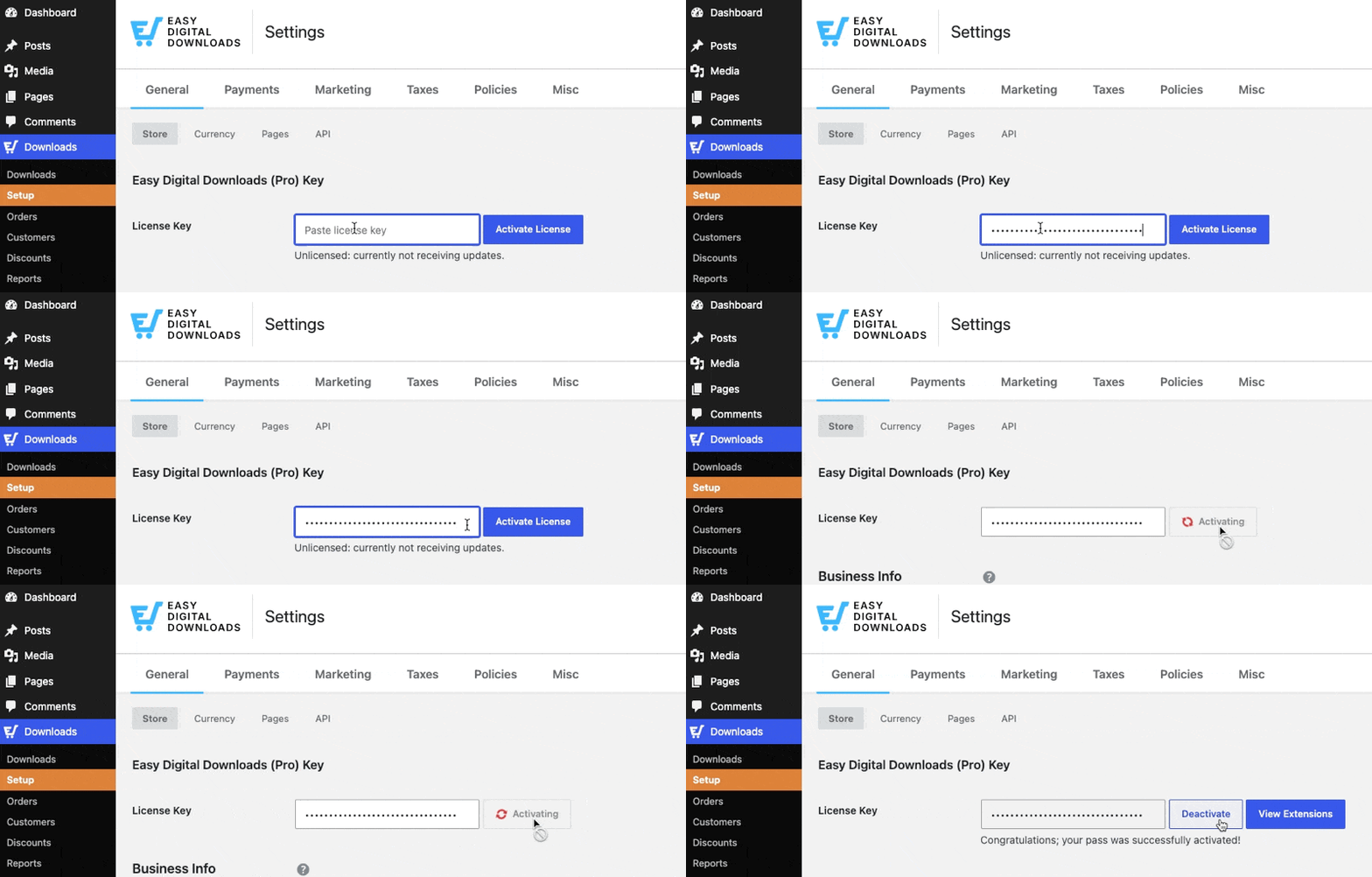
Save your changes.
Important: Keep your license active and in good standing. If your Pass license expires or fails to renew, the fee will return on all Stripe transactions until the license is restored.
If you need help with the setup, the EDD Quickstart Guide walks you through it step by step.
Step 2: Install Stripe Pro (Optional)
At this point, the 3% platform fee is already removed. Your active EDD Pass license handles that. You don’t need to install anything else for the fee reduction to take effect.
However, if you want to add pre-sale support, you’ll need to activate the Stripe Payment Gateway (Pro) feature under Downloads » Extensions.
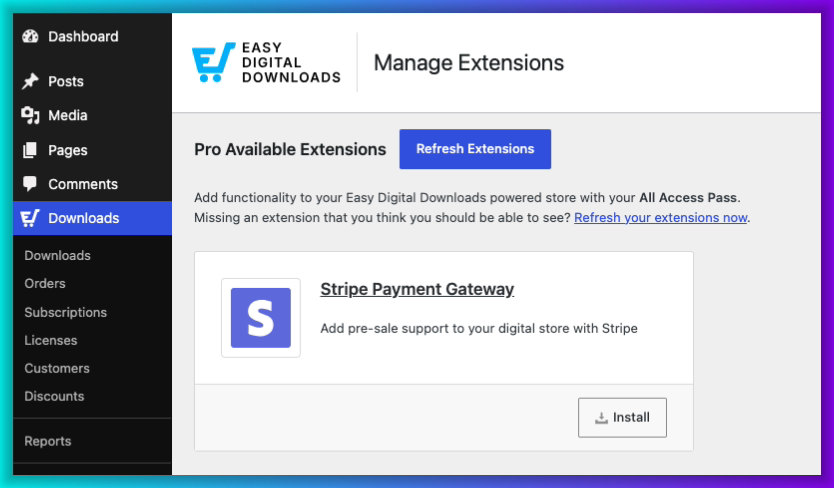
This lets you collect a customer’s payment details without immediately processing the charge, which is useful for pre-orders and reservation-style products.
Once you select Install, it activates automatically.
Step 3: Confirm Your Settings
If you haven’t yet, ensure you have Stripe enabled and configured as your active payment gateway.
Go to Downloads » Settings » Payments.
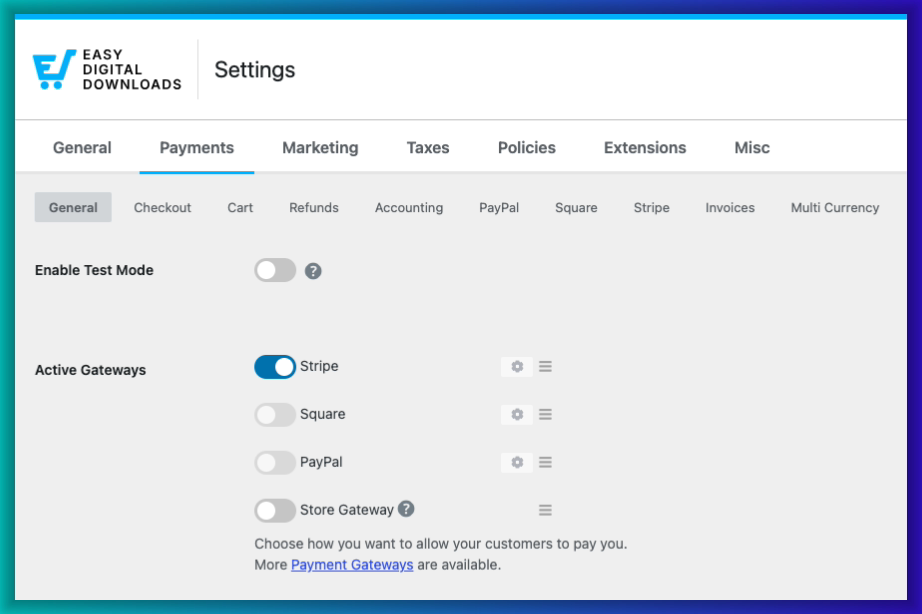
If you haven’t configured your Stripe account and EDD yet, head over to the Stripe tab and select Connect with Stripe.
Follow the prompts. If you run into issues, the EDD Stripe documentation covers this step by step.
That’s it. From this point on, every Stripe transaction on your store runs without the platform fee!
Your Pro Pass also unlocks subscription payment support through EDD’s Recurring Payments feature.
🏁 Want to confirm everything is working correctly? Follow our guide to testing Stripe payments in WordPress.
Strategy 2: Lower Your Base Rate With ACH Payments
Upgrading to EDD Pro removes the platform fee, but Stripe’s 2.9% + 30¢ still applies to every card payment. For higher-priced products, enabling ACH bank transfers can cut that base rate significantly.
ACH (Automated Clearing House) is a direct bank-to-bank transfer method available through Stripe. Instead of running through the card networks, the payment moves directly between bank accounts. Stripe charges 0.8% per ACH transaction, capped at $5.
Here’s what that difference looks like on a $200 sale:
| Card Payment | ACH Payment | |
|---|---|---|
| Processing fee on $200 | $6.10 (2.9% + $0.30) | $1.60 (0.8%) |
| You save | $4.50 per transaction |
When ACH makes the most sense:
- Products priced above $75, where the card fee starts to add up
- US-based customers (ACH is a US payment method)
- Buyers who aren’t in a rush (ACH transfers take 3 to 5 business days to clear)
When to stick with cards: Lower-priced products, impulse purchases, or international customers are better served by card payments. ACH is a supplement for your higher-ticket offers, not a full replacement.
If your customers are in the UK, Stripe offers Bacs Direct Debit at 1% (capped at £2), which provides a similar rate advantage for UK-based stores.
To enable ACH bank transfers in EDD, go to Downloads » Settings » Payments and select the Stripe tab. Under Payment Methods, toggle on US Bank Account (that’s Stripe’s label for ACH Direct Debit).
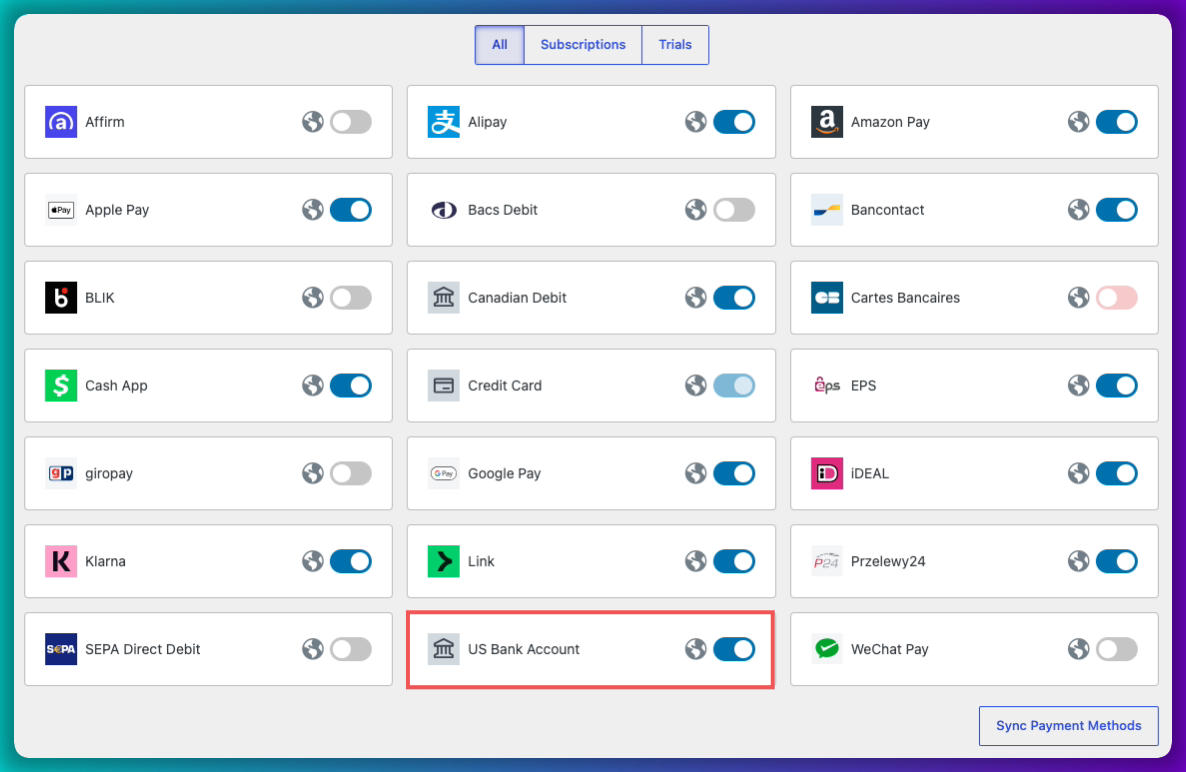
You’ll need Pro installed and your Stripe account configured to accept ACH payments.
See the EDD Stripe documentation for the full configuration steps.
What About Passing Fees to Customers?
There’s a third option worth knowing: passing processing fees directly to customers at checkout. EDD’s Gateway Fees feature lets you add a small surcharge to the order total based on the payment method the customer chooses.
It works with Stripe, PayPal, and other gateways.
A few things to keep in mind before enabling it:
- Legal restrictions apply. Credit card surcharging is prohibited or limited in some US states, and is banned in the UK and EU under card network rules. Check the regulations for your region before turning this on.
- It can affect conversion. Some customers will abandon checkout when they see a fee added to their total. It’s worth testing on higher-ticket products before rolling it out store-wide.
- Not compatible with Recurring Payments. If you use EDD’s Recurring Payments feature, Gateway Fees won’t apply to subscription transactions, including initial payments and renewals. It works for one-time purchases only.
For the settings reference, check out our Gateway Fees setup documentation.
FAQs About Reducing Credit Card Processing Fees
Let’s wrap up by answering some frequently asked questions WordPress store owners have about how to reduce credit card processing fees.
Can you completely remove credit card processing fees in WordPress?
Not entirely. Stripe’s base fee of 2.9% + 30¢ per card transaction applies to all Stripe users and can’t be waived. What you can eliminate is the additional transaction fees charged on the free version of Easy Digital Downloads. Upgrading to an Extended Pass and keeping your license active removes that fee on every future transaction.
Does upgrading to EDD Pro remove Stripe’s transaction fees?
No. Upgrading to EDD Pro removes the platform fee, not Stripe’s fees. Stripe charges 2.9% + 30¢ per card transaction regardless of your EDD plan. What upgrading does give you is the ability to reduce your effective rate: ACH bank transfers through Stripe drop to 0.8% per transaction (capped at $5), and your Pass unlocks subscription support through EDD’s Recurring Payments feature.
Is ACH available on the free version of Easy Digital Downloads?
ACH bank transfer payments through Stripe require Pro, which is included in the EDD Extended Pass and higher-tier plans. It’s not available on the free version of Easy Digital Downloads. Upgrading gives you both the ACH payment option and the removal of the additional fee.
How can upgrading from EDD Lite to Pro reduce costs?
The free version of Easy Digital Downloads adds a 3% fee on every Stripe transaction, on top of Stripe’s standard rate. On $1,000 in monthly sales, that’s $30 a month in platform fees, or $360 a year. On $2,000 a month, it’s $60 a month, or $720 a year. Upgrading to EDD Pro removes this fee on every future transaction.
Are credit card processing fees tax deductible for digital sellers?
Generally, yes. Payment processing fees are considered a business operating expense and are typically tax deductible. That said, tax rules vary by country, state, and business structure. Consult an accountant or tax professional to confirm what applies to your situation before claiming these deductions.
Start Keeping More of Every Sale in WordPress
The EDD platform fee is the easiest cost to cut. One plan upgrade removes it from every transaction going forward. If you’re selling higher-priced digital products, enabling ACH payments through Stripe can reduce your base processing rate even further.
Ready to get started? Explore our plans to find the right fit for your store and grab your Pro pass:
And if you’re looking for a broader comparison of payment options, see our guide on the best WordPress payment gateways for ecommerce.
📣 P.S. Be sure to subscribe to our newsletter and follow us on Facebook, Twitter/X, or LinkedIn for more WordPress resources!








