


Ready to enhance your online store and provide customers with a more convenient payment experience?
Today, Easy Digital Downloads is excited to announce the release of EDD v3.3.5 — an update that supports more payment options than ever. 🥳
Using the Stripe payment gateway, you can accept online payments via cards, digital wallets, bank redirects, and buy now/pay later options.
EDD + Stripe: Best Solution for Digital Sellers
Stripe is a leading payment processor known for its security, reliability, and global reach. With Stripe, you can be confident that customers’ payment information is protected and that transactions are processed efficiently.
Plus, Stripe supports payments in over 40 countries and 135 currencies, making it a versatile choice for businesses of all sizes.
As the #1 WordPress plugin for digital selling and a verified Stripe partner, Easy Digital Downloads works seamlessly with Stripe to provide a powerful and user-friendly eCommerce solution — whether you’re offering one-time purchases or recurring payments and subscriptions.

With Stripe and EDD, you can:
- Save payment details for faster checkout
- Monitor early fraud warnings to prevent chargebacks
- Easily sell digital downloads
- Approve or decline refunds within WordPress
- Much more
New Stripe Payment Methods Added
Offering customers a variety of payment options is essential for digital sellers. It improves customer convenience and helps you reach a broader audience. A wider range of payment methods can help reduce cart abandonment, boost conversion rates, and increase overall sales.
Previously, EDD users could use Stripe to accept bank transfers, debit and credit cards, and Apple Pay/Google Pay.
As of EDD v3.3.5, connected accounts using the Stripe Payment Element can access more options, including:
| Cards | Link |
| Affirm | Bancontact |
| AliPay | EPS |
| Amazon Pay | giropay |
| Apple Pay | iDEAL |
| CashApp Pay | Przelewy2 |
| Google Pay | WeChat Pay |
Note that this is not an exhaustive list. Stripe support and payment method availability may vary depending on the payment type, as well as location, currency, and cart contents.
Managing Stripe Payment Methods
EDD enables most Stripe payment methods by default. You can manage them directly within EDD settings in WordPress.
Just go to Downloads » Settings » Payments » Stripe. Under the Payment Methods section, you manage which methods are turned on/off.
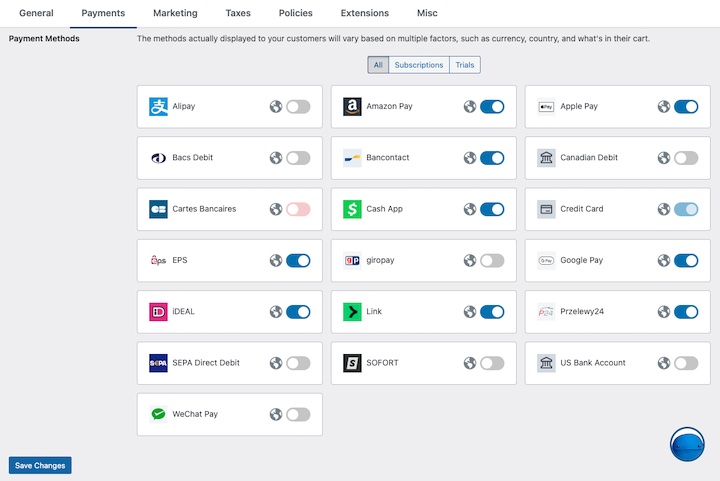
Certain payment methods may require you to request access to turn them on. If so, you can handle this from your Stripe dashboard. Go to Settings ⚙︎ in the top right corner, then click followed by Payments.
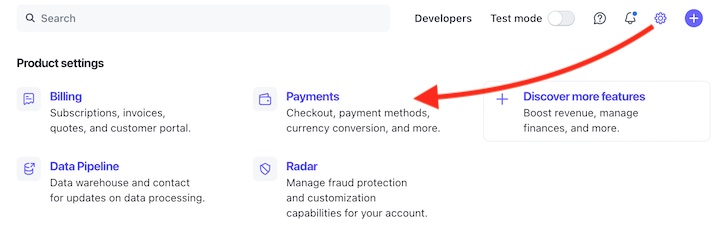
Under the Payment Methods tab, locate the payment method you want to enable and select Turn on. If further configuration is needed, it will be listed as Pending until approved.
Upgrade EDD and Add More Payment Options
Update to EDD 3.3.5 is a simple and effective way to enhance your online store and provide customers with a more convenient payment experience.
Go to Dashboard » Updates from your WordPress admin area to upgrade to the latest version.
If you want more information about the latest updates, feel free to visit the EDD Release Notes.
Don’t have Easy Digital Downloads yet? Upgrade to a premium pass and eliminate the 3% Stripe transaction fees!
Any questions, concerns, or comments? Don’t hesitate to leave a comment below or get in touch with our support team directly through our support page.
📣 P.S. Be sure to subscribe to our newsletter and follow us on Facebook, Twitter/X, or LinkedIn for more WordPress resources!








