Your Easy Digital Downloads pass and its license key stay active for one year at a time. They renew automatically through your subscription.
This guide explains how renewal works and answers the most common questions about renewing, upgrading, and canceling.
- How Does License Renewal Work?
- FAQ on License Renewal
- What happens if I don't renew my license?
- If I renew my license, do I need to download and install the software again?
- If I upgrade my pass, will my license be extended for another year?
- Will Easy Digital Downloads (Pro) still work with an expired or inactive license?
- Can I renew my license early or late?
- Can I buy a lifetime license?
- If I have live and testing sites, do I need to activate my license on both?
- How do I renew my license?
- Will my license renew automatically?
- How will I know when my license renews?
- What if I don't want to renew?
How Does License Renewal Work?
When you buy a pass (Personal, Extended, Professional, or All Access), you get 1 license key that unlocks Easy Digital Downloads (Pro) and the features included in your pass. Your purchase also creates a subscription. That subscription renews your license key each year.
An active license key gives you plugin updates, access to support, and downloads from your account. As long as your subscription stays active, all of this continues without any action from you.
You can check your license status any time from your Easy Digital Downloads account. The Downloads tab shows your license key, its expiration date, and a status badge.
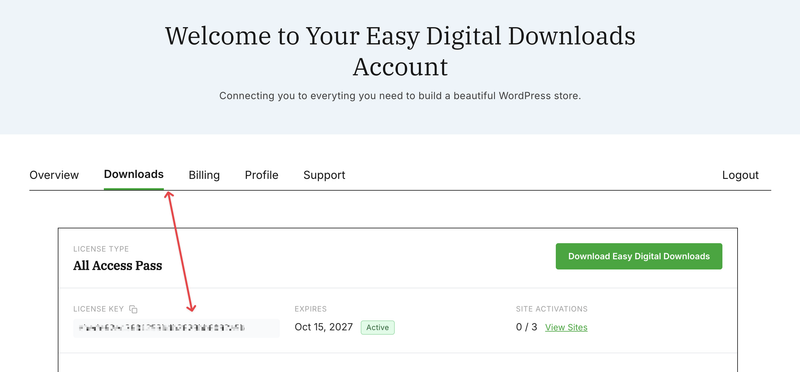
The Billing tab lists your subscriptions and their renewal dates.
To renew a license that has already expired, see How Do I Renew an Existing License Key?
FAQ on License Renewal
Below, we’ve answered some of the most common questions about license renewal.
What happens if I don’t renew my license?
Easy Digital Downloads keeps running on your site. Your products and orders stay in place. These changes happen once your license expires:
- Plugin updates, including security and feature updates, stop.
- You lose access to support and to plugin downloads in your account.
- Pro features that need a valid license key turn off. These include, but aren’t limited to, abandoned cart recovery, EU VAT validation, and AI cart recommendations in the cart preview. Campaign Tracking, geolocation, and conditional email tags also turn off.
- If you accept payments with Stripe or PayPal, an application fee on each transaction starts after a 14-day grace period.
If I renew my license, do I need to download and install the software again?
No. Once your license key is active again, updates arrive through the normal WordPress plugin updates screen. It can take up to four hours for an available update to show up, because WordPress stores update information for a while before checking again.
If I upgrade my pass, will my license be extended for another year?
No. An upgrade changes your pass level, but it keeps your current renewal date.
For example, say your pass renews on December 1. If you upgrade on November 1, your next renewal is still December 1. It renews at the price of the pass you upgraded to.
For upgrade steps, see Can I Upgrade My Licenses?
Will Easy Digital Downloads (Pro) still work with an expired or inactive license?
Yes. Easy Digital Downloads (Pro) keeps working after your license expires or if it was never activated. The features that need a valid license key turn off. The payment application fee described above also applies.
WordPress and other plugins release updates regularly. Renewing keeps your copy of Easy Digital Downloads up to date with those changes. That’s why we recommend keeping your license active.
Can I renew my license early or late?
You can’t renew early by hand. While your subscription is active, it renews automatically and adds 1 year to your current expiration date, so you never lose any time.
If your license has already expired, you can renew it at any time. Renewing adds 1 year from the day you renew. For example, if your license expired in April and you renew in July, your new expiration is July of the following year. Between April and July, you don’t get updates or support.
Can I buy a lifetime license?
All passes are annual subscriptions that renew each year. Keeping your subscription active also keeps your renewal pricing. You can compare passes on our pricing page.
If I have live and testing sites, do I need to activate my license on both?
Yes, activate your license key on your test site so it receives updates too. Local and staging sites (for example, sites on a .local or .test domain, or a host’s staging environment) don’t count toward your site activations.
For the full list of supported staging setups, see WordPress Staging Site Support. If a development site uses up one of your activations, contact our support team and we’ll help.
How do I renew my license?
If your license has expired, log in to your account and click Renew Pass on the Downloads tab. You can also use the Renew link next to your subscription on the Billing tab.
For more renewal options, see How Do I Renew an Existing License Key?
Will my license renew automatically?
Yes, as long as you haven’t canceled your subscription. Every pass purchase creates a subscription. That subscription renews your license key. If you cancel, your license key expires at the end of your current term.
How will I know when my license renews?
While your subscription is active, we email you 2 days before the renewal charge, then again once your license has been renewed. If your subscription is canceled or has expired, we send license reminders 30 days, 7 days, and 48 hours before your license expires. You’ll also get a subscription expiration notice about a month before. You can also see your renewal date on the Billing tab of your account.
What if I don’t want to renew?
You can cancel your subscription at any time from the Billing tab of your account. Canceling doesn’t remove the time you’ve already paid for. It just stops the automatic renewal at the end of your term.
For details, see Can I Cancel My Subscriptions?