

If you sell software on WordPress, whether that’s a plugin, a theme, or any other digital product, protecting it matters just as much as building it.
Without license keys controlling access, anyone downloading your WordPress plugin or theme can copy your code, skip your update process, or use your support resources without ever paying for them.
Easy Digital Downloads (EDD) makes licensing simple: automatic key generation, configurable activation limits, and built-in update delivery. You manage it all from one dashboard, without the complexity of stitching together multiple tools.
In this guide, you’ll learn exactly how to license software in WordPress with EDD’s Software Licensing feature, from initial setup to day-to-day management.
- Key Takeaways
- What Is Software Licensing?
- Why License Software in WordPress?
- Benefits of EDD Software Licensing
- How EDD Compares to SureCart and FluentCart
- How to License Software in WordPress
- Managing Licenses and Renewals
- FAQs on Licensing Software in WordPress
- How do I generate license keys in WordPress?
- Is licensing WordPress plugins legal under GPL?
- What happens if a WordPress license key expires?
- Can I automate license renewals for customers?
- Is EDD the best way to sell and license software in WordPress?
- How does this system protect my software from being pirated?
- How is EDD's Software Licensing feature different from newer tools like FluentCart or SureCart?
- License Software in WordPress Today
Key Takeaways
| Automatic Key Generation | EDD creates a unique license key for every purchase automatically, no manual tracking required. |
| Built-In Update Delivery | Deliver 1-click WordPress updates directly through the license, no separate update server needed. |
| Renewals Without Complexity | Combine with the Recurring Payments feature for automatic renewal billing and expiration reminder emails. |
| Full Activation Control | Set exactly how many sites or devices each license key can activate. |
| GPL Compliant | Licensing gates access to updates and support, not the code itself, so it stays compliant. |
What Is Software Licensing?
Software licensing in WordPress is the process of assigning a unique alphanumeric key to a digital product, such as a plugin or theme. This key acts as a digital handshake between your store and the customer’s website.
When a customer enters the key, it validates their purchase status via an API, allowing you to deliver automatic updates and premium support only to active subscribers.
In the WordPress ecosystem, licensing is less about locking down the code (which is often open source) and more about managing access to the services associated with the software.
By implementing a licensing system, you transition from selling a static file to selling a subscription that grants continued access to security patches, new features, and help desk support.
How WordPress Licensing Fits with the GPL
It’s important to understand that WordPress operates under the GNU General Public License (GPL). This license grants users the freedom to use, modify, and redistribute software.
A common misconception is that licensing plugins violates the GPL. It doesn’t.
When you license software in WordPress, you’re not restricting the user’s right to use the code. Instead, you’re limiting access to your distribution channel for updates and support.
- The Code: Often remains open source and GPL compliant.
- License Key: Gates access to your API. Without a valid key, the user can’t download the latest version of the software automatically from your server or access your support ticket system.
This Software as a Service (SaaS) model is the standard for successful WordPress businesses. It respects the freedoms of open source while ensuring developers are paid for their ongoing maintenance and support work.
Why License Software in WordPress?
There are many reasons to license software in WordPress.
Prevent Piracy and Unauthorized Use. 🔐
License keys create a barrier that protects your intellectual property. Only customers with valid keys get access to updates and support. It’s not foolproof, but it significantly reduces unauthorized sharing.
Create Recurring Revenue Streams. 💸
Annual renewals for continued access mean predictable income. Instead of one-time sales, you’re building a subscription-like model that grows over time. I’ve watched developers transform their side projects into full-time businesses this way.
Deliver Automatic Updates Securely. ✅
Your customers get one in their WordPress dashboard. But only if their license is active. This creates real value for staying current with payments.
Gate Access to Premium Support. 💬
Your time becomes more valuable when it’s focused on paying customers. Licensing lets you provide excellent support to those who’ve invested in your product.
Build a Scalable Business Foundation .⚖️
Professional licensing systems look legitimate to enterprise customers. They’re often required for businesses to purchase and use your software internally.
Benefits of EDD Software Licensing
Easy Digital Downloads (EDD) was designed from the ground up to sell digital goods.
No shipping settings, inventory management, or physical product features cluttering your interface. Just the tools you actually need.
This isn’t some third-party hack. The EDD Software Licensing feature is a native system built specifically for plugins, themes, and software. It integrates smoothly with EDD’s core functionality.
Many other WordPress eCommerce plugins carry baggage from physical eCommerce that slows down your site. EDD stays lean and focused on what matters for digital sales. Clear documentation makes integration straightforward.
How EDD Compares to SureCart and FluentCart
Easy Digital Downloads isn’t the only way to license software on WordPress. Here’s how it stacks up against two other options you’ll see mentioned in software-seller communities.
| Easy Digital Downloads | SureCart | FluentCart | |
|---|---|---|---|
| Built for | Digital products only | General WordPress ecommerce (physical, digital, and subscriptions) | General WordPress ecommerce with a dedicated licensing module |
| License key generation | Automatic, per purchase | Automatic, per purchase | Automatic, per purchase |
| Activation limits | Configurable per product | Set per license (sites, duration, support tier) | Per-tier activation limits |
| Automatic plugin/theme updates | Built in | Not a stated focus | Built in |
| Renewal automation | Yes, with email reminders | Subscription billing, platform-wide | Yes, with a dedicated subscriptions dashboard |
| Track record | Over a decade, 50,000+ businesses | Newer platform | Licensing workspace added in 2026 |
If you’re only selling software and nothing else, Easy Digital Downloads stays lean because that’s the only thing it does. SureCart and FluentCart both build licensing into broader ecommerce platforms, which can make sense if you’re already selling physical products or need an all-in-one system.
For software sellers specifically, EDD’s decade-plus track record with license key management, renewals, and update delivery is hard to match from a newer entrant.
How to License Software in WordPress
Ready to set up professional software licensing? Here is the complete process we will cover:
Note: If you’re already an EDD Pro user, feel free to skip to Step 2.
Step 1. Install and Set Up Easy Digital Downloads
First things first: you need the Easy Digital Downloads (Pro) plugin installed. You’ll need at least the Professional Pass to access the Software Licensing feature.
You can download the Pro plugin from your EDD account dashboard.
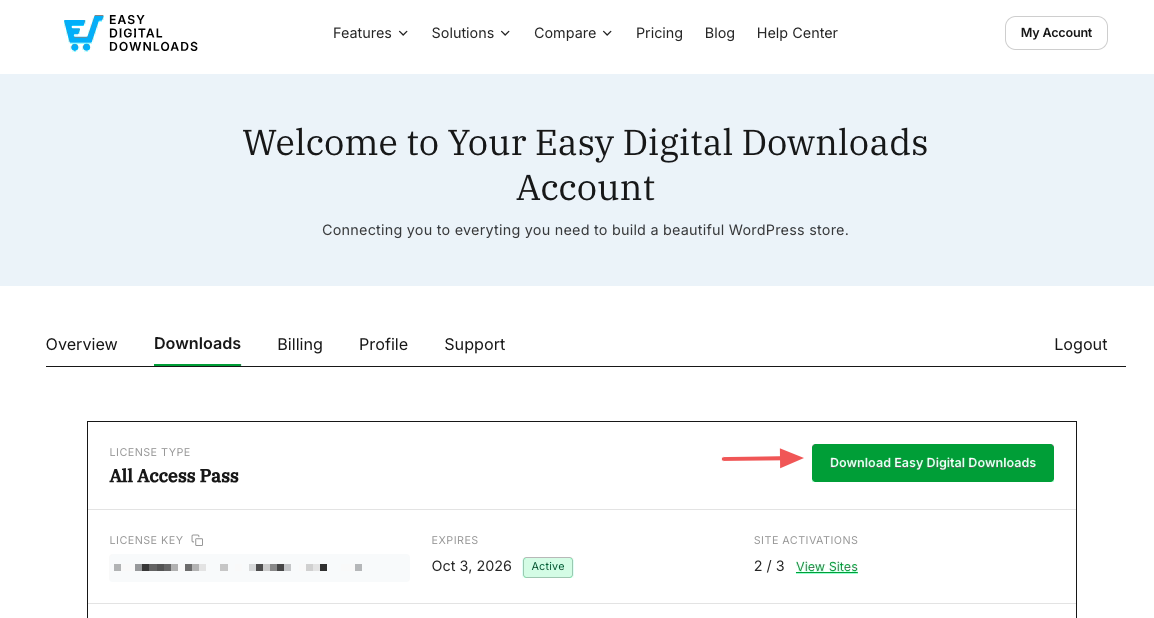
Then from your WordPress site, head to Plugins » Add Plugin » Upload Plugin » Choose File.
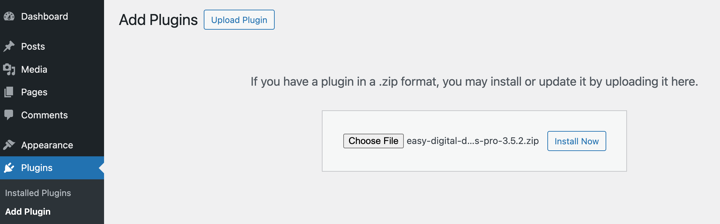
Install and activate the plugin. This gives you the foundation for selling digital products.
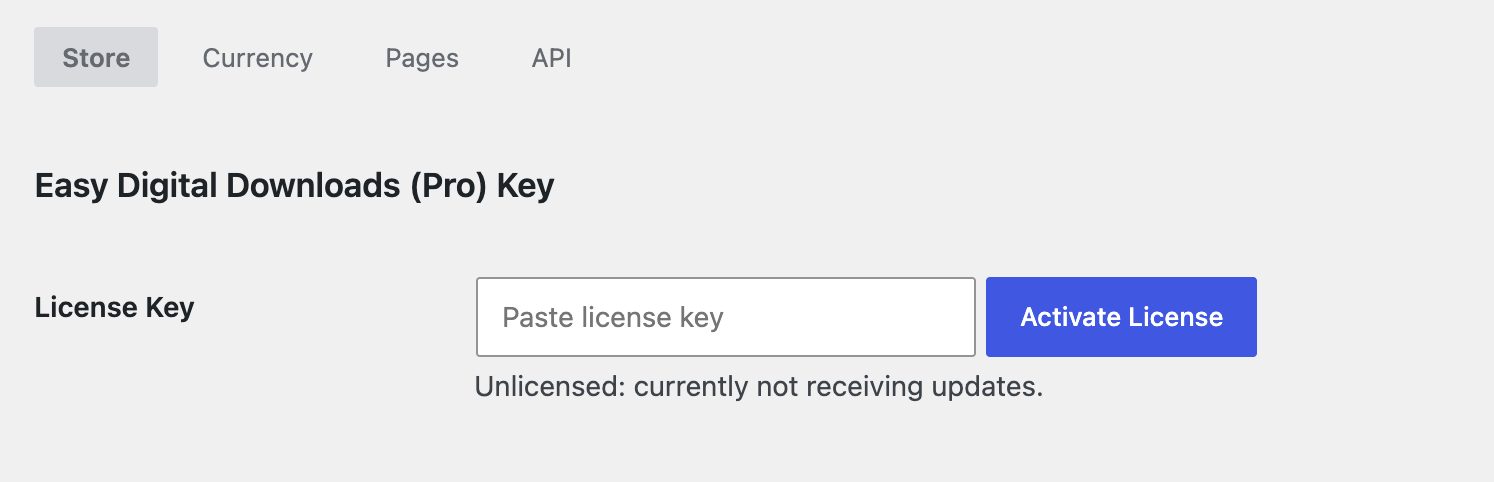
Once activated, you’ll see a new Downloads menu item in your WordPress admin. Under Settings, you can enter your Pro License key.
Run through the setup wizard (Downloads » Setup » Get Started) to configure your store’s basic settings like currency, location, and primary payment gateway.
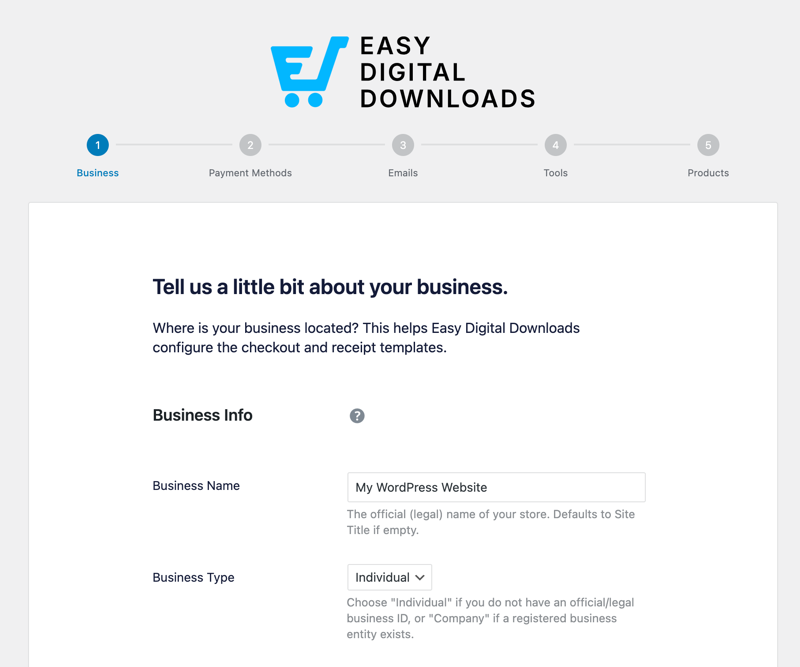
▶️ For details, check out our complete Getting Started Guide.
Step 2. Add the Software Licensing Feature
Now for the magic ingredient: the Software Licensing feature.
Install it on your WordPress site by going Downloads » Extensions. Locate Software Licensing and select Install.
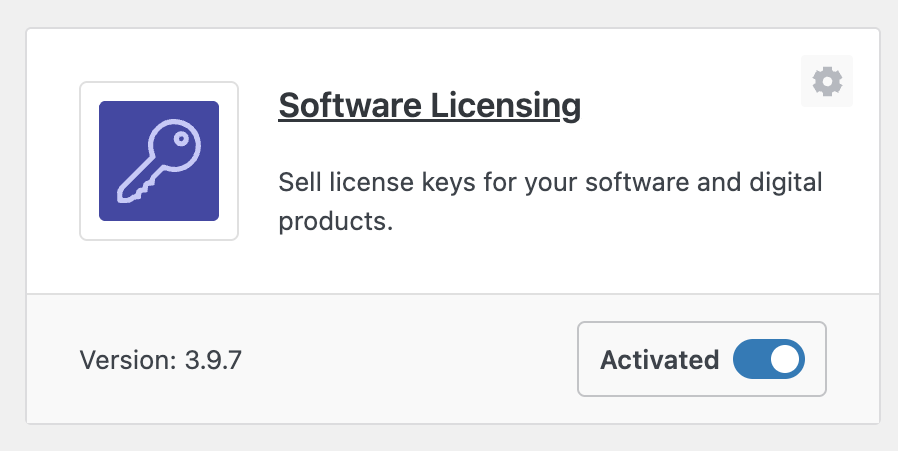
This feature adds powerful licensing capabilities to every product in your store. Each download can have its own licensing settings, so you can sell both licensed software and regular digital products side by side.
Step 3. Add Your Software Product
Time to add your plugin or theme as a product. Go to Downloads » Add Download to create your software listing.
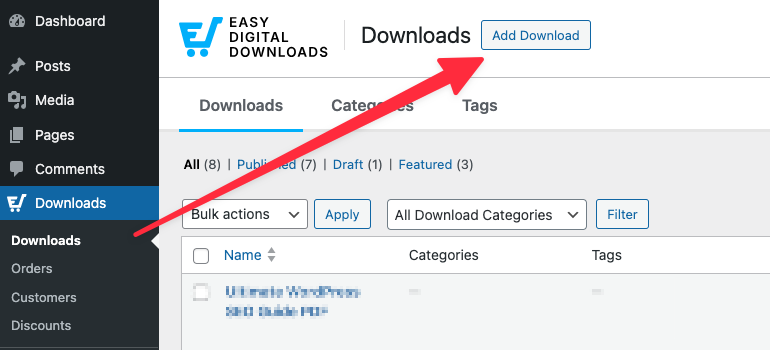
Add a compelling product name and description that explains what your software does.
Under Download Details » Details beneath the editor, you can choose your product type and set your pricing structure. You can enable the options to create price variations and licenses for your product.
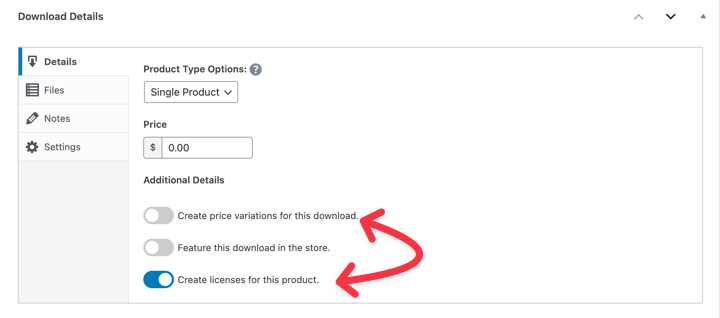
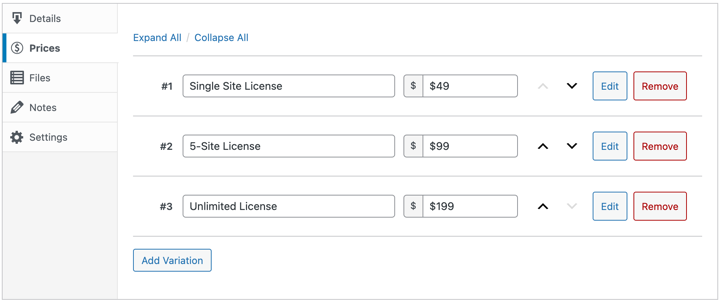
Here’s where Variable Pricing becomes incredibly useful. If you enable this option, a Prices tab appears where you can create different license tiers.
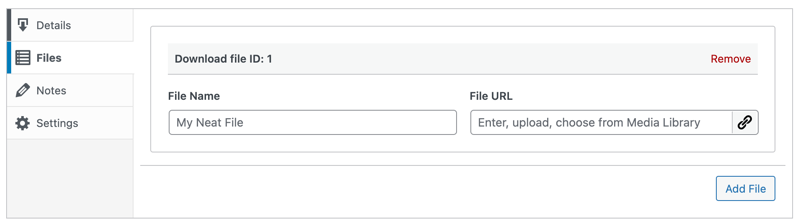
Upload your software file under Files. This should be a .zip file containing your plugin or theme ready for WordPress installation.
The beauty of EDD is how it handles these different pricing tiers automatically. Customers choose their level during checkout, and the system generates appropriate license limits.
Step 4. Configure Software Licensing Settings
Here’s where the real licensing magic happens. Once you enable the Create licenses for this product option, a new Licensing Settings metabox is added to the bottom of your product page.
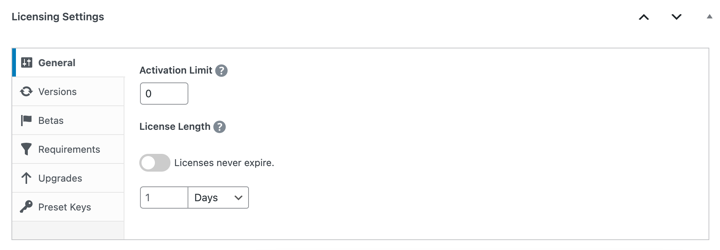
This reveals all the licensing configuration options:
Activation Limit: Set how many sites each license can be used on. For a 5-site license, enter 5. Leave blank for unlimited activations.
License Length: Choose how long licenses remain valid. One year is standard, but you can set any duration or make them lifetime licenses.
Under the Versions tab, you can enter a Version Number. This is critical for automatic updates.
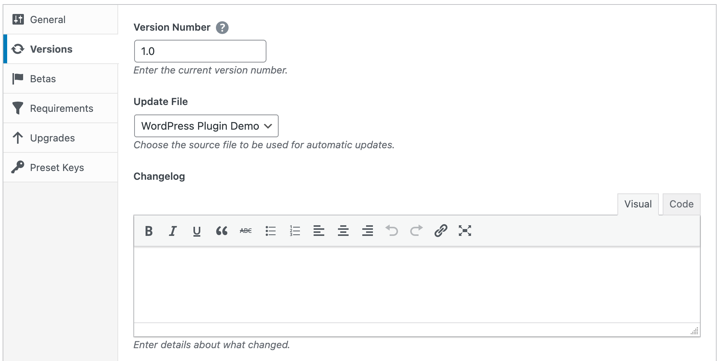
If you’re selling version 1.2.1, enter that exactly. This tells customer sites when updates are available.
In the Changelog section, you can document what’s new in each version. This appears in WordPress update notifications, just like plugins from the repository.
If this is the first version or release of your software, you can leave this blank. But for future releases and iterations, this is a great place to inform users of new features, bug fixes, and so on.
The system automatically generates unique license keys when customers purchase. You don’t need to create keys manually unless you want to use preset custom keys.
This one setting does a lot of work: it’s what lets you offer a cheaper single-site license alongside a pricier multi-site or unlimited tier, without building separate products for each.
⚙️ Learn more about each of the Software Licensing usage instructions.
Step 5. Integrate the Licensing Updater (SDK Method)
Setting up your store is the easy part. Now, you need to tell your plugin or theme how to communicate with that store. This is what allows your customers to receive automatic updates in their WordPress dashboard.
EDD provides a “drop-in” solution called the Software Licensing SDK. It handles all the heavy lifting for you.
First, let’s get the sample code. When you downloaded the Software Licensing feature in Step 2, it included a samples folder within the zip file.
- Locate the Software Licensing zip file on your computer.
- Open the samples directory.
- You’ll see a sample plugin and a sample theme. These contain the SDK files you need.
Next, add the SDK to your project. Copy the SDK files (usually found in the vendor directory of the sample) into your own plugin or theme.
Then add the connection code.
In your main plugin file (or your theme’s functions.php), you need to add a code snippet that registers your product with the SDK.
Add this code to your main file:
add_action( 'edd_sl_sdk_registry', function ( $init ) {
    $init->register(
        array(
            'id'      => 'your-plugin-slug',   // The plugin slug (e.g. 'my-awesome-plugin')
            'url'     => 'https://yoursite.com', // The URL of your website with EDD installed
            'item_id' => 12,                   // The ID of the product in your EDD Downloads list
            'version' => '1.0.0',              // The current version of the product
            'file'    => __FILE__,             // The path to this main plugin file
        )
    );
});

// Load the SDK from your plugin's folder
// Make sure this path matches where you put the SDK files
if ( file_exists( __DIR__ . '/vendor/easy-digital-downloads/edd-sl-sdk/edd-sl-sdk.php' ) ) {
    require_once __DIR__ . '/vendor/easy-digital-downloads/edd-sl-sdk/edd-sl-sdk.php';
}
What do these fields mean?
url: This is your store’s URL (where you installed EDD).item_id: The unique ID number of the Download you created in Step 3.version: This must match the Version Number you set in Step 4.
Once this code is active, your plugin will automatically “ping” your store. If you release version 1.0.1 on your site, customers using 1.0.0 will see a standard WordPress update notification.
Step 6. Test Process to License Software in WordPress
When you’re done, you can click on the Publish button in the top right-hand corner of the screen.
Then you can select View Download to see how it looks from the front-end of your site.
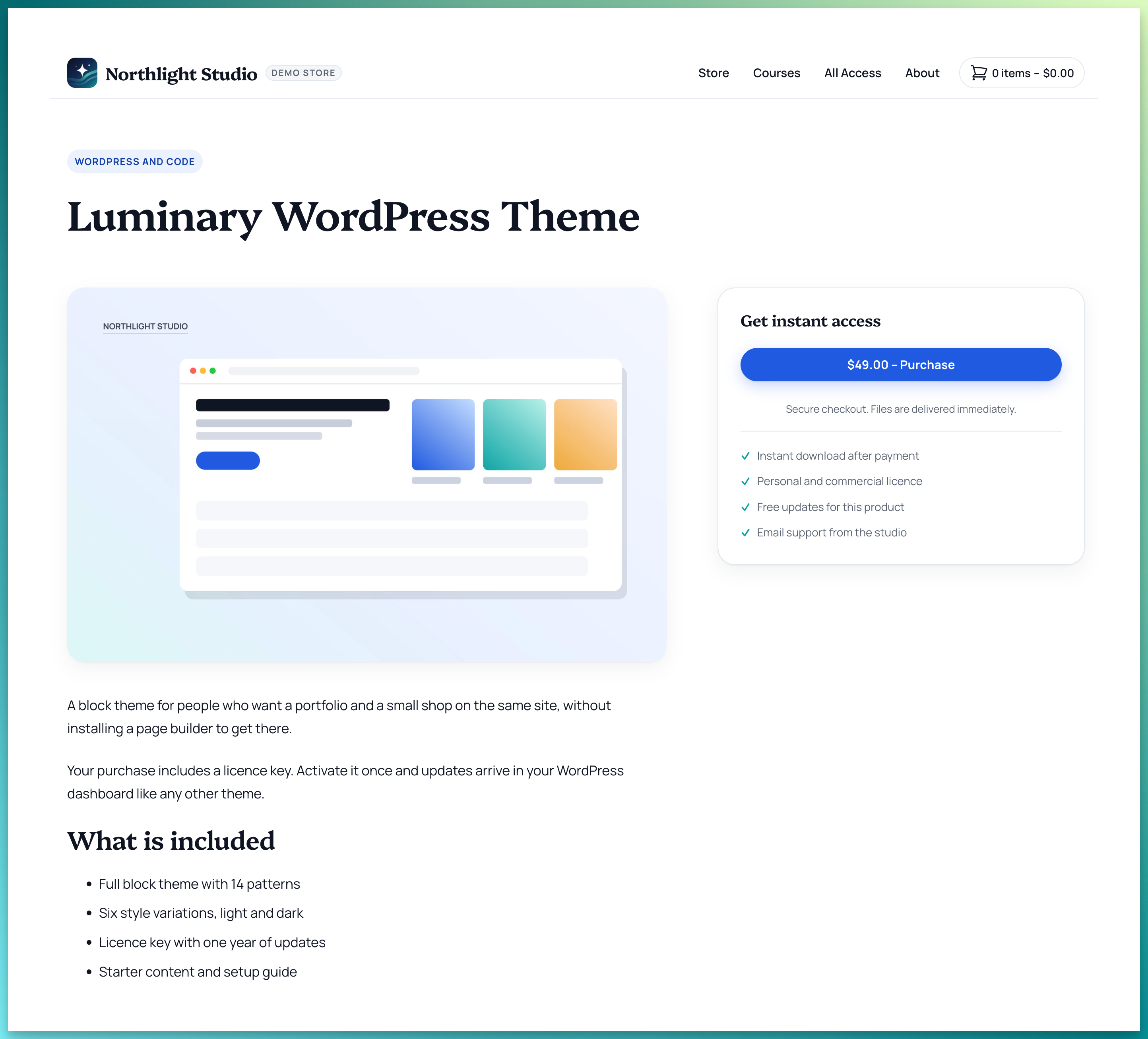
At this point, I also recommend going through a test purchase to verify that the process to purchase and license software works correctly.
You can put your site in test mode by going to Downloads » Settings » Payments. Then select the option to Enable Test Mode.
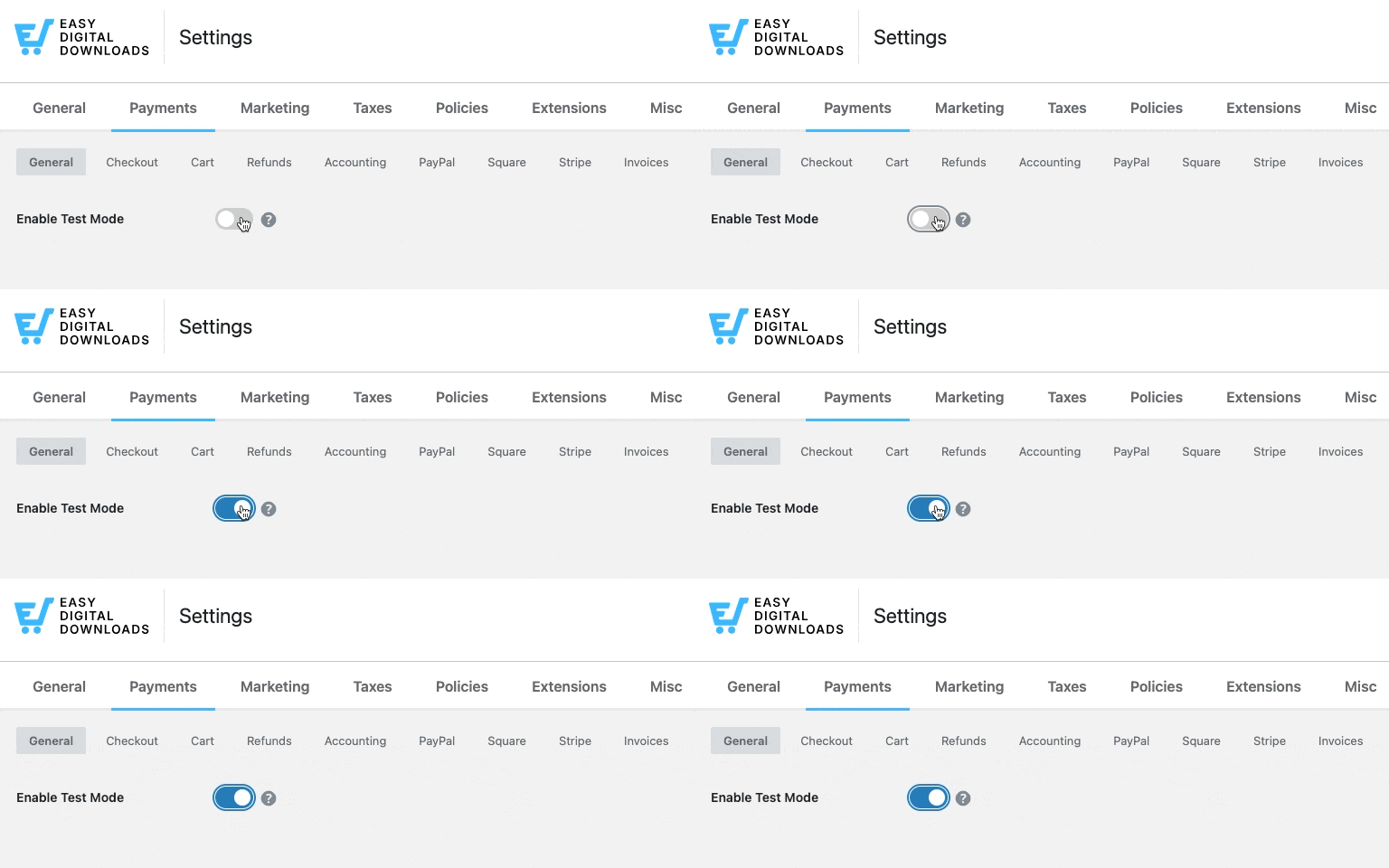
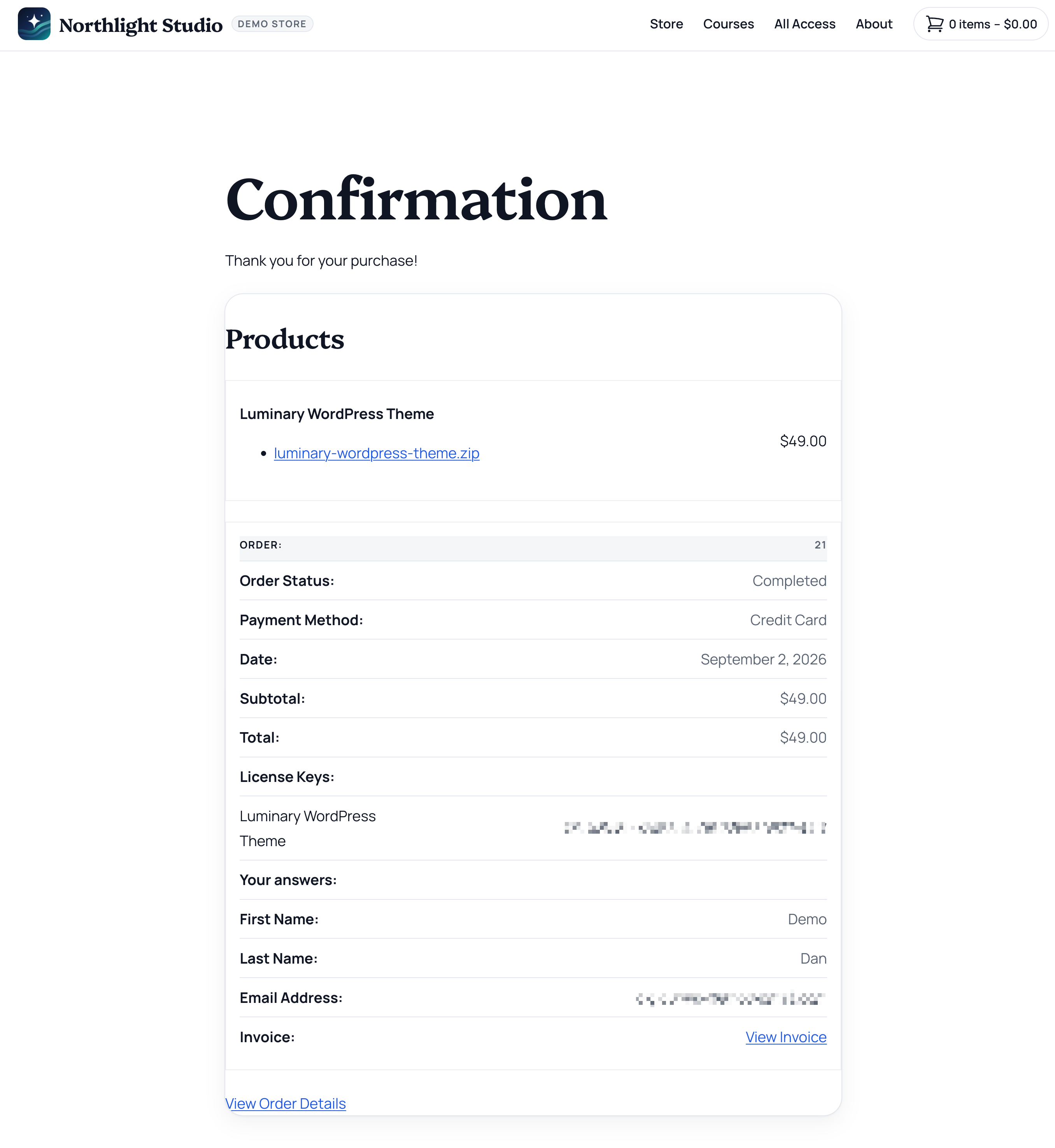
Go through the entire process as if you were a customer. If successful, you should see a confirmation purchase receipt with the details of your software license and order.
Managing Licenses and Renewals
Once customers start purchasing, you’ll need to manage the licensing workflow: ongoing software license management means staying on top of active keys, renewals, and updates.
View and Manage License Keys
Easy Digital Downloads provides smart license key management.
The Downloads » Licenses page gives you complete oversight of all generated licenses.
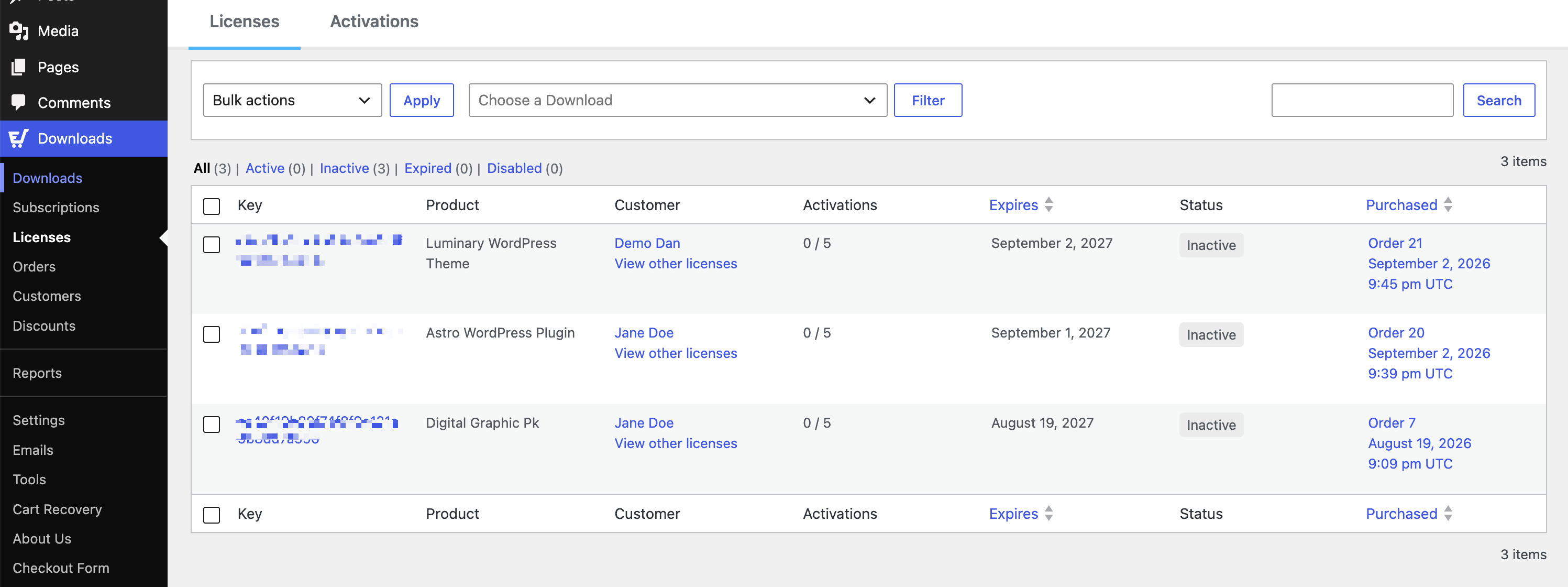
Each key shows:
- Current status (Active, Inactive, Expired, Disabled)
- Activation count and limits
- Customer information
- Expiration dates
- Renewal URLs
You can also find license details on customer and order history pages.
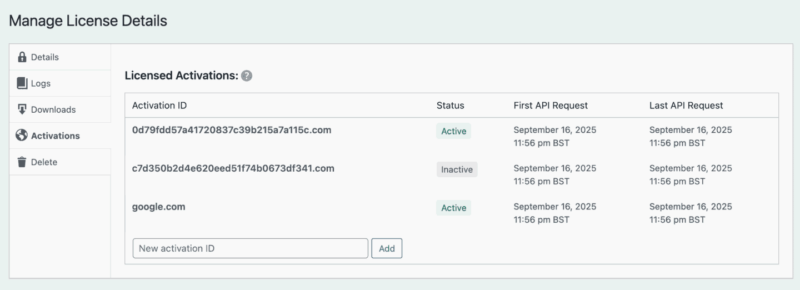
You can manually extend, disable, or delete licenses as needed. The system also tracks activation logs, so you can see exactly where and when each license was used.
Customers can view their licenses on their account page using the EDD license keys shortcode. This shows their keys, renewal options, and upgrade paths all in one place.
Set Up Automated Renewals
The real revenue magic happens when you combine Software Licensing with the Recurring Payments feature.
This creates automatic subscription renewals for continued license access.
Configure renewals under Downloads » Settings » Extensions » Software Licensing.
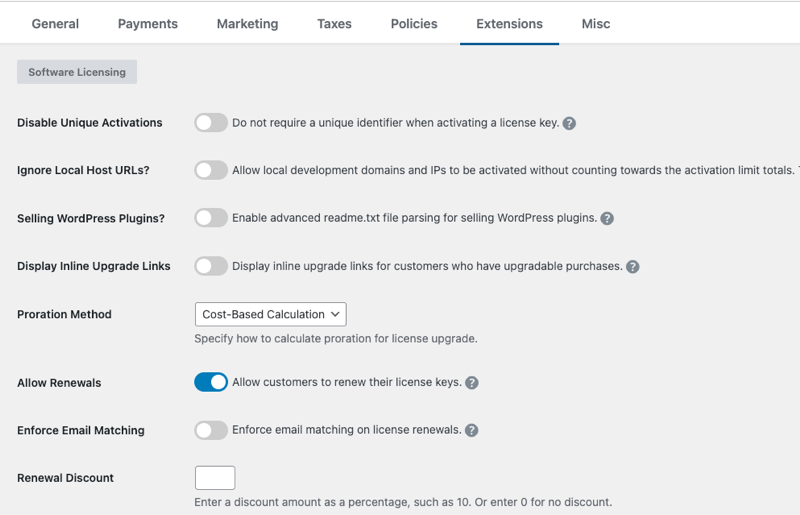
You can set the renewal discount percentage and how many days before expiration to send notices.
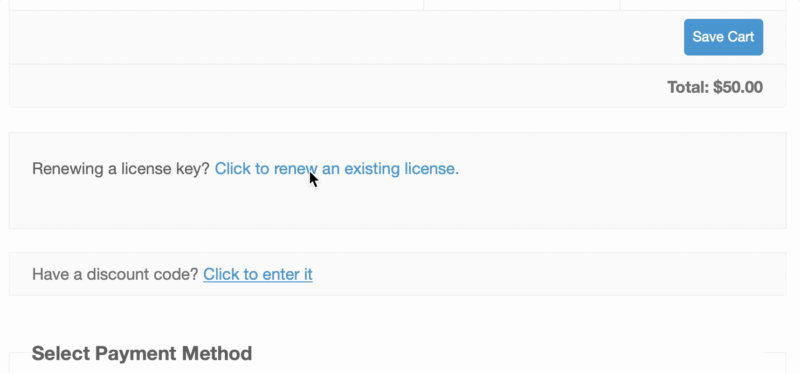
Customers get email reminders with direct links to renew their licenses. The process is streamlined. They click, pay, and their license automatically extends for another term.
How Automatic Updates Work
From your customers’ perspective, the experience is simple. They enter their license key once in your plugin’s settings page. From then on, they see update notifications in their WordPress dashboard just like any other plugin.
When they click Update, WordPress downloads the new version from your store (after validating their license). No manual downloads or file uploads required.
Expired or invalid licenses simply don’t get update notifications. This creates real incentive to keep licenses current.
FAQs on Licensing Software in WordPress
Let’s wrap up by answering some frequently asked questions about how to license software in WordPress using Easy Digital Downloads.
How do I generate license keys in WordPress?
Easy Digital Downloads automatically generates unique license keys when customers purchase software products. Simply enable “Create licenses for this product” in your download’s licensing settings, and the system handles key generation, validation, and management through its built-in API.
Is licensing WordPress plugins legal under GPL?
Yes, you are licensing the access to updates/support, not restricting the code usage.
What happens if a WordPress license key expires?
The software keeps working, but updates and support stop.
Can I automate license renewals for customers?
Yes, combining Easy Digital Downloads’ Software Licensing feature with Recurring Payments enables fully automated license renewals. Customers can set up subscription billing to automatically renew their licenses, and you can send email reminders before expiration with direct renewal links.
Is EDD the best way to sell and license software in WordPress?
Absolutely. The process is simple whether you’re looking to license and sell WordPress themes, plugins, or other types of digital products.
How does this system protect my software from being pirated?
It creates a strong barrier. While no system is 100% foolproof, requiring a valid license for automatic updates and support significantly discourages unauthorized sharing and use.
How is EDD’s Software Licensing feature different from newer tools like FluentCart or SureCart?
EDD has managed software licensing for over a decade, with automatic key generation, activation limits, and update delivery built specifically for digital product sellers. FluentCart and SureCart both added licensing more recently as part of broader ecommerce platforms, so if you’re selling software and nothing else, EDD stays more focused on exactly what you need.
License Software in WordPress Today
You now have the complete road-map for professional software licensing in WordPress. By implementing Easy Digital Downloads with the Software Licensing extension, you can protect your intellectual property, create sustainable recurring revenue, and deliver a professional experience that customers expect.
The combination transforms your software from a one-time sale into a real business with predictable income streams. No more worrying about piracy or manually managing customer access. The system handles everything automatically.
Ready to turn your WordPress software into a legitimate business? Get started with Easy Digital Downloads pass today.
P.S. Be sure to subscribe to our newsletter and follow us on Facebook, Twitter/X, or LinkedIn for more WordPress resources!