

Adding PayPal to your WordPress site sounds simple until you start looking it up. One guide tells you to paste in a button. Another says you need a form plugin. A third points you toward a full ecommerce setup.
They’re all describing real methods. They just solve completely different problems.
This guide sorts it out. You’ll see the three ways to add PayPal to WordPress, which one fits what you’re actually trying to do, and a full walk-through of the method most digital product sellers need.
By the end, your store can take PayPal, cards, Venmo, Apple Pay, and Google Pay without sending customers off to a PayPal login screen.
- Key Takeaways
- The 3 Ways to Add PayPal to WordPress
- Why PayPal Is Worth Adding to Your Checkout
- What You Need Before You Add PayPal
- Why Use Easy Digital Downloads to Add PayPal
- How to Add PayPal to WordPress With Easy Digital Downloads
- What Is PayPal Onsite Checkout?
- How Much Does It Cost to Add PayPal to WordPress?
- FAQs About Adding PayPal to WordPress
- Is it free to add PayPal to WordPress?
- Do I need a PayPal Business account?
- Do I need an SSL certificate?
- Can customers pay by card without a PayPal account?
- Why isn't PayPal guest checkout showing at my checkout?
- Can I add PayPal without a plugin?
- Can I use PayPal for recurring payments?
- Can I remove the Pay Later or Pay in 3 buttons?
- Accept PayPal Payments on Your WordPress Site
Key Takeaways
| What you need | A PayPal Business account, an SSL certificate, and Easy Digital Downloads |
| Plan required | Free (Lite) or any Pro plan |
| Platform fee | None. EDD doesn’t add fees on top of PayPal’s own rate. |
| Setup time | Around 10 minutes |
| Where customers pay | On your own checkout page |
| Ways to pay | PayPal, debit or credit card, Venmo, Apple Pay, Google Pay, Pay Later |
The 3 Ways to Add PayPal to WordPress
There are three ways to add PayPal to WordPress: paste a PayPal button into a page with HTML, use a payment form plugin, or use a WordPress ecommerce plugin. The right choice depends on whether you’re collecting a one-off payment or selling products that need a cart and automatic delivery.
| Method | Best for | Cart and file delivery | Customer stays on your site |
|---|---|---|---|
| PayPal button (HTML) | A single donation or one-off payment | No | No |
| Payment form plugin | Invoices, custom orders, donations | Partial | Yes |
| WordPress ecommerce plugin | Selling products, especially digital ones | Yes | Yes |
Method 1: Add a PayPal button with HTML
PayPal can generate a button for you, and you paste the code into a Custom HTML block on any page or post.
It’s the fastest option, and for a single donation link it’s perfectly reasonable.
What you give up is everything around the payment. There’s no cart, no order history, no customer record, and no automatic file delivery. When someone buys, you find out by email and handle the rest yourself.
Anyone selling more than one thing outgrows this quickly.
Method 2: Use a payment form plugin
If you just need to collect a payment and don’t need a store, a form plugin is the right tool. Think invoices, custom quotes, event fees, or donations.
WPForms handles this well. You build a form, add a PayPal field, and the payment happens inside the form on your site. WPBeginner has a full walk-through of adding a PayPal payment form in WordPress if that’s the path you want.
The limit is the same as before: forms collect money, but they don’t manage products, downloads, or customers.
Method 3: Use a WordPress ecommerce plugin
If you’re selling actual products, a WordPress ecommerce plugin is what you want. This is the WordPress PayPal integration that most sellers are really looking for when they search for a way to add PayPal.
A proper plugin gives you a cart, a checkout page, order records, discount codes, and automatic delivery of whatever the customer bought.
For digital products specifically, that last part matters most. The file needs to reach the buyer the moment the payment clears, with a secure link that isn’t just a public URL anyone can pass around.
The rest of this guide uses this method.
Why PayPal Is Worth Adding to Your Checkout
PayPal is one of the most recognized payment brands in the world, and that recognition pays off at checkout. Buyers who see a familiar option are more likely to finish a purchase instead of abandoning the cart.
According to Digital Commerce 360’s Top 1000 Report, PayPal is accepted by the vast majority of online retailers. That level of adoption signals trust, and trust drives conversions.
Its reputation for security and reliability makes it a strong default for accepting payments on your WordPress website.
There’s a second reason worth knowing. Customers who don’t have a PayPal account can still pay by card through the same connection, so offering PayPal doesn’t narrow your audience. It widens it.
What You Need Before You Add PayPal
Before you connect PayPal to your WordPress site, get these three things in place.
- A PayPal Business account. PayPal requires a Business account to connect with platforms like Easy Digital Downloads. Personal accounts won’t work. You can upgrade an existing account or create a new Business account on PayPal’s website, both free.
- An SSL certificate. PayPal requires your site to run on HTTPS. Most WordPress hosts include a free SSL certificate. If yours doesn’t, add one before you start, because the connection won’t complete without it.
- Easy Digital Downloads installed. The free Lite version includes PayPal support out of the box, so no paid plan is required to get started.
Once those are ready, the connection itself takes a few minutes.
Why Use Easy Digital Downloads to Add PayPal
There are several ways to run WordPress ecommerce with PayPal, but Easy Digital Downloads is built specifically for people selling digital products.
With EDD, you keep more of every sale. PayPal charges its own processing fee, and EDD doesn’t add a platform fee on top of it the way some other plugins do.
One PayPal connection also covers a lot of ground. Your customers can pay with their PayPal balance, a debit or credit card, Venmo, Apple Pay, or Google Pay.
Which options appear depends on your country and your PayPal account eligibility. PayPal decides that, not EDD.
Want the full breakdown of every PayPal payment option EDD supports? See how to add PayPal payment methods in WordPress for a complete walkthrough of Venmo, Apple Pay, Google Pay, and PayPal Fastlane.
How to Add PayPal to WordPress With Easy Digital Downloads
Six steps, start to finish. If you already have Easy Digital Downloads running, skip to Step 2.
Step 1: Install Easy Digital Downloads
Go to Plugins » Add Plugin in your WordPress dashboard and search for “Easy Digital Downloads.”
Click Install Now, then Activate.
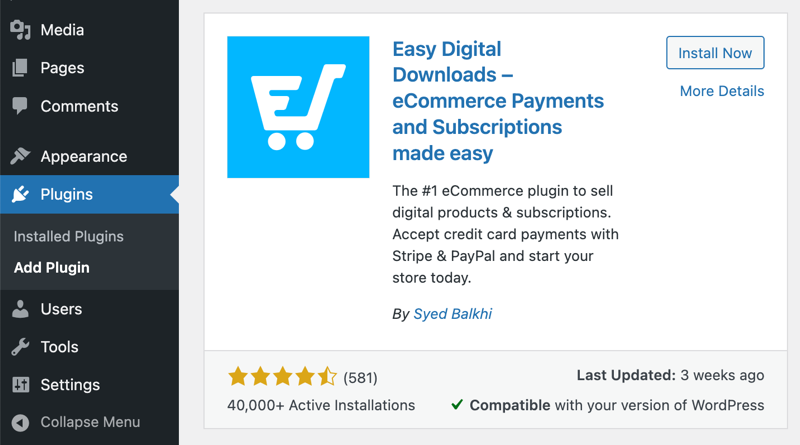
Already have EDD installed? Update it to the latest version before you connect PayPal. The full set of payment methods requires a recent release.
If you want a hand setting up the rest of your store first, our Getting Started Guide covers it.
Step 2: Connect Your PayPal Business Account
Go to Downloads » Settings » Payments » PayPal.
Click Connect with PayPal in live mode. You’ll need to allow browser popups, because PayPal opens its onboarding in a modal window. If nothing appears, check your popup settings and try again.
Log in to your PayPal Business account and follow the prompts to authorize the connection.

Don’t skip the last screen. When PayPal finishes, it shows a button to return to your store. You have to click it. If you close the window instead, the connection won’t finish and you’ll have to start the whole process again.
Step 3: Check Your Connection Status
Back in your EDD settings, find the Connection Status area.
This is where EDD confirms it can actually talk to PayPal. You want to see your API connection, payment status, and webhook all reporting as connected.
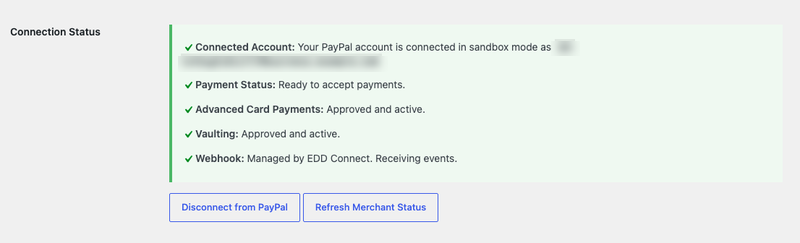
If something shows a warning here, fix it now. A half-finished connection will look fine on the settings page and then fail at checkout.
Step 4: Choose Which Payment Methods to Offer
Under the Payment Methods section, pick which PayPal options to show at checkout.
Depending on your country and account eligibility, that list can include the PayPal wallet, Venmo, Apple Pay, Google Pay, Fastlane, and Pay Later.
Cards get two separate options, and the difference matters. Credit/Debit Cards via PayPal sends card payments through PayPal. Credit/Debit Cards on Checkout puts the card fields on your own checkout page instead.
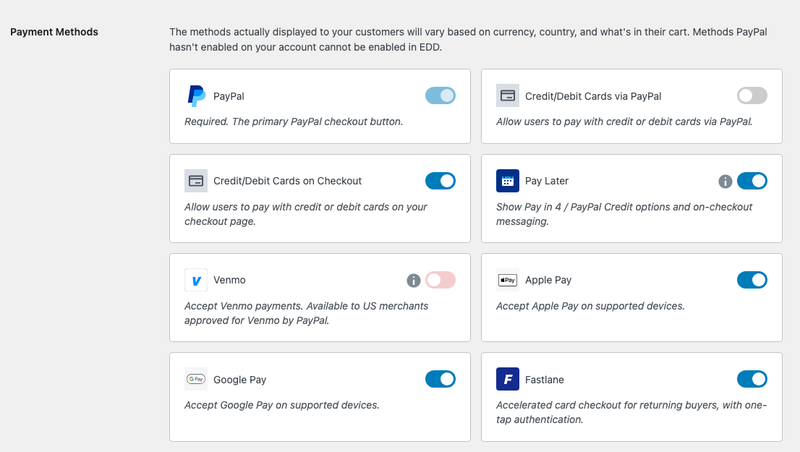
Turn on the ones that make sense for your store and leave the rest off. Pay Later is one toggle that covers the Pay in 4 and PayPal Credit options plus the on-checkout messaging, so switching it off removes all of them together.
Anything PayPal hasn’t approved for your account appears greyed out and can’t be switched on from EDD. Venmo is the common one: it needs US merchant approval from PayPal first.
Already connected to PayPal but don’t see these options? Disconnect and reconnect your account. The disconnect option is on the same settings page.
Select Save Changes when you’re done.
Step 5: Enable PayPal as an Active Gateway
Connecting your account isn’t quite the same as turning PayPal on. Go to Downloads » Settings » Payments » General.
Toggle PayPal under Active Gateways.
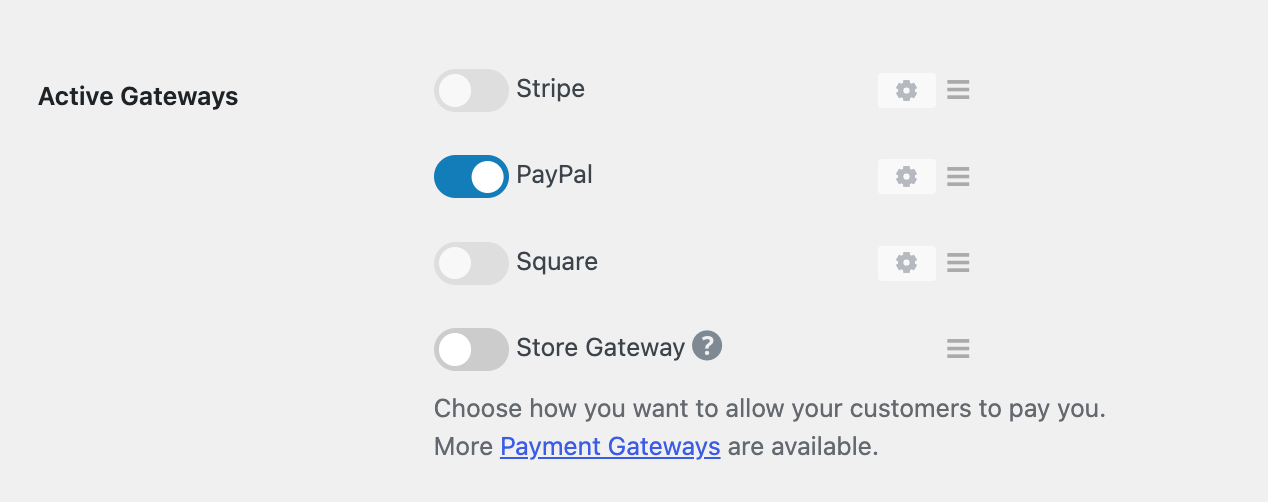
If you want PayPal to be the option customers see first, select it under Default Gateway too.
You’ll also find a Payment Method Icons setting here. Worth knowing what it does: it controls which card logos display on your checkout page, and nothing else. Ticking a card icon doesn’t enable processing for that card type, which is handled by your gateway. See the payment settings documentation for the full list of options on this screen.
Select Save Changes.
Step 6: Test Your Checkout and Switch to Live Mode
Before real money moves, run a test purchase. You’ll need at least one product in your store to do it.
Go to Downloads » Settings » Payments » General and turn on Enable Test Mode.
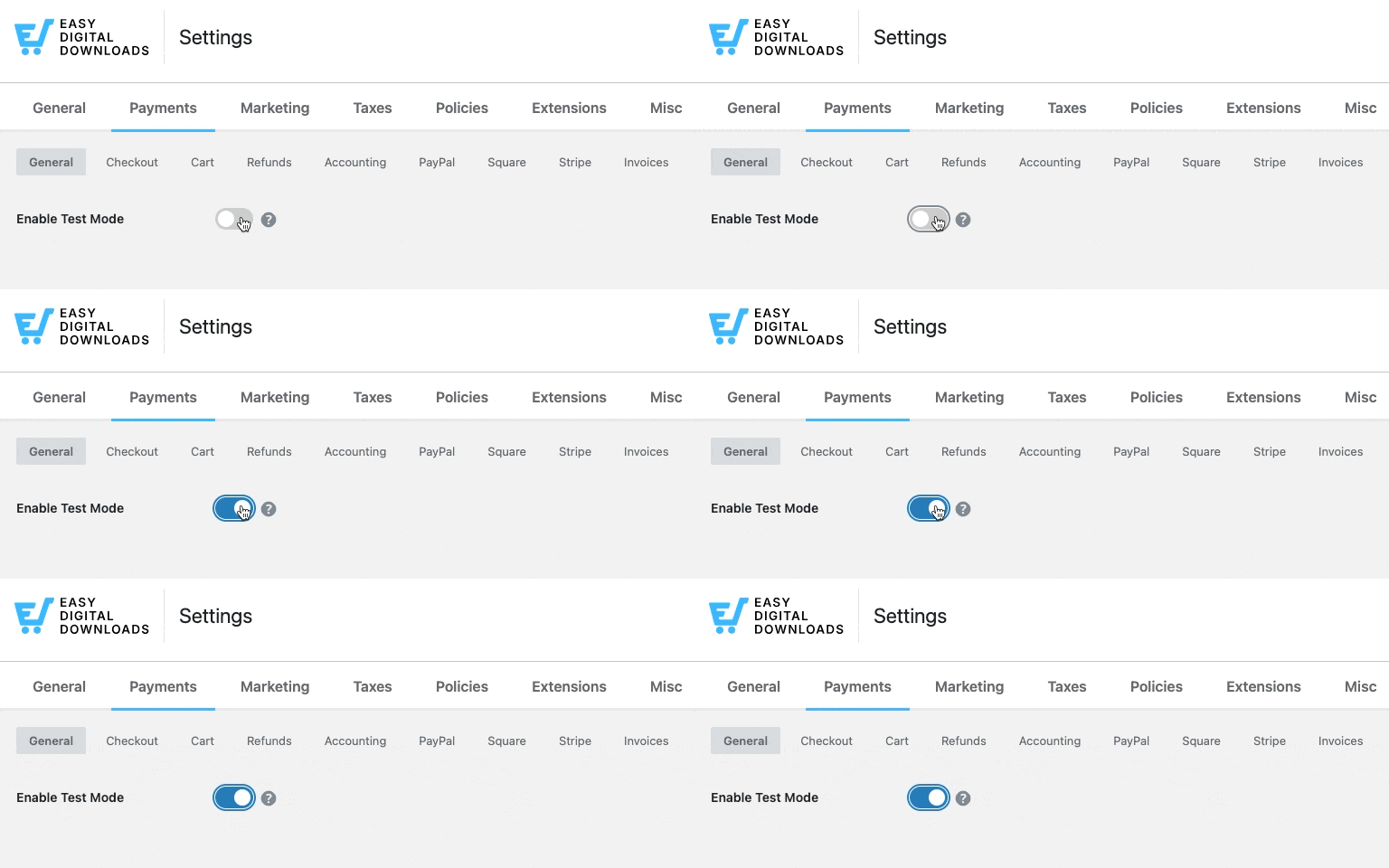
Add a product to the cart, go through checkout, and choose PayPal. Confirm that the confirmation page loads and that the receipt email arrives with a working download link.
When you’re satisfied, switch over properly. Under the General tab, disable Test Mode. Then go back to the PayPal tab and select Connect with PayPal in live mode.
That second part catches people out. Test mode uses sandbox credentials, so live mode needs its own connection to your real Business account.
For sandbox accounts and the rest of the configuration options, see the EDD PayPal setup documentation.
What Is PayPal Onsite Checkout?
What “PayPal Onsite” actually means
PayPal Onsite checkout means the customer completes payment on your own website instead of being sent to PayPal’s site to log in and pay. The payment fields and PayPal buttons appear inside your checkout page, so the buyer never loses sight of your store.
The older approach worked differently. A basic PayPal button handed the customer off to PayPal, then hoped they found their way back. Every one of those hand-offs is a chance to lose the sale.
What your customers see at checkout
Your checkout form ends with PayPal’s smart buttons rather than one generic purchase button, and the methods you switched on sit right alongside them.
Exactly which buttons appear depends on the shopper. Their device, browser, and country all factor in, along with what’s in the cart, so not every visitor sees the same set. A desktop buyer might get PayPal, Pay Later, and Google Pay. On a phone that often means Venmo, and Apple Pay turns up for buyers on Apple devices.
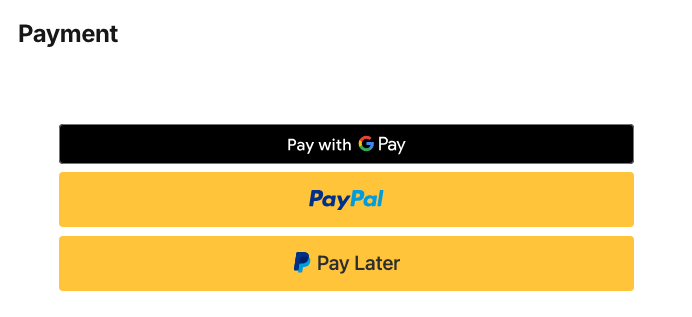
Customers pick what they prefer without leaving the page. If you want more control over how those choices are presented, see how to let customers choose a payment method in WordPress.
Does the customer leave your site to pay?
No. Customers stay on your checkout page throughout. Choosing PayPal opens a “Pay with PayPal” modal over your page rather than redirecting to PayPal’s website, and card details are entered in fields on your own checkout.
PayPal still processes the transaction on its own secure servers, which is exactly what you want, since it means the sensitive card data never touches your site. What’s changed is the experience. Your customer isn’t bounced away and back.
How Much Does It Cost to Add PayPal to WordPress?
Adding PayPal through EDD costs nothing beyond PayPal’s own processing fee. Easy Digital Downloads doesn’t add a platform fee on top.
PayPal’s standard rate in the US is currently around 2.99% plus $0.49 per transaction, though it varies by country and account type. Check PayPal’s pricing page for current rates.
One thing to know: the free EDD Lite plan applies a 3% per-transaction fee on PayPal payments. Upgrading to EDD Pro removes it, which adds up as your sales grow.
FAQs About Adding PayPal to WordPress
A few questions come up often when people set this up for the first time.
Is it free to add PayPal to WordPress?
Yes. You can add PayPal using the free EDD Lite plugin. PayPal’s own processing fee applies, around 2.99% plus $0.49 per transaction in the US, and EDD Lite adds a 3% per-transaction fee that a Pro plan removes. EDD doesn’t charge a platform fee on top of PayPal’s rate.
Do I need a PayPal Business account?
Yes. PayPal requires a Business account to connect with platforms like Easy Digital Downloads, and Personal accounts aren’t supported. You can upgrade an existing PayPal account to Business for free on PayPal’s website, or create a separate Business account and keep your personal one as it is.
Do I need an SSL certificate?
Yes. PayPal requires your site to run on HTTPS. Most WordPress hosts include a free SSL certificate, so check with yours if you’re not sure whether it’s active. The PayPal connection won’t complete on a site without it.
Can customers pay by card without a PayPal account?
Yes. When you connect PayPal through EDD, card fields appear at checkout alongside the PayPal button, so buyers without a PayPal account can still pay. Turn on Credit/Debit Cards on Checkout in your Payment Methods settings to put those fields on your own checkout page.
Why isn’t PayPal guest checkout showing at my checkout?
Guest card payments are controlled by a setting in your PayPal account called PayPal Account Optional, not by EDD. In PayPal, go to Account Settings, then Website payments, click Update beside Website preferences, and set PayPal account optional to On.
Can I add PayPal without a plugin?
Technically yes. PayPal offers a basic button you can embed with HTML. Without a plugin you get no cart, no order management, no automatic file delivery, and no purchase history. For anything past a single donation button, a plugin is the practical choice.
Can I use PayPal for recurring payments?
Yes. Easy Digital Downloads supports recurring PayPal payments through our Recurring Payments feature, available on paid plans. Use it to sell subscriptions, memberships, or any product billed on a schedule, whether that’s weekly, monthly, or annually.
Accept PayPal Payments on Your WordPress Site
Adding PayPal to WordPress is one of the quickest wins available to a new store. Pick the method that matches what you’re selling, and if that’s digital products, Easy Digital Downloads gets you from installed to accepting payments in about ten minutes.
No platform fees or handing customers off to another website to pay. Your store can be taking PayPal payments today.
📣 P.S. Be sure to subscribe to our newsletter and follow us on Facebook, Twitter/X, or LinkedIn for more WordPress resources!