

When a customer clicks Buy on your online store, a lot happens before their payment goes through. Their card details travel securely from your checkout to their bank and back, all in a matter of seconds.
That journey runs through a payment gateway.
Most online store owners use one every day without fully understanding what it does. This guide covers what a payment gateway is, how it actually works, what it costs, and which one makes the most sense for your store.
- Key Takeaways
- What Is a Payment Gateway?
- How Does a Payment Gateway Work?
- Payment Gateway vs. Payment Processor vs. Merchant Account
- How Much Does a Payment Gateway Cost?
- Types of Payment Gateways
- How to Choose a Payment Gateway for Your WordPress Store
- FAQs About Payment Gateways for WordPress
- Do I need a payment gateway for my WordPress site?
- What's the difference between a payment gateway and a payment processor?
- Is a payment gateway secure?
- What happens if a payment gateway declines a transaction?
- Can I use more than one payment gateway in WordPress?
- What is a hosted payment gateway?
- Do payment gateways work for selling digital products?
- Start Accepting Payments on Your WordPress Store
Key Takeaways
- Secure data transfer. A payment gateway encrypts and transmits your customer’s payment data between your store, the payment processor, and their bank.
- Required for online sales. Without a payment gateway, you can’t accept online payments on your WordPress site.
- One provider does it all. For most WordPress sellers, Stripe combines the gateway, processor, and merchant account in a single account with no monthly fees.
What Is a Payment Gateway?
A payment gateway is a technology that securely captures and transmits your customer’s payment information between your online store and their bank.
It encrypts the data, sends it to the payment processor for authorization, and returns an approval or decline — all in a few seconds.
Think of it as a secure courier. Your customer hands their payment details to your store, the gateway picks them up, verifies everything is safe, and delivers the authorization response back to your checkout.
Every online store needs one. Without a payment gateway, there’s no secure way to accept card payments on your site.
How Does a Payment Gateway Work?
The whole process feels instant to your customer, but there are several steps happening behind the scenes.
Here’s how a typical transaction works:
- Customer enters payment details at your checkout.
- Your store sends the data to the payment gateway, encrypted so it can’t be intercepted.
- The gateway forwards the data to the payment processor, the service that moves money between banks.
- The processor contacts the customer’s bank to request authorization.
- The bank approves or declines based on available funds and fraud checks.
- The approval or decline is sent back through the processor to the gateway.
- The gateway relays the response to your store. The customer sees “Payment approved” and the order completes.
- The processor settles the transaction. Funds transfer from your customer’s bank to your account, typically within 1 to 2 business days.
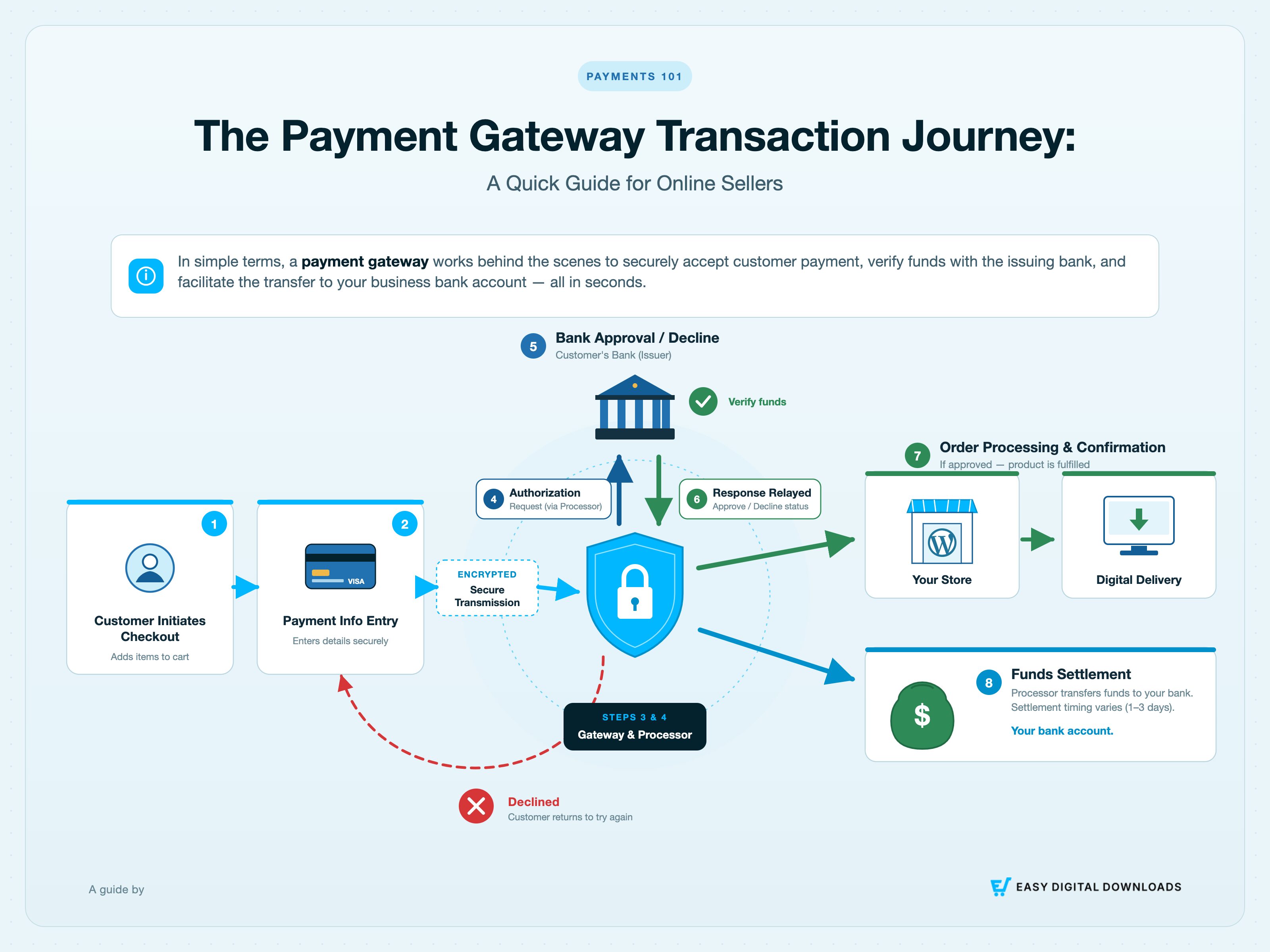
This entire sequence takes 2-3 seconds. Modern gateways like Stripe also run their own fraud screening between steps 3 and 4, flagging suspicious transactions before they reach the bank.
Payment Gateway vs. Payment Processor vs. Merchant Account
These three terms come up together constantly, and the differences matter.
| Term | What It Does | Do You Need It Separately? |
|---|---|---|
| Payment gateway | Captures and encrypts payment data | No; built into Stripe and PayPal |
| Payment processor | Moves the money between banks | No; built into Stripe and PayPal |
| Merchant account | Holds funds before they reach your bank | No; not needed with Stripe or PayPal |
In the past, these were three separate services you had to sign up for independently. Today, platforms like Stripe and PayPal combine all three into one account.
For most WordPress digital sellers, you don’t need to think about them separately. You choose one provider, connect it to your store, and you’re ready to accept payments.
A separate merchant account is only worth considering if you’re processing very high sales volume (typically over $100,000/month) and want to negotiate lower per-transaction rates directly with a bank.
How Much Does a Payment Gateway Cost?
Most payment gateways charge a percentage fee per transaction, typically between 2.9% and 3.5%, plus a small flat fee per charge. There are no setup fees or monthly costs for the two gateways most WordPress sellers use.
| Gateway | Per-Transaction Fee | Monthly Fee | Setup Fee |
|---|---|---|---|
| Stripe | 2.9% + 30¢ | None | None |
| PayPal | 3.49% + 49¢ | None | None |
Easy Digital Downloads (EDD) doesn’t charge any additional platform fees on top of these. Every sale you make, you keep everything after the processor’s cut.
That’s a meaningful difference from marketplace platforms. Gumroad takes an additional 10% + $0.50 per sale. Etsy charges a 6.5% transaction fee on top of payment processing. Envato now
On your own WordPress store with EDD, those fees stay in your pocket.
Watch for these extra costs:
- Currency conversion fees: Stripe charges 1% for international transactions in a different currency.
- Chargeback fees: Typically $15 per dispute, regardless of outcome.
- Premium features: Stripe’s Radar fraud protection advanced tools, invoicing, and subscription management tools may carry add-on costs at higher usage levels.
🔎 Learn more about Ecommerce Website Cost Breakdown.
Types of Payment Gateways
Not all payment gateways work the same way. There are three main types, and the differences affect your checkout experience and how much technical setup you’ll need.
Hosted Payment Gateways
A hosted gateway redirects your customer to an external page to complete payment. PayPal Standard works this way. The customer leaves your site, pays on PayPal’s platform, and is redirected back when done.
Hosted gateways are the easiest to set up because the payment provider handles everything. The tradeoff is less control over the checkout experience, and the redirect can reduce conversions.
For a step-by-step walkthrough, see how to connect PayPal Commerce to WordPress.
Integrated (On-Site) Payment Gateways
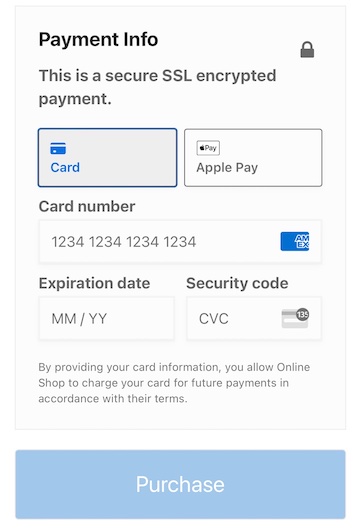
An integrated gateway keeps the customer on your site throughout checkout. Stripe works this way. Payment details are entered directly on your checkout page, processed securely in the background.
This is the better experience for your customers. No redirects, no leaving your site. For most WordPress sellers, an integrated gateway like Stripe is the right choice.
For tips on reducing checkout friction even further, see our guide on frictionless checkouts with Stripe.
API/Self-Hosted Gateways
A self-hosted gateway gives you full control over the payment flow by connecting directly via API. It’s the most customizable option, but it also means you take on full responsibility for PCI DSS compliance.
This option is only worth considering if you have a development team and a specific reason to need that level of control. For most sellers, it’s overkill.
Digital Wallets and Express Checkout
Apple Pay, Google Pay, and Buy Now Pay Later options like Klarna and Afterpay aren’t payment gateways themselves, but they run through the same gateway infrastructure. If your gateway supports them, your customers can use them at checkout.
For mobile shoppers especially, one-tap payment options make a real difference. Entering card details on a small screen adds friction. Apple Pay and Google Pay skip that step entirely.
Easy Digital Downloads with Stripe supports Apple Pay and Google Pay natively through the Stripe Payment Element. No extra setup is required beyond enabling Stripe on your store.
How to Choose a Payment Gateway for Your WordPress Store
Most sellers overthink this decision. For a WordPress digital product store, it comes down to three practical questions.
Does It Work With Your WordPress Plugin?
Start here. Your payment gateway needs to integrate directly with your eCommerce plugin.
Easy Digital Downloads natively supports Stripe and PayPal. Both connect in a few clicks from Downloads » Settings » Payments with no custom code required.
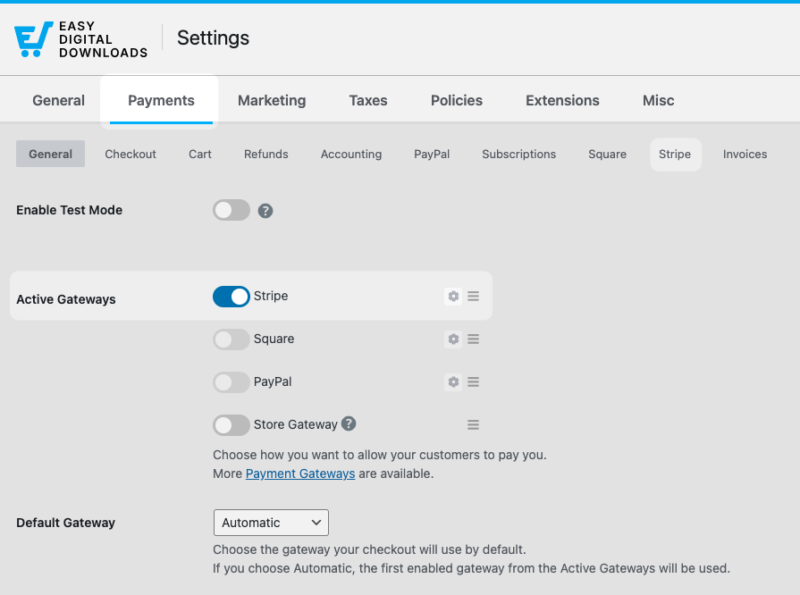
Once you’re connected, you can start selling digital downloads with Stripe right away. EDD’s optimized checkout handles the full payment flow with no extra configuration needed.
If you’re on WooCommerce, check WooCommerce Payments or its Stripe feature. Other plugins have their own list of supported gateways, usually found in their documentation.
Does It Support Your Customers’ Location?
If you’re selling internationally, coverage matters.
Stripe supports 135+ currencies and works in 46+ countries. PayPal works in 200+ countries and markets.
For most sellers just starting out, Stripe is the better default because of its stronger developer tools and simpler fee structure. PayPal is worth adding as a second option for customers who prefer to pay that way.
What Are the Fee Tradeoffs?
As covered in the pricing section, Stripe and PayPal both operate on a pay-per-transaction model with no monthly costs. For a new store, that’s ideal. You only pay when you make a sale.
As your volume grows, the per-transaction percentage becomes more significant. At that point it’s worth comparing whether a gateway with a small monthly fee and lower per-transaction rate would save you money overall.
⭐️ Quick recommendation:
- Best for high-volume or enterprise stores: Authorize.net
- Best for most WordPress sellers: Stripe
- Best if your customers prefer PayPal: PayPal
FAQs About Payment Gateways for WordPress
Let’s wrap up with some frequently asked questions about choosing a payment gateway for WordPress.
Do I need a payment gateway for my WordPress site?
Yes, if you want to accept online payments. WordPress doesn’t include payment processing on its own. You need an ecommerce plugin (like Easy Digital Downloads or WooCommerce) and a payment gateway connected to it. Without both, you can’t securely accept card payments on your site.
What’s the difference between a payment gateway and a payment processor?
A payment gateway captures and encrypts your customer’s payment data and sends it securely to the payment processor. The processor then moves the money between your customer’s bank and your account. With modern providers like Stripe and PayPal, both functions are handled by the same platform, so you don’t need to sign up for them separately.
Is a payment gateway secure?
Yes. Payment gateways use SSL/TLS encryption to protect data in transit and are required to comply with PCI DSS (Payment Card Industry Data Security Standard), a global standard for handling card information. Stripe and PayPal both maintain the highest level of PCI compliance (Level 1), which means your customers’ payment details are never stored on your server.
What happens if a payment gateway declines a transaction?
The gateway relays the decline back to your checkout and your customer sees an error message. Common reasons include insufficient funds, an incorrect card number, or a fraud flag. The customer can try a different card or payment method. No money changes hands when a transaction is declined.
Can I use more than one payment gateway in WordPress?
Yes. Easy Digital Downloads lets you enable multiple payment gateways at once. Many sellers offer both Stripe and PayPal at checkout so customers can choose their preferred method. Adding a second gateway takes a few minutes and can meaningfully increase your checkout completion rate.
What is a hosted payment gateway?
A hosted payment gateway redirects your customer to an external page (hosted by the payment provider) to complete their purchase. PayPal Standard is a common example. Once payment is complete, the customer is redirected back to your site. Hosted gateways are easy to set up but can reduce conversions because of the redirect.
Do payment gateways work for selling digital products?
Yes, and they work particularly well for digital products. Because there’s no physical shipment, the entire transaction from purchase to delivery is instant. A customer pays through the gateway, the payment is authorized, and your ecommerce plugin automatically delivers the download link. Easy Digital Downloads handles this flow natively with Stripe and PayPal.
Start Accepting Payments on Your WordPress Store
A payment gateway is the infrastructure behind every sale you make online. For WordPress sellers, the good news is that setting one up is straightforward.
Stripe handles the gateway, processor, and merchant account in one account. It connects directly to Easy Digital Downloads with no code required, charges no monthly fees, and supports customers in 135+ currencies.
Ready to get started?
Want to learn more about checkout optimization? Learn how to sell products in multiple currencies.
📣 P.S. Be sure to subscribe to our newsletter and follow us on Facebook, Twitter/X, or LinkedIn for more WordPress resources!