


Subscription revenue is one of the most reliable ways to build a sustainable online business. Instead of chasing one-time sales, you earn predictable income on a set schedule. Your customers pay automatically, and you can plan ahead with confidence.
The catch? WordPress doesn’t handle subscriptions on its own. To sell subscriptions with WordPress, you need a plugin to manage recurring billing, automatic renewals, and customer notifications.
The good news: there are several strong options, and the right one depends on what you’re selling. This guide walks you through how to sell subscriptions with WordPress, helps you choose the right plugin for your situation, and takes you through a complete setup step by step.
Key Takeaways
Plugin required: WordPress doesn’t process recurring payments natively. You need a subscription plugin to handle billing and renewals.
Match your tool to your product: The best plugin depends on whether you’re selling digital files, physical goods, or gating a membership community.
Best for digital sellers: Easy Digital Downloads (EDD) is purpose-built for digital product creators and handles subscriptions, file delivery, and licensing in one place.
Let’s dive in!
- What Does It Mean to Sell Subscriptions on WordPress?
- Subscriptions vs. Memberships: What's the Difference?
- What Can You Sell With WordPress Subscriptions?
- The Best WordPress Subscription Plugins [Comparison]
- How to Sell Subscriptions With WordPress Using EDD
- Managing Subscriptions and Reducing Churn
- FAQs About Selling Subscriptions With WordPress
- Does WordPress have built-in subscription functionality?
- What's the best WordPress plugin for selling subscriptions?
- What's the difference between a subscription and a membership in WordPress?
- Can I offer a free trial with my WordPress subscriptions?
- How much does it cost to sell subscriptions on WordPress?
- What payment gateways support recurring payments in WordPress?
- Can I sell multiple subscription tiers on one product in EDD?
- Sell Subscriptions With WordPress and Earn Recurring Revenue
What Does It Mean to Sell Subscriptions on WordPress?
Selling subscriptions on WordPress means using a plugin to charge customers on a recurring schedule: monthly, annually, or another interval you set. The plugin handles billing automatically.
It charges the customer, sends a receipt, renews the subscription at the next cycle, retries failed payments, and notifies the customer when something changes. You set it up once, and it runs in the background.
WordPress itself doesn’t come with any of this built in. Out of the box, it’s a content management system. To accept any kind of payment, you need an ecommerce plugin. For subscriptions specifically, you need a plugin that also handles recurring billing logic.
The result is a store where customers sign up once and continue to receive access to your product or service for as long as their subscription stays active.
Subscriptions vs. Memberships: What’s the Difference?
These two terms get mixed up constantly, but they describe different things. Understanding the distinction helps you choose the right plugin from the start.
What Is a WordPress Subscription?
A subscription is about billing. When a customer buys a subscription, they agree to be charged on a recurring schedule: monthly, quarterly, or annually. The product gets delivered when they pay and renewed when their billing cycle renews.
Think of it like a software license that auto-renews each year. You pay, you get access, and it continues as long as you keep paying.
What Is a WordPress Membership?
A membership is about access control. A membership plugin restricts who can see certain pages, posts, downloads, or content areas on your site. Members log in and see things that non-members can’t.
Think of it like a members-only content library. Your login credentials get you in. Whether you paid monthly or annually is a separate question.
Do You Need Both?
It depends on what you’re building.
If you’re selling a digital file on a recurring basis, a subscription plugin handles it. If you’re building a gated community or content portal where access to multiple areas of your site is tied to a paid plan, you may need a subscription plugin for billing and a membership plugin for access control.
Easy Digital Downloads handles both for digital product sellers in a single plugin, which is one reason it’s a go-to choice for creators and developers.
What Can You Sell With WordPress Subscriptions?
Subscriptions work for any product or service where ongoing access or recurring delivery makes sense. Here are some of the most common use cases:
- Software and plugin licenses with annual renewal
- Digital asset libraries (photos, icons, fonts, templates)
- Premium newsletters or curated content feeds
- Online courses or training portals with drip content
- Music, audio, or video content libraries
- Coaching or consulting access with monthly retainers
- Ebook or document collections that grow over time
- Membership communities with gated forums or resources
The plugin you choose should fit your use case. If you’re delivering files and licenses, you need something purpose-built for digital products. If you’re running a community site with restricted pages and posts, a membership-focused plugin makes more sense.
The Best WordPress Subscription Plugins [Comparison]
No single plugin is the right choice for every situation. Here’s a quick comparison of the most widely used options:
| Plugin | Best For | Starting Price | Free Version? |
|---|---|---|---|
| Easy Digital Downloads | Digital products and downloads | $99.50/yr | Yes (basic) |
| WooCommerce Subscriptions | Physical and mixed-product stores | $279/yr | No |
| MemberPress | Membership sites with gated content | $179/yr | No |
| Paid Memberships Pro | Multi-tier membership communities | Free / $297/yr | Yes |
Easy Digital Downloads (Best for Digital Products) 🏆
Easy Digital Downloads (EDD) is purpose-built for people selling digital goods: software, ebooks, templates, music, fonts, and more.
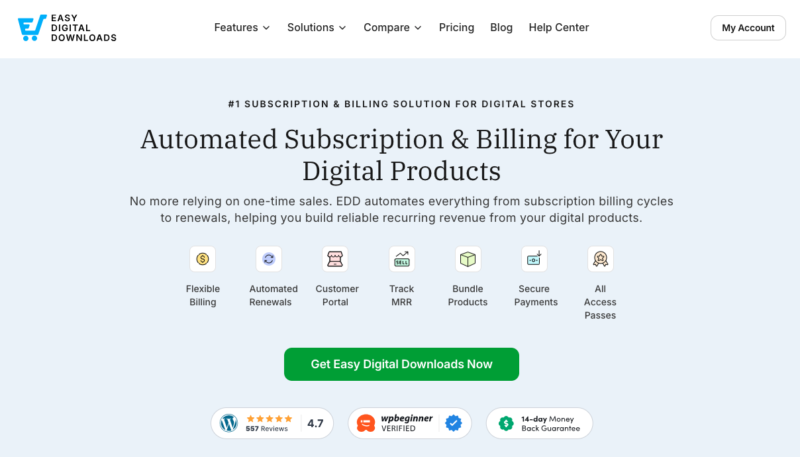
It handles subscriptions, recurring billing, file delivery, and software licensing in one place, with no platform commission fees. You only pay standard payment processor fees.
If your business is built around digital downloads, EDD is the most focused and efficient option. The rest of this guide walks through setting up subscriptions with EDD step by step.
🔎 Learn more about EDD Free vs Pro plans.
WooCommerce Subscriptions (Best for Physical or Mixed Products)
WooCommerce Subscriptions is the right choice if you’re already running a WooCommerce store and selling physical goods, or a mix of physical and digital products. It integrates with over 25 payment gateways and gives customers self-service subscription management.
It’s more expensive than EDD and adds more setup complexity. If you only sell digital products, it’s more than you need.
Compare EDD and WooCommerce.
MemberPress (Best for Membership Sites)
MemberPress is the strongest option when your primary goal is gating content: locking down courses, articles, communities, or video libraries behind a paid plan. It has powerful access rules, built-in course creation, and solid integration with email marketing tools.
It’s not designed around file delivery, so if selling downloads is your main goal, EDD will serve you better.
Paid Memberships Pro (Best Free Starting Point)
Paid Memberships Pro has a free tier that makes it a solid entry point for multi-level membership sites. It supports unlimited membership levels, content restriction, and Stripe and PayPal payments out of the box.
The free version covers the basics. Premium plans unlock recurring billing management, discount codes, and deeper integrations.
How to Sell Subscriptions With WordPress Using EDD
If you’re selling digital products, Easy Digital Downloads is the most straightforward way to set up subscriptions on WordPress. Here’s how to go from zero to live subscriptions.
Step 1: Get Easy Digital Downloads Pro
The free version of Easy Digital Downloads handles one-time payments, but subscriptions require the Recurring Payments feature, which is included in EDD Pro.
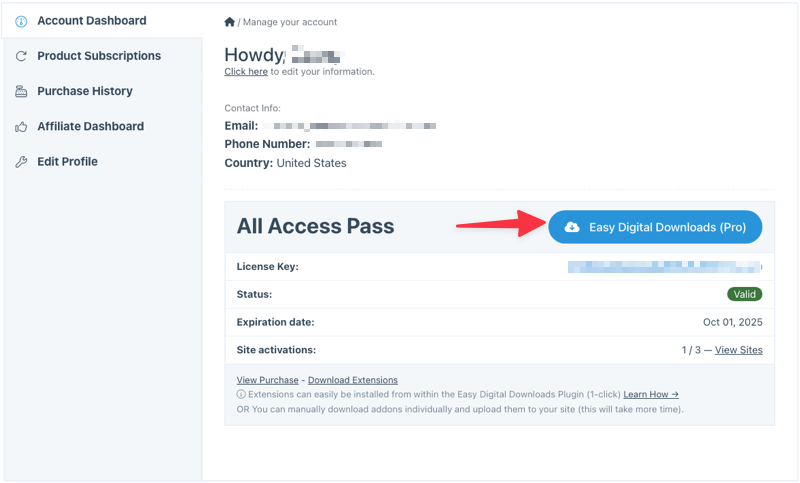
After you choose an EDD pass, download the plugin from your account dashboard.
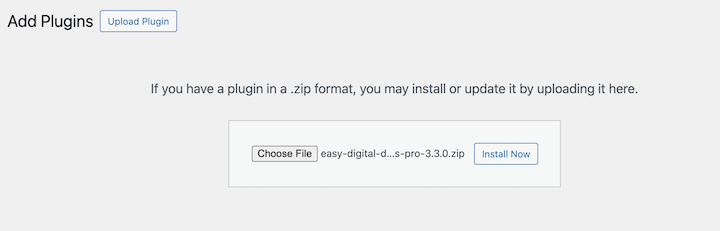
In your WordPress admin, go to Plugins » Add New Plugin » Upload Plugin. Select the zip file you downloaded, click Install Now, then Activate Plugin.
After activation, you’ll see a new Downloads menu in your WordPress dashboard.
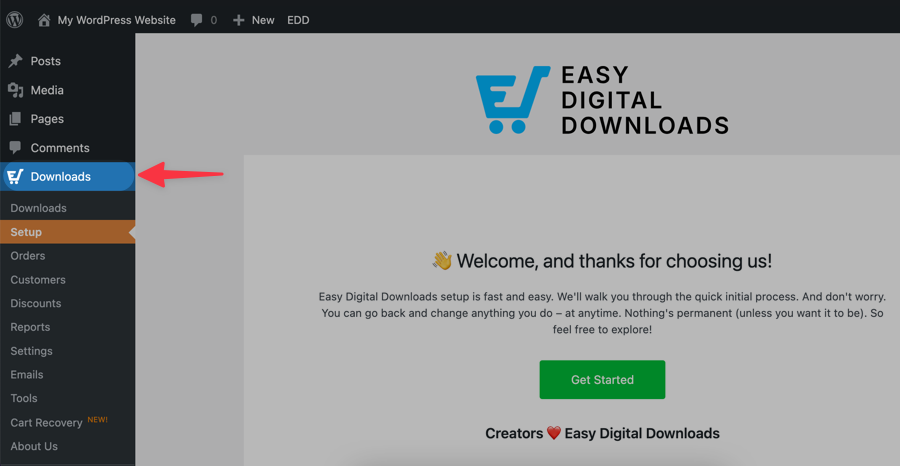
Click Get Started to launch the setup wizard, which will guide you through basic configuration like your store’s currency, location, and tax settings.
You can also activate your license key under Downloads » Settings.
Check out the video below for step-by-step guidance.
Step 2: Enable Recurring Payments
Once Easy Digital Downloads Pro is active, navigate to Downloads » Extensions. Find Recurring Payments in the list and click Install. It activates automatically.
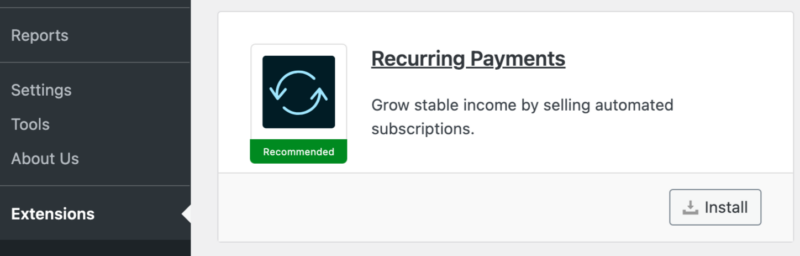
This extension is what makes subscriptions possible. It handles automatic renewals, failed payment retries, subscription status tracking, and customer notification emails — all without any manual work on your end.
Step 3: Connect Your Payment Gateway
Go to Downloads » Settings » Payments and connect your preferred gateway.
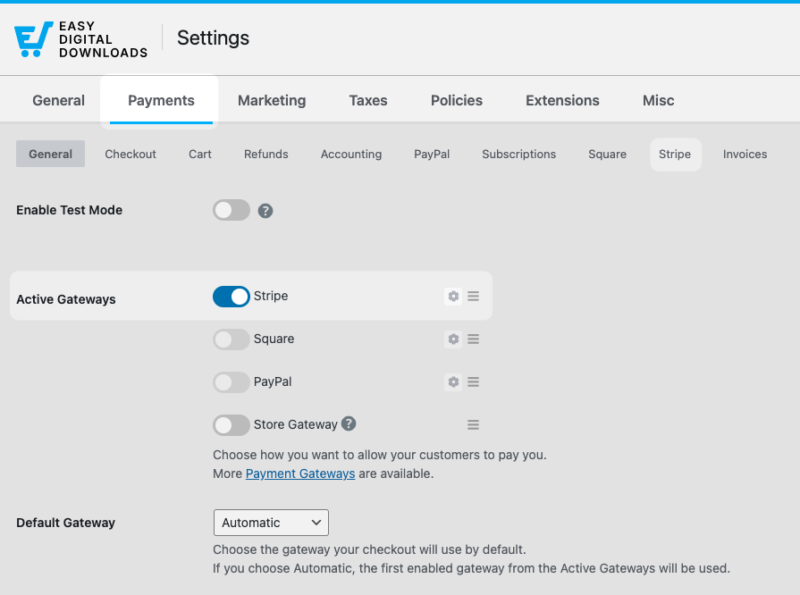
Stripe is the recommended option. It supports all major credit and debit cards, processes renewals automatically at each billing cycle, and handles failed payment retries. Click Connect with Stripe and follow the prompts to link your account.
PayPal is also supported as an alternative. You can enable multiple gateways if you want to give customers a choice at checkout.
You’ll need to configure your Stripe connection under the Stripe tab.
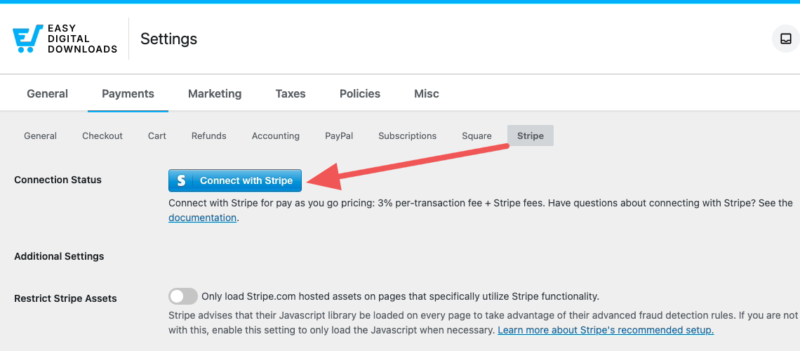
The process takes about two minutes and handles all the technical setup automatically. If you don’t have one, you can create one for free.
⚙️ Follow our Stripe setup doc for step-by-step instructions.
Step 4: Create Your First Subscription Product
Now for the exciting part: creating your actual subscription product. In EDD, products are called ‘downloads’.
Go to Downloads » Add Download to create your first offering.
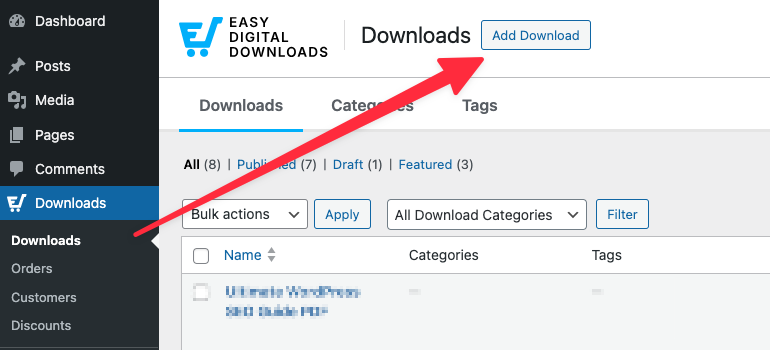
In the example below, I’ll use a monthly Marketing Trends Report in which users subscribe for a monthly fee to see updated data.
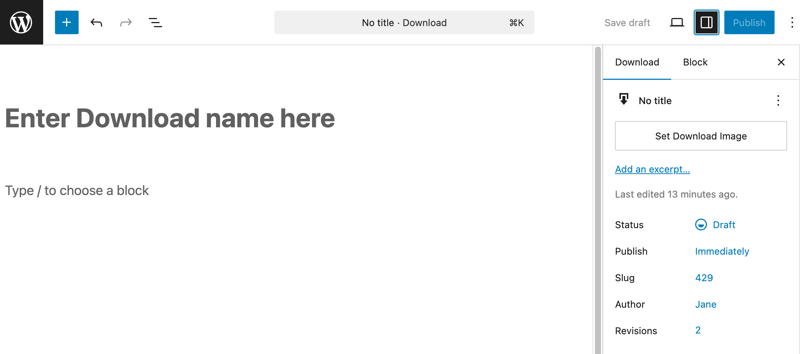
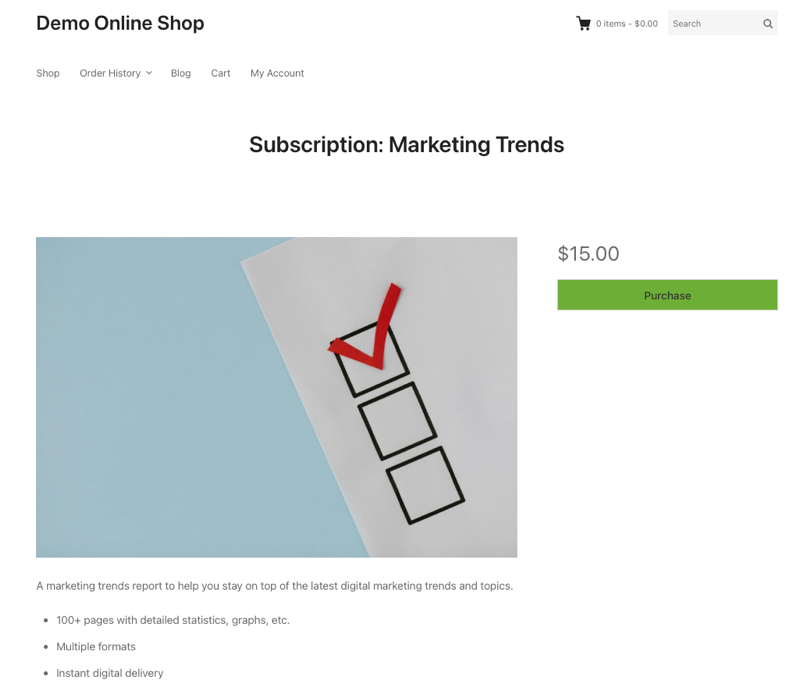
Start with the basics. Give your subscription a compelling title, write a description that clearly explains what customers get, and add an attractive featured image.
Think of this like any other product page; it needs to convince visitors to subscribe.
Under Download Details, you can configure a variety of settings to make it the type of subscription you want.
In the Price section, set your base subscription price. Next, under Recurring, select Yes from the drop-down.
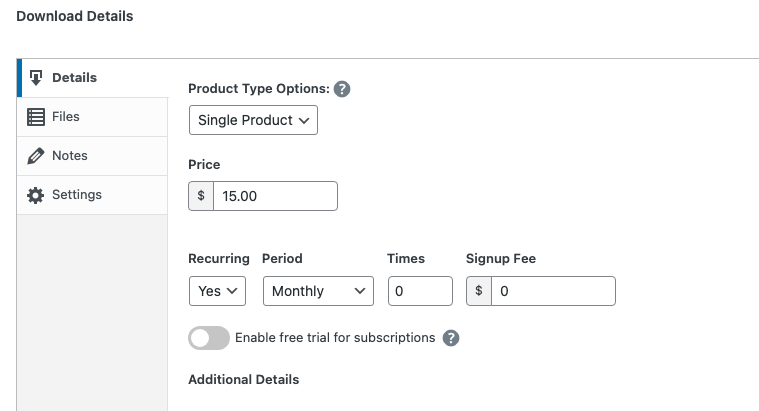
For each pricing tier, set the price, the billing period (weekly, monthly, quarterly, or annually), and optionally a free trial length. A free trial is a great way to lower sign-up friction. Billing starts automatically when the trial ends.
If you’re delivering a file, scroll to the Files section and upload it. Easy Digital Downloads handles file delivery automatically after a successful payment and again at each renewal.
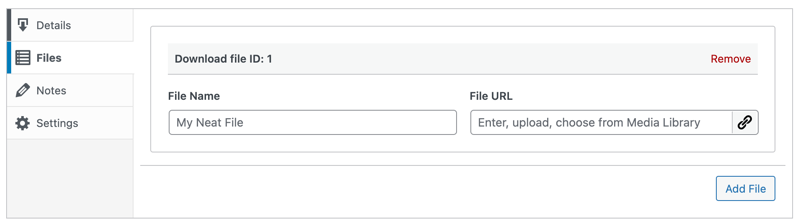
The File Name is the clickable text users select to download the product. You can add specific download instructions under Notes.
When you’re ready, click on Save draft followed by Publish.
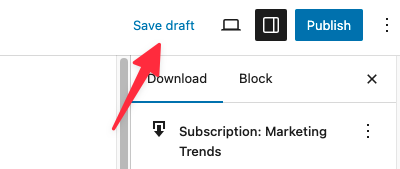
After publishing your download a banner will appear at the top with a View Download link.
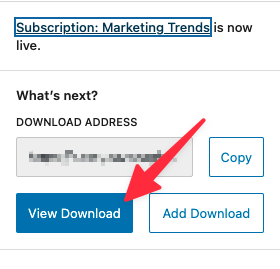
Click View Download to see your new subscription product on the front-end of your website.
⚙️ For more info on each option, check out our Creating Products documentation.
Step 5: Test and Launch Your Subscription
Before going live, run a test transaction to make sure everything works end to end.
Go to Downloads » Settings » Payments and enable Test Mode. Then visit your product page, add it to cart, and complete a test checkout using Stripe’s test card number (4242 4242 4242 4242).
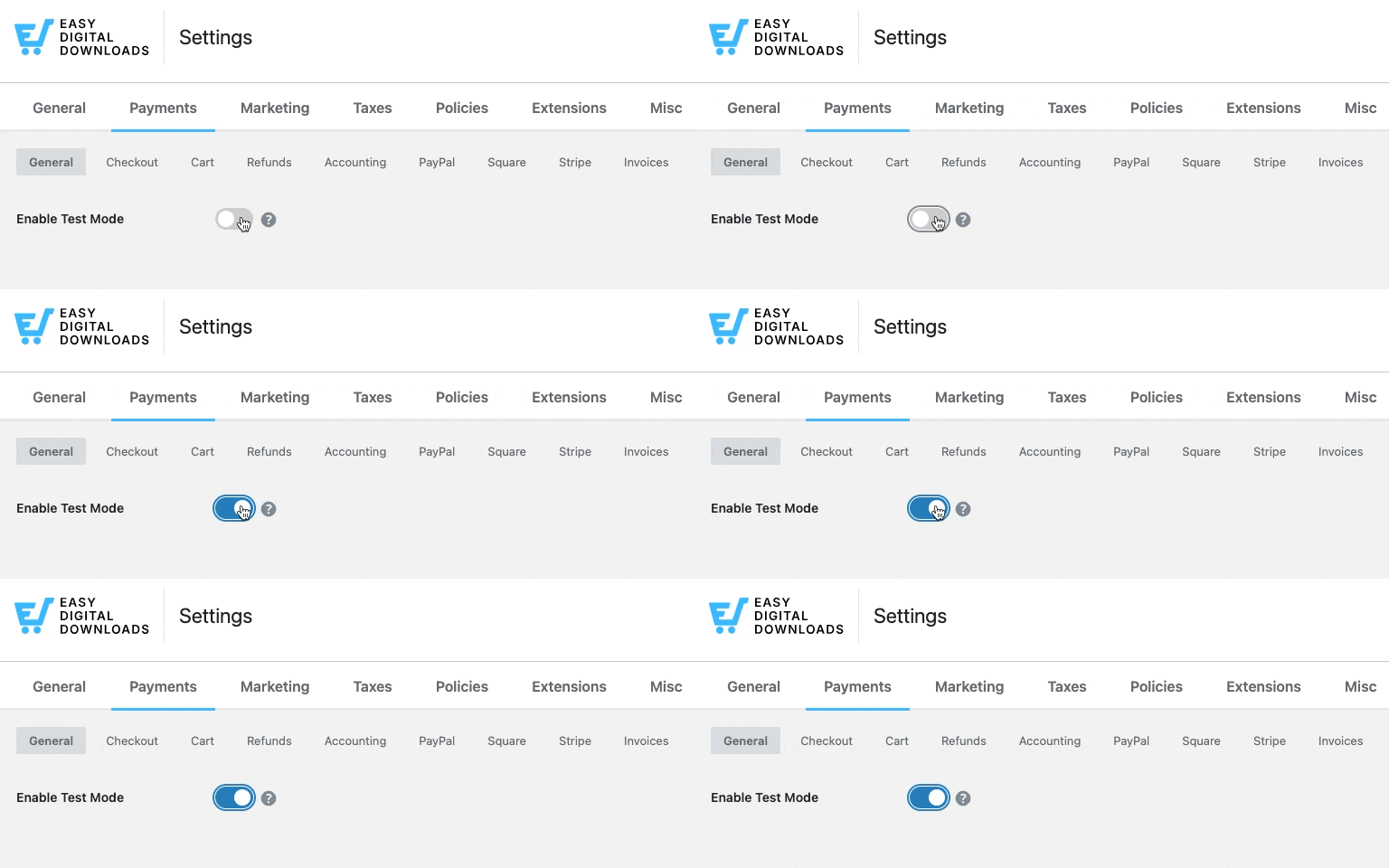
After checkout, verify three things:
- The customer can access the file from their purchase receipt.
- A confirmation email arrived.
- The subscription appears under Downloads » Subscriptions.
Learn more about how to test payments.
Once everything checks out, go back to Settings » Payments and disable Test Mode. Your store is ready for live subscriptions.
Managing Subscriptions and Reducing Churn
Getting subscribers is step one. Keeping them is where sustainable recurring revenue is built.
Managing Subscribers in EDD
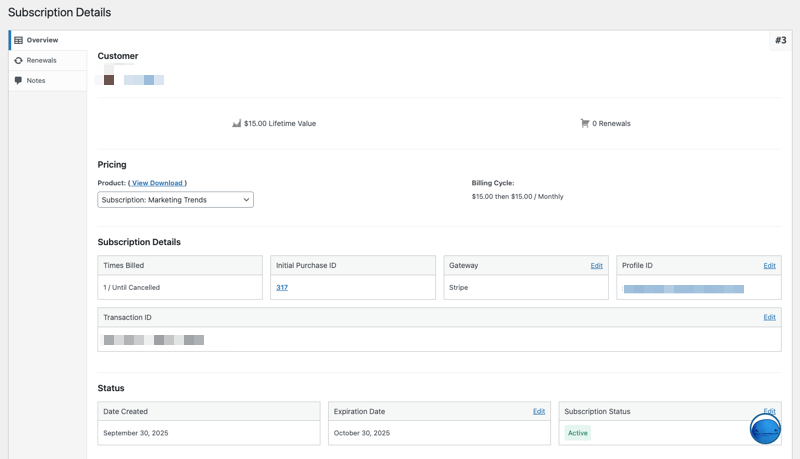
All active subscriptions are visible under Downloads » Subscriptions. From here you can view each subscriber’s billing status, renewal date, and payment history.
You can also act on individual subscriptions: cancel, pause, change the renewal date, or issue a refund. Customers can manage their own subscriptions from their account page without needing to contact you.
Under Downloads » Subscriptions, you can view all active, expired, and canceled subscriptions.
Each entry shows the customer’s name, subscription status, next renewal date, and total amount paid.
⚙️ Learn more about managing subscriptions.
Handling Failed Payments
Failed payments are the most common cause of involuntary churn. A card expires, a bank flags the charge, or a customer’s account runs low. Without a retry system, those subscriptions cancel quietly.
EDD’s Recurring Payments feature handles this automatically. When a payment fails, it retries the charge multiple times over the following days and sends the customer an email to update their payment details. Most failed payment situations resolve on their own before the subscription cancels.
Tips to Reduce Subscription Churn
A few practices consistently help keep subscribers longer:
- Offer annual plans at a discount. Customers who pay for a full year churn far less than month-to-month subscribers.
- Use free trials to lower sign-up friction. Letting customers try before committing improves conversion and builds trust.
- Send renewal reminders. A friendly email a few days before billing reduces surprise cancellations.
- Make payment updates easy. The simpler it is to update a card, the fewer subscriptions you lose to expired payment info.
FAQs About Selling Subscriptions With WordPress
Let’s wrap up by answering some frequently asked questions about the best way to sell subscriptions with WordPress.
Does WordPress have built-in subscription functionality?
No. WordPress doesn’t include any built-in payment or recurring billing features. To sell subscriptions, you need to install an ecommerce plugin that supports recurring payments, such as Easy Digital Downloads, WooCommerce Subscriptions, or MemberPress.
What’s the best WordPress plugin for selling subscriptions?
The best plugin depends on what you’re selling. Easy Digital Downloads (EDD) is the top choice for digital product sellers: software, ebooks, templates, and downloads. WooCommerce Subscriptions is better suited for physical or mixed-product stores. MemberPress is the strongest option for gated membership sites and content communities.
What’s the difference between a subscription and a membership in WordPress?
A subscription is about recurring billing. A membership is about access control. Subscriptions charge customers on a set schedule; memberships restrict who can view or download specific content. Many creators use both together, but Easy Digital Downloads handles both in one plugin for digital product businesses.
Can I offer a free trial with my WordPress subscriptions?
Yes. Easy Digital Downloads lets you add a free trial to any subscription product when you configure your pricing tiers. You set the trial length, and billing starts automatically when the trial ends. WooCommerce Subscriptions and MemberPress also support free trials with similar setup options.
How much does it cost to sell subscriptions on WordPress?
Easy Digital Downloads Pro starts at $99.50/yr and includes the Recurring Payments extension. WooCommerce Subscriptions costs $279/yr. MemberPress starts at $179/yr. On top of plugin costs, you’ll pay standard payment processor fees: Stripe charges 2.9% + 30 cents per transaction, with no additional platform cut from EDD.
What payment gateways support recurring payments in WordPress?
Stripe and PayPal are the most widely supported options across all major WordPress subscription plugins. Easy Digital Downloads supports both, with additional gateways available through extensions. WooCommerce Subscriptions integrates with over 25 payment gateways, including Mollie, Authorize.net, and more.
Can I sell multiple subscription tiers on one product in EDD?
Yes. Easy Digital Downloads’ Variable Pricing feature lets you create multiple tiers on a single product page, each with its own price, billing interval, and trial length. This makes it easy to offer monthly and annual plans side by side, or different feature tiers at different price points.
Sell Subscriptions With WordPress and Earn Recurring Revenue
ubscriptions are one of the most reliable ways to build predictable income as a digital product seller. You earn revenue on a schedule, reduce dependence on one-time sales, and build longer-term relationships with your customers.
If you’re selling digital products on WordPress, Easy Digital Downloads gives you everything you need: recurring billing, automatic renewals, file delivery, and subscriber management, all in one place.
Ready to start building your subscription business? Get your EDD Pro pass today and transform your one-time sales into predictable recurring revenue.
Want to learn more about building your digital product store? How to start selling digital products with WordPress.
📣 P.S. Be sure to subscribe to our newsletter and follow us on Facebook, Twitter/X, or LinkedIn for more WordPress resources!








