

More creators are ditching marketplaces and selling digital content directly from their own websites. It’s not hard to see why.
Platforms like Etsy, Gumroad, and Teachable take a cut of every sale, limit how you present your brand, and own the customer relationship you worked hard to build.
Selling digital content online with WordPress changes that equation. You keep more of your revenue, you own your customer data, and you control the entire experience from first click to file delivery.
This guide walks you through exactly how to do it: choosing the right plugin, connecting payments, adding your first product, protecting your files, and making your first sale.
🔎 In this article, I’ll cover:
- What Is Digital Content? (And What Can You Sell?)
- Why Sell Digital Content on WordPress (Not a Marketplace)?
- What You Need Before You Start
- Choosing the Right Plugin to Sell Digital Content on WordPress
- How to Sell Digital Content Online with WordPress: Step by Step
- What Happens After Someone Buys Your Digital Content?
- How Much Does It Cost to Sell Digital Content on WordPress?
- How to Promote Your Digital Content After Launch
- FAQs on Selling Digital Products with WordPress
- Use EDD to Sell Digital Content with WordPress
What Is Digital Content? (And What Can You Sell?)
Digital content refers to any product that exists and is delivered in digital format. That’s a broader category than most people realize. It goes well beyond downloadable files.
With the right WordPress setup, you can sell:
- Downloadable files: eBooks, PDFs, templates, stock photos, music, fonts, software, plugins, presets, and printables
- Access-based content: online courses, gated articles, video libraries, and membership areas
- Recurring content: newsletter subscriptions, software licenses with ongoing updates, and membership tiers
This breadth is what makes “digital content” distinct from just “digital downloads.” It’s also what makes WordPress with Easy Digital Downloads (EDD) such a strong fit. Whether you’re selling a single PDF or running a full membership site, EDD handles it.
Why Sell Digital Content on WordPress (Not a Marketplace)?
Marketplaces give you a built-in audience but take control and revenue in return. Self-hosted WordPress gives you full ownership. Here’s what that means in practice.
Keep 100% of Your Revenue 💰
Marketplace fees add up fast. Etsy charges 6.5% per sale. Gumroad takes 10%. Creative Market keeps 50% of every transaction. With WordPress, you only pay standard payment processing fees: Stripe charges 2.9% + 30¢ per transaction. That’s it.
Own Your Customer Relationships 🤝
When you sell on a marketplace, the customers belong to the marketplace. You can’t email them, retarget them, or build a direct relationship. On WordPress, your email list, your customer data, and your brand are yours.
Sell Any Type of Digital Content 🛒
No platform restrictions on file types, pricing models, or content categories. Subscriptions, bundles, license keys, gated content, and access-based products are all possible. You set the rules.
Scale Without Limits 🚀
No listing fees, no product caps, no bandwidth charges. Whether you’re selling one eBook or a library of 500 templates, the cost structure stays the same.
🔎 Learn more about Marketplaces vs Your Own Site.
What You Need Before You Start
You don’t need much to get going. Here’s the short list:
- Payment processor account. Stripe (recommended) or PayPal. Both are free to create. Fees apply per transaction.
- A self-hosted WordPress site. This guide uses WordPress.org, which is the self-hosted version you install on your own hosting. This is different from WordPress.com, which is a hosted service with restrictions on plugins and customization. If you’re not sure which you have, check with your hosting provider.
- Web hosting. SiteGround’s Managed EDD Hosting is the fastest path: WordPress and Easy Digital Downloads come pre-installed. Plans start from around $4 to $15/mo depending on the tier.
Choosing the Right Plugin to Sell Digital Content on WordPress
WordPress doesn’t let you sell digital content out of the box. You need an eCommerce plugin to handle the storefront, payments, and file delivery. There are two main options.
Easy Digital Downloads (Recommended for Digital Content) 🏆
Easy Digital Downloads is built specifically for digital products. There are no shipping fields, no inventory management screens, and no features cluttering up your dashboard that you’ll never use.
The free core plugin handles everything you need to get started: a shopping cart, Stripe and PayPal payments, secure file delivery, customer management, download limits, and discount codes.
Pro plans unlock subscriptions, software licensing, content restriction for membership sites, abandoned cart recovery, and advanced reporting. EDD powers the stores for WPForms, MonsterInsights, and All in One SEO. It’s trusted by more than 50,000 businesses.
WooCommerce (If You Sell Physical Products)
WooCommerce is the most popular eCommerce plugin for WordPress, and it’s an excellent choice if your store mixes physical and digital products. For digital-only sellers, though, it adds unnecessary complexity. Selling digital content requires configuring each product as “virtual” and “downloadable,” which adds extra steps and friction that EDD avoids entirely.
➡️ The recommendation: For creators selling digital content only, EDD is the faster, cleaner choice.
🔎 Check out EDD vs WooCommerce for a more detailed comparison.
How to Sell Digital Content Online with WordPress: Step by Step
Here’s the full setup process from a fresh WordPress install to your first live product.
Step 1: Set Up Your WordPress Site
If you’re using SiteGround Managed EDD Hosting, WordPress and EDD come pre-installed. You can skip ahead to Step 3.
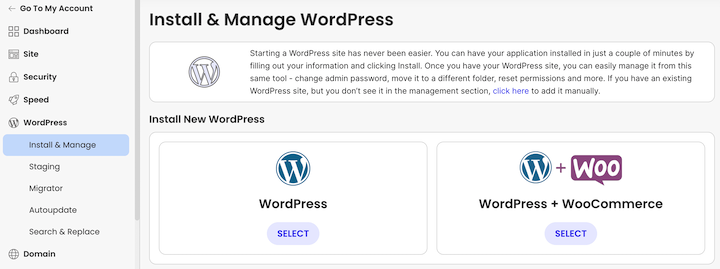
If you’re starting from scratch, install WordPress through your hosting provider’s one-click installer. Most major hosts (SiteGround, Bluehost, Hostinger) include this in their dashboard.
Step 2: Install and Activate Easy Digital Downloads
From your WordPress dashboard, go to Plugins » Add New and search for “Easy Digital Downloads.” Click Install Now, then Activate.
You can also download the plugin from easydigitaldownloads.com and upload it via Plugins » Upload Plugin.
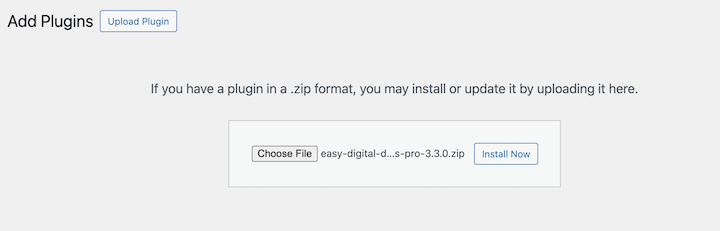
After activation, the plugin adds a Downloads menu to your admin area. Click on Get Started to launch the EDD Setup Wizard.
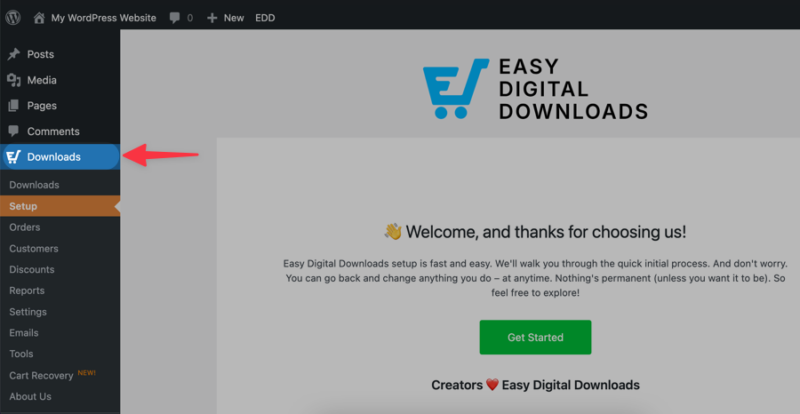
Feel free to use the video below for details guidance on setting up your EDD store:
Step 3: Configure Your Store Settings
The Setup Wizard walks you through the basics: your store location, preferred currency, and business category. These settings tell EDD how to handle taxes and formatting.
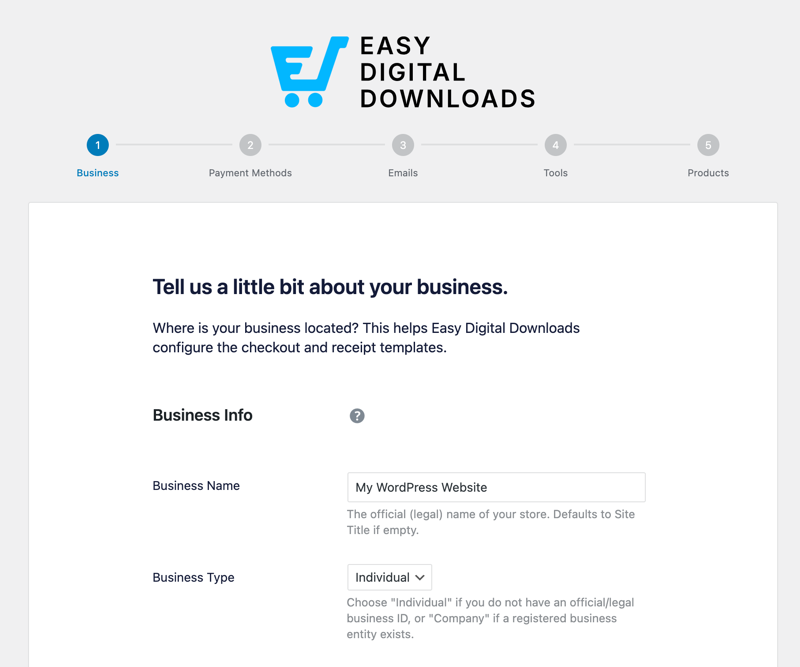
You can revisit any of these later. Just go to Downloads » Settings from your dashboard.
Step 4: Connect Your Payment Gateway
EDD supports Stripe (recommended) and PayPal, along with several other gateways.
To connect Stripe, go to Downloads » Settings » Payments and click Connect with Stripe. It’s an OAuth connection, so there are no API keys to copy and paste. Just log in to your Stripe account and authorize the connection.
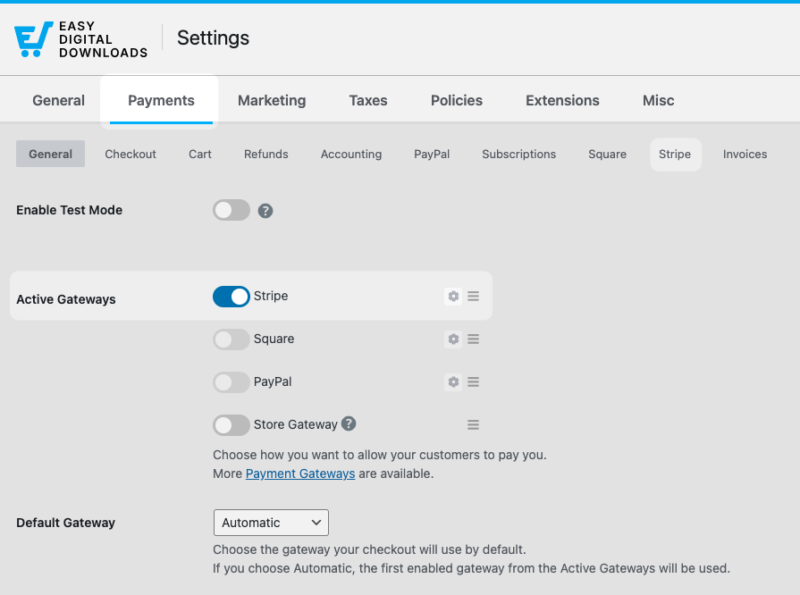
Once its connected, you’ll just need to select the option to Automatically set up webhooks.
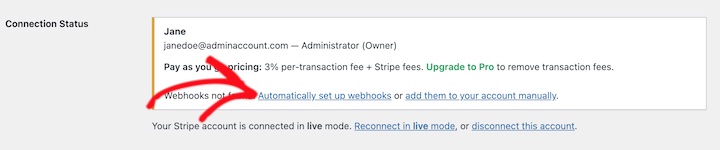
For PayPal, you’ll follow a similar process from the same Payments settings screen. PayPal is a solid alternative in regions where Stripe isn’t available.
A note on fees: Stripe charges 2.9% + 30¢ per transaction. EDD Pro eliminates an additional Stripe processing fee, which adds up meaningfully once your sales volume grows.
⚙️ If you need help, refer to our Stripe setup documentation.
Step 5: Add Your First Digital Product
In EDD, digital products are called digital downloads. To sell digital content, you’ll create a product page.
Go to Downloads » Add Download. This is where you create your digital product listing.
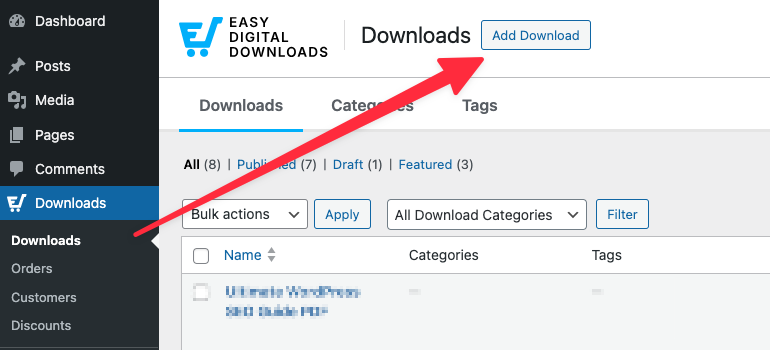
Fill in the product name and description at the top. Think of the description as your sales copy, not just a label. A clear, benefit-focused description does real work here.
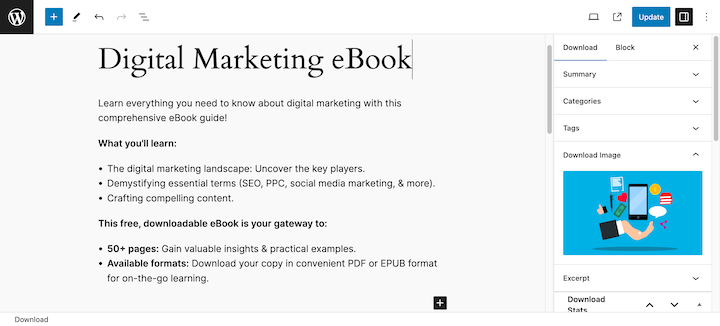
Under Download Details, set your price. You can also set it to $0 for a free download or lead magnet.
EDD supports various pricing options. For instance, you can enable variable pricing or set up subscription-based pricing.
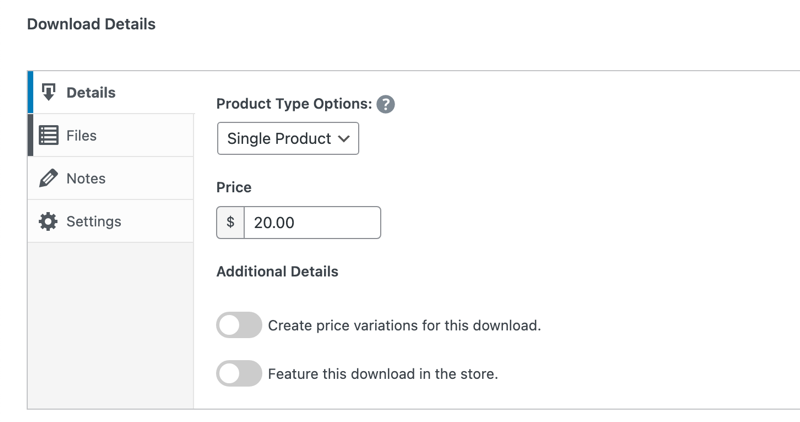
Under Files, upload your file directly (PDF, ZIP, MP3, MP4, and other formats are all supported) or paste a hosted URL from Amazon S3, Dropbox, or another storage provider.
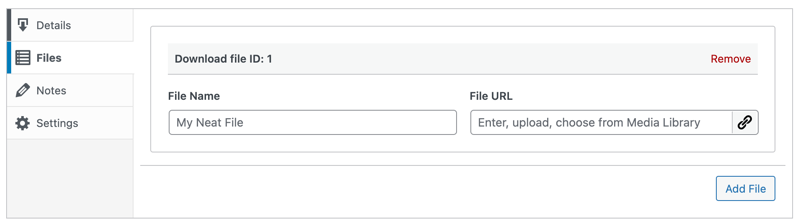
Give the file a name in the File Name field. That’s the clickable link text customers see on the download confirmation page.
In the sidebar, add a product image. It appears on your store page and product listing.
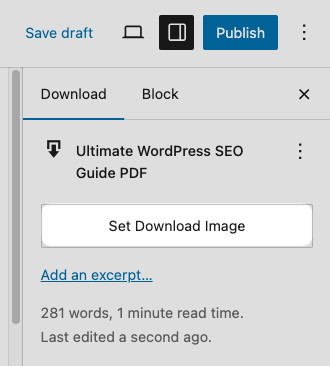
When you’re ready, click Publish.
Step 6: Protect Your Digital Content
This step separates a professional digital store from an insecure one. EDD includes built-in file protection that most platforms don’t match.
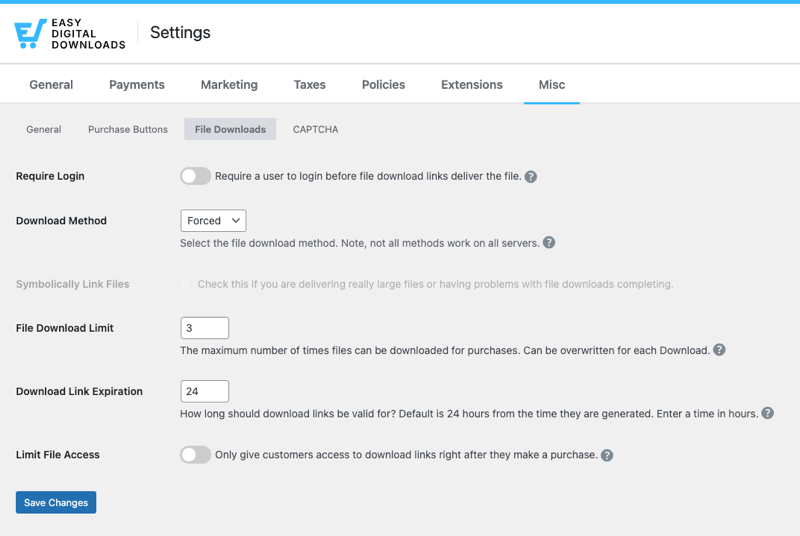
Head to Downloads » Settings » Misc » File Downloads to configure these three protections:
- Download limit: Restrict how many times a customer can download after purchase. The default is unlimited. Setting a limit of 3 to 5 downloads is standard practice for most content types.
- Download expiry: Set a number of days before the download link expires. An expiring link can’t be shared indefinitely after purchase.
- Secure file storage: EDD stores your files outside the public web root by default. Someone can’t access your file just by guessing the URL. A valid purchase is required.
Pro plans add even more protections and restrictions for additional control.
Step 7: Preview and Test Your Store
I highly recommending making a test purchase on your store while you preview it to ensure everything looks and functions correctly.
Enable test mode to simulate a purchase before going live.
Go to Downloads » Settings » Payments and enable Test Mode.
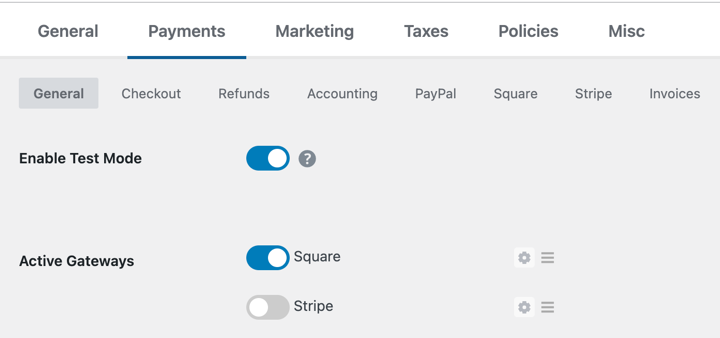
Save your changes.
Click View Download on your digital product to see the front-end listing.
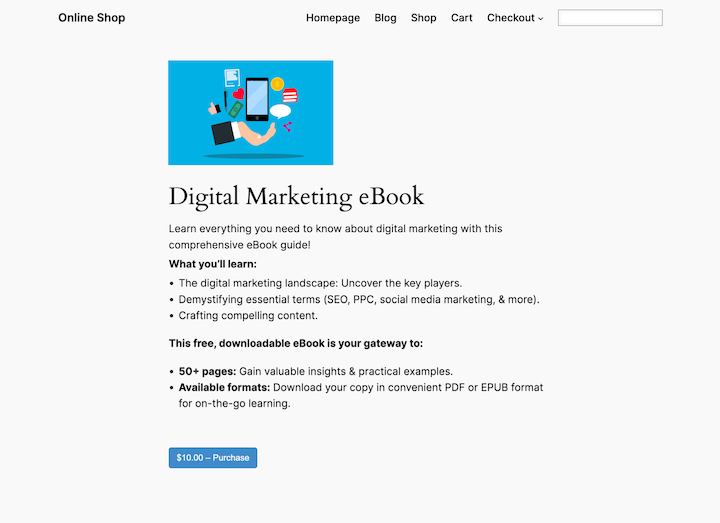
Make a test purchase and check three things:
- Does the confirmation email arrive?
- Does the download link work?
- Does the download page look the way you want?
Once everything checks out, turn off Test Mode and your store is live.
What Happens After Someone Buys Your Digital Content?
This is something a lot of sellers wonder about before their first sale: what does the buyer actually experience?
EDD handles delivery automatically. Here’s what happens the moment someone completes a purchase:
Confirmation page: The customer is redirected to a purchase receipt page immediately after payment. A download button appears right there, no waiting.
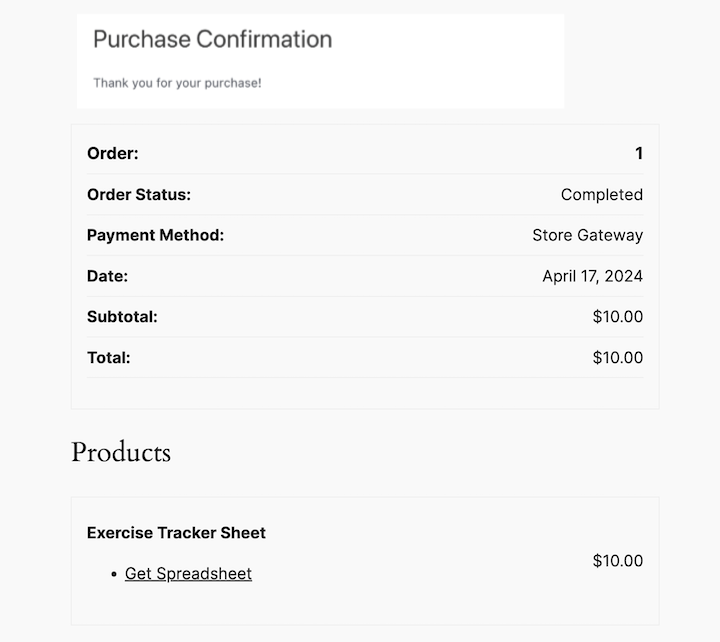
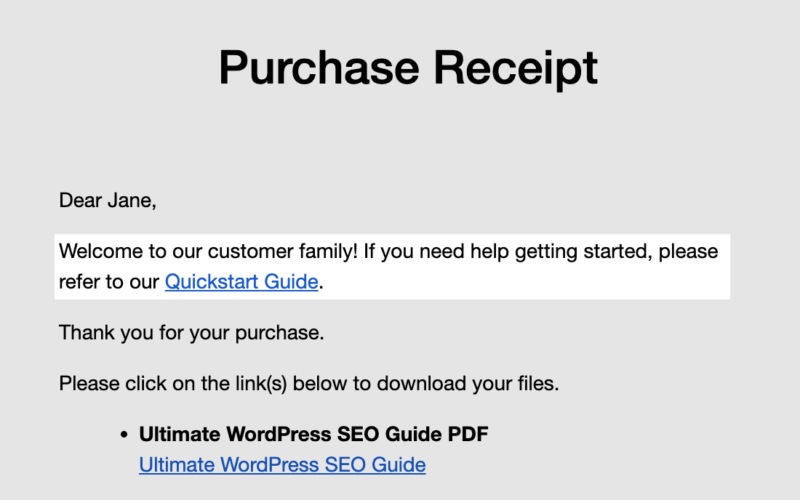
Confirmation email: EDD sends an automatic email with the download link. You can customize the email template and content under Downloads » Settings » Emails. Adding your logo, a thank-you message, and usage instructions makes a strong first impression.
If you have EDD Pro, you can customize purchase emails with conditional tags!
Customer account (optional): If you enable user registration, customers can log back in and re-download from their account page. This is especially useful for software, courses, or content you update over time.
Re-download access: EDD logs every download attempt per customer. If someone loses access, you can manually resend the link or extend their access from the order screen.
How Much Does It Cost to Sell Digital Content on WordPress?
There’s no single answer. The cost depends on which plan you choose. Here’s the honest breakdown.
🔎 Check out our full eComerce Website Cost + Pricing Breakdown.
| Cost Item | Free Option | Paid Option |
|---|---|---|
| WordPress | Free (self-hosted) | n/a |
| Web hosting | n/a | ~$4 to $15/mo (SiteGround, Bluehost, etc.) |
| Domain name | n/a | ~$14 to $18/yr |
| SSL certificate | Free (included with most hosts) | n/a |
| Easy Digital Downloads | Free (core plugin) | $99 to $499/yr (Pro plans) |
| Payment processing | n/a | 2.9% + 30¢ per transaction (Stripe/PayPal) |
Minimum to start: Around $4 to $6/mo for hosting, plus the free EDD plugin, plus payment processing fees that only kick in when you make a sale.
When to upgrade to EDD Pro: If you need subscriptions, software licensing, content restriction for a membership site, abandoned cart recovery, or you want to eliminate the additional Stripe transaction fee.
🔎 Easy Digital Downloads Free vs Pro: Which Is Right for You?
How to Promote Your Digital Content After Launch
Getting your store live is step one. Getting sales is step two. Here are four practical ways to drive traffic and revenue.
Publish content that answers questions your buyers are already searching for. Each post is a long-term traffic asset that can link directly to your product pages. A post that ranks in search doesn’t stop working for you after you publish it.
Offer a free download as a lead magnet to grow your list. EDD integrates with Mailchimp, ConvertKit, ActiveCampaign, and other email platforms. Use those integrations to follow up with buyers and stay in front of prospects who didn’t purchase on the first visit.
EDD includes a built-in coupon system. Launch discounts, limited-time offers, and affiliate promo codes all drive first purchases and word-of-mouth referrals. You can set percentage or flat-rate discounts and control how many times each code can be used.
Let other people promote your digital content for a commission. EDD integrates with AffiliateWP, one of the most widely used affiliate program plugins for WordPress. Starting an affiliate program can expand your reach without additional ad spend.
FAQs on Selling Digital Products with WordPress
Let’s wrap up with some frequently asked questions about why and how to sell digital content online.
Can I sell digital content on WordPress for free?
Yes. WordPress itself is free, and Easy Digital Downloads has a free core plugin. You’ll pay for web hosting (around $4 to $15/mo) and standard payment processing fees (2.9% + 30¢ per Stripe transaction). There are no monthly platform fees and no commission cuts on your sales.
Is Easy Digital Downloads better than WooCommerce for digital content?
For sellers focused exclusively on digital content, yes. EDD is purpose-built for digital products, with a simpler setup and no unnecessary shipping or inventory features. WooCommerce is the better choice if your store sells both physical and digital products.
How do I protect my digital content from being shared?
EDD includes download limits, expiring download links, and secure file storage (files aren’t accessible by direct URL) in the free plugin. Pro plans add IP address restrictions and per-customer access management for additional control.
What types of digital products can I sell on WordPress?
With EDD, you can sell eBooks, PDFs, templates, software, plugins, music, audio files, stock photos, video files, online courses, and access-based content like membership areas and gated articles. If it can be stored as a file or delivered as access, you can sell it.
Do I need coding skills to sell digital content on WordPress?
No. EDD is incredibly user- and beginner-friendly. Adding products, setting prices, connecting Stripe, and customizing your emails all happen through standard WordPress admin screens. No code required.
Use EDD to Sell Digital Content with WordPress
Selling digital content online with WordPress gives you full ownership, no marketplace fees, and the flexibility to sell any type of content to any audience. The setup takes less than an hour. The protections are built in. And Easy Digital Downloads scales with you as your catalog and customer base grow.
By following the steps outlined in this guide and leveraging the power of EDD, you can transform your creations into valuable assets and sell digital content that generates income while you sleep.
Don’t have EDD yet? Grab your pass and start selling digital products in no time:
📣 P.S. Be sure to subscribe to our newsletter and follow us on Facebook, Twitter/X, or LinkedIn for more WordPress resources!