


Selling digital products is one of the best ways to build a business online. There’s no inventory to manage, no shipping to coordinate, and your products can sell around the clock without any extra work on your part.
The hard part isn’t making something worth selling. It’s figuring out where and how to sell it.
Marketplaces like Gumroad or Etsy make it easy to get started, but they take a cut of every sale and leave you with little control over your store, your pricing, or your customer relationships. Building your own digital download store on WordPress is different. You set the rules.
With Easy Digital Downloads (EDD), trusted by over 50,000 businesses, you can have a fully working store up and running in under an hour. You keep your revenue (minus standard payment processing fees), own your customer data, and control every part of how your store looks and runs.
This guide covers every step, from getting hosting to making your first sale.
Key Takeaways
| Best plugin | Easy Digital Downloads is purpose-built for digital sellers and works with any WordPress site. |
| What you can sell | eBooks, software, photos, music, templates, courses, and any downloadable file. |
| Cost to start | The EDD core plugin is free; advanced features are available through affordable paid pass tiers. |
| Setup time | Most stores are up and running in under an hour with EDD’s onboarding wizard. |
| Payment options | Stripe and PayPal are supported out of the box on the free plan. |
What Is a Digital Download Store?
A digital download store is an online shop where customers buy and instantly receive downloadable files. No physical product is shipped. After checkout, the buyer gets a secure link to download their purchase directly.
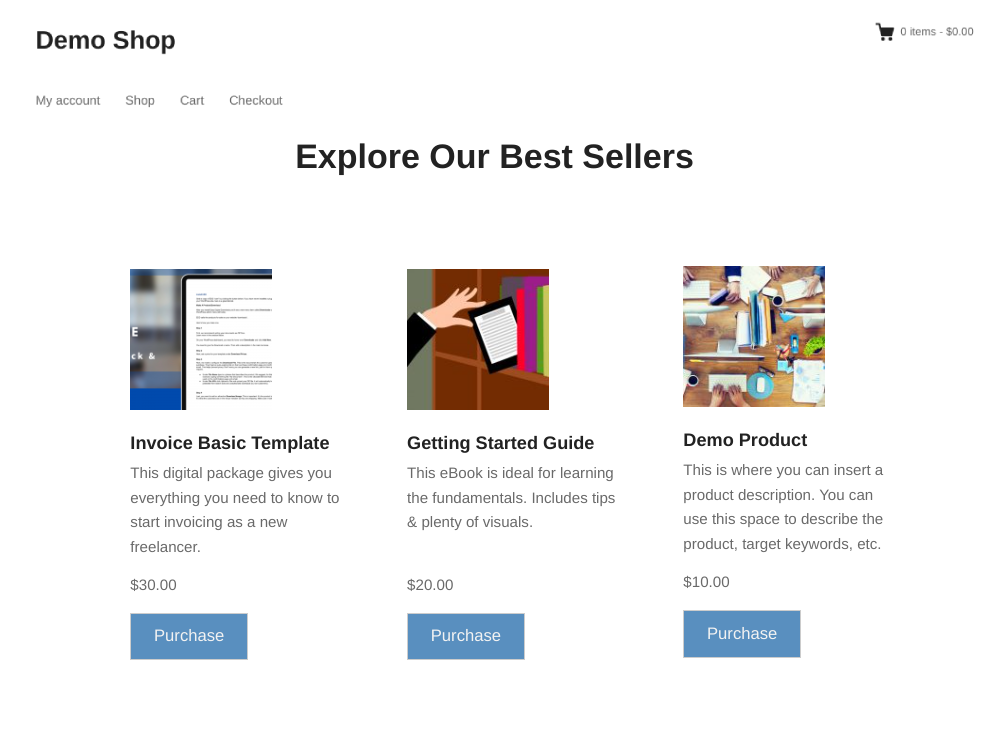
This model works for any file you can create once and sell repeatedly: documents, audio, video, software, and more. You make the product once, and EDD handles the delivery every time someone buys it.
The key difference between your own store and a marketplace is ownership. On a marketplace, the platform controls your pricing options, takes a percentage of every sale, and owns the customer relationship.
Your own WordPress store gives you full control over all three, and that adds up to significantly higher margins over time.
Want to learn more? Check out:
- How to Create an Online Store with WordPress
- Marketplace vs. Your Own Store (Which is better?)
- How to Move: Marketplace ➡️ Your Own Digital Store
What Can You Sell in a Digital Download Store?
Almost anything that can be saved as a file. Here are the most popular digital product types:
- eBooks and PDF guides:Written content, how-to guides, cookbooks, templates, and reports
- Software and plugins: Desktop apps, WordPress plugins, and themes (with automated license key delivery through EDD’s Software Licensing feature)
- Stock photos and digital art: Image packs, illustrations, icons, and design assets
- Music and audio: Songs, sound packs, beats, and audio courses
- Video content: Tutorial recordings, courses, and film
- Templates: Canva templates, PowerPoint decks, Figma files, and document templates
- Worksheets and planners: Printables, trackers, and educational materials
- Online course materials: Structured learning content delivered as downloadable files or ZIP packages
Easy Digital Downloads supports any file type that WordPress accepts in the Media Library, so you’re not limited to a specific format.
EDD vs. WooCommerce: Which Should You Use?
If you’re selling digital products only, Easy Digital Downloads is the better choice.
WooCommerce is a powerful platform, but it’s built for physical goods. Features like shipping options, inventory management, and product weight fields are useful if you’re selling T-shirts. They add unnecessary complexity if you’re selling eBooks or software.
EDD is built exclusively for digital sellers, so every feature it includes is one you’ll actually use.
| Easy Digital Downloads | WooCommerce | |
|---|---|---|
| Built for digital goods | Yes | No (built for physical) |
| Free core plugin | Yes | Yes |
| License key management | Yes (Software Licensing feature) | No |
| Setup complexity | Simple | More involved |
| Physical-goods features you don’t need | None | Many |
If you plan to sell physical and digital products together, WooCommerce may be worth considering. For a digital-only store, EDD wins on focus and simplicity.
🔎 Learn more about EDD vs Woo
How to Create a Digital Download Store in WordPress
Now let’s get into the tutorial on how to create a digital download store in WordPress.
Here’s the complete process, from setting up your site to making your first sale.
Step 1: Get a Domain Name and Hosting
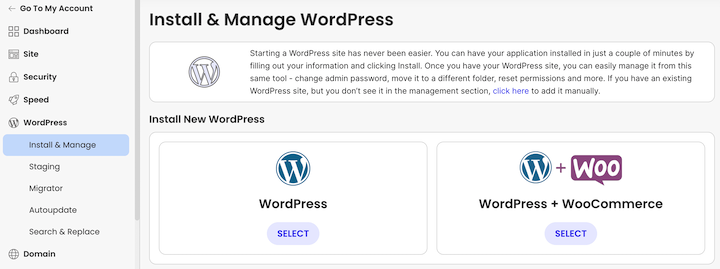
Before you can install WordPress, you need a domain name and a hosting plan.
Your domain name is your store’s address on the web (for example, yourstore.com). Keep it short, easy to spell, and relevant to what you sell. Stick to a .com extension whenever possible, and avoid numbers and hyphens that make it harder to share by word of mouth.
For hosting, you’ll want a provider that includes:
- One-click WordPress installation
- A free SSL certificate (required for secure checkout)
- Reliable uptime and solid loading speeds
- Support you can actually reach when something goes wrong
Managed WordPress hosting providers like SiteGround, WP Engine, or Bluehost are solid options that work well with Easy Digital Downloads. They handle server maintenance for you, so you can focus on running your store instead of managing technical infrastructure.
Step 2: Install Easy Digital Downloads
Easy Digital Downloads is a freemium plugin available directly from the WordPress plugin directory.
In your WordPress dashboard, go to Plugins » Add New Plugin. Search for “Easy Digital Downloads,” then click Install Now and Activate.
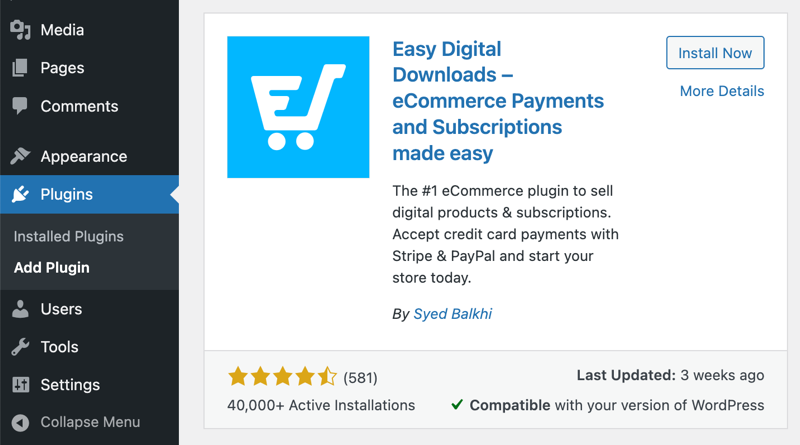
Once activated, EDD adds a Downloads menu to your dashboard. The first time you run it, the onboarding wizard guides you through the initial setup: entering your business name and location, connecting a payment gateway, and adding your first product.
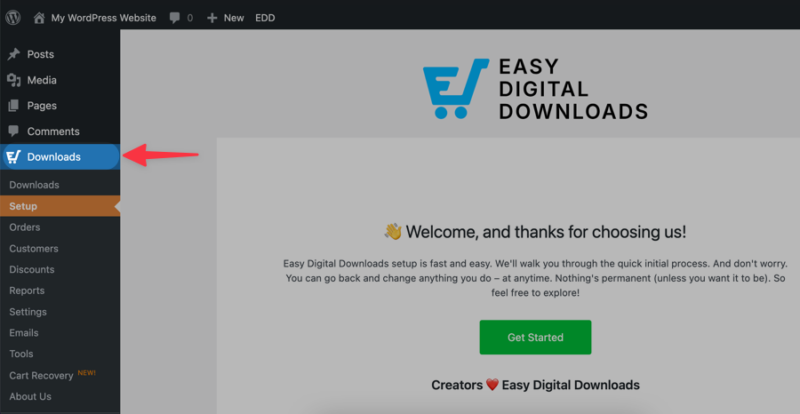
You can complete the wizard now or skip it and configure each section manually. Either way, the wizard covers most of the same ground as the steps below, so there’s no wrong approach.
The free Easy Digital Downloads plugin includes everything you need to create a store, add unlimited products, and start accepting payments. Premium features are available through EDD’s paid pass tiers if you need them down the road.
💡 Feel free to refer to these guides:
Step 3: Choose a Theme for Your Store
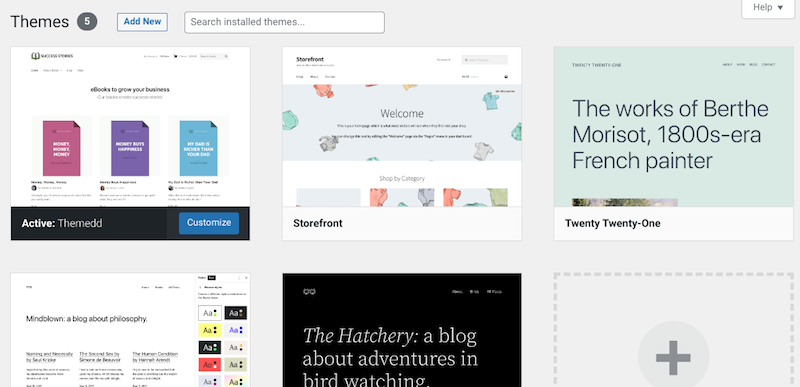
Easy Digital Downloads works with most WordPress themes, but a few are designed specifically for digital download stores and make setup even easier.
Two themes built for EDD:
- Vendd: A clean, minimal theme designed specifically for Easy Digital Downloads stores, with built-in styling for product pages and checkout
- Themedd: A flexible EDD-native theme with full support for EDD’s layout and checkout features out of the box
If you prefer to use a more general-purpose theme, look for one that loads quickly, works well on mobile, and has a clean product page layout. Themes like GeneratePress pair well with EDD.
To install a theme, go to Appearance » Themes » Add New and search by name.
Step 4: Connect a Payment Gateway
To take payments, you need to connect at least one payment gateway. Go to Downloads » Settings and click the Payments tab.
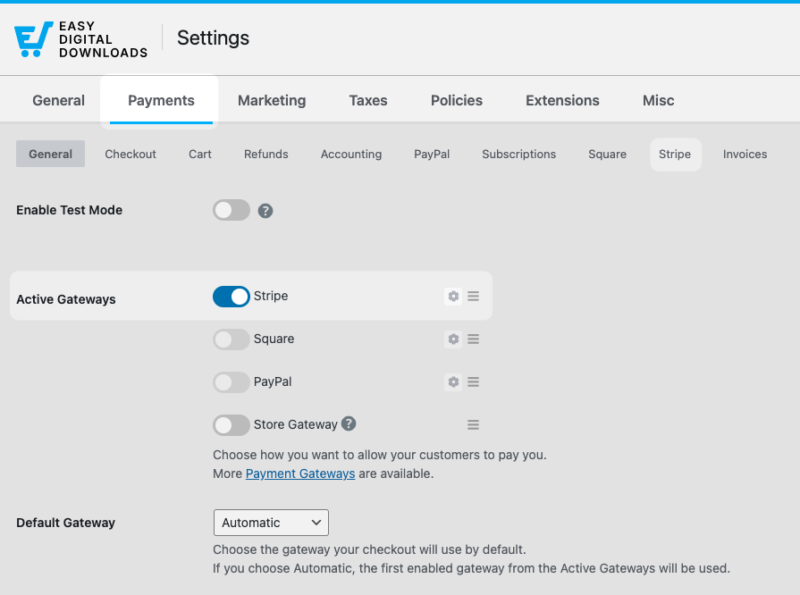
EDD includes built-in support for Stripe, PayPal, and Square on the free plan.
Stripe is the recommended choice for most stores. It processes payments directly on your checkout page, so customers never leave your site to complete a purchase.
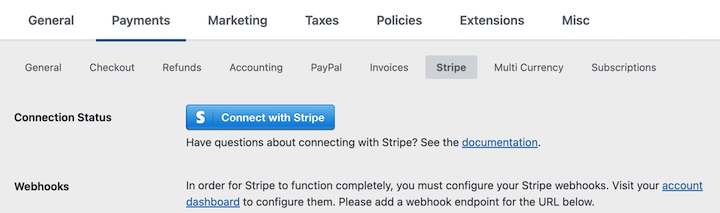
Once you enable it under the Payments tab, head over to the Stripe tab. Then click Connect with Stripe and follow the prompts to link your Stripe account. Stripe charges a standard per-transaction fee and no additional platform fees.
PayPal is a strong secondary option, particularly if a portion of your buyers prefer paying with a PayPal balance.
Once you’ve connected a payment method, run a test transaction before you open your store to the public. Enable test mode under Downloads » Settings » Payments » General, place a test order, and confirm the purchase flow works end to end.
⚙️ For full guidance on this process, refer to our Stripe Setup documentation.
Additional payment gateways, including Authorize.net and others, are available through EDD’s paid pass tiers.
Step 5: Add Your Digital Products
This is where your store starts to take shape.
Go to Downloads » Add Download.
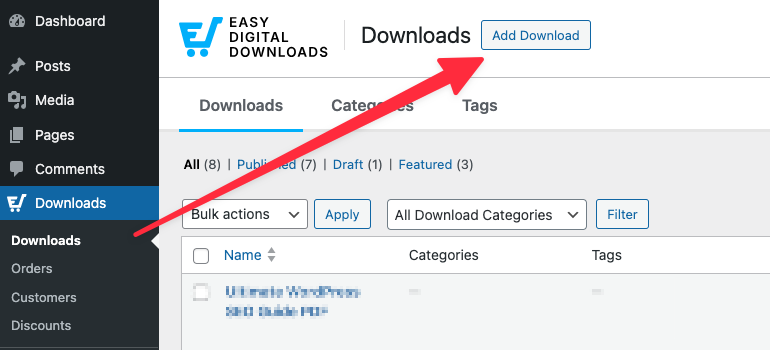
The product editor looks similar to the standard WordPress post editor, with a few additional sections for pricing and file management.
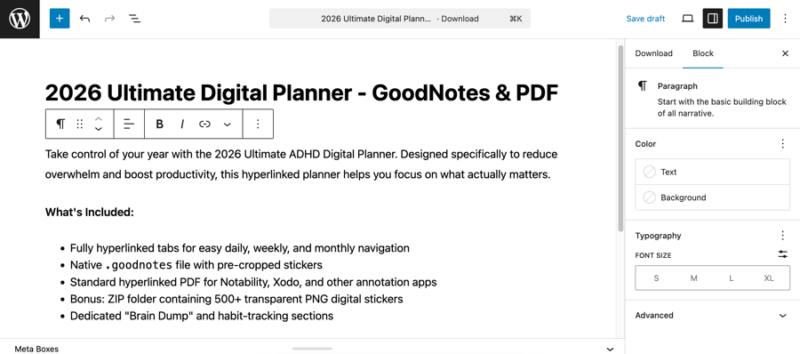
Fill in the following for each product:
Product title. Use a clear, descriptive name that tells buyers exactly what they’re getting. Good product titles also help with search visibility.
Product description. Use the full editor to explain what the buyer gets, who it’s for, and why it’s valuable. Add formatting, images, or a preview if it helps.
Download price. Enter your price in the Download Details » Prices section.
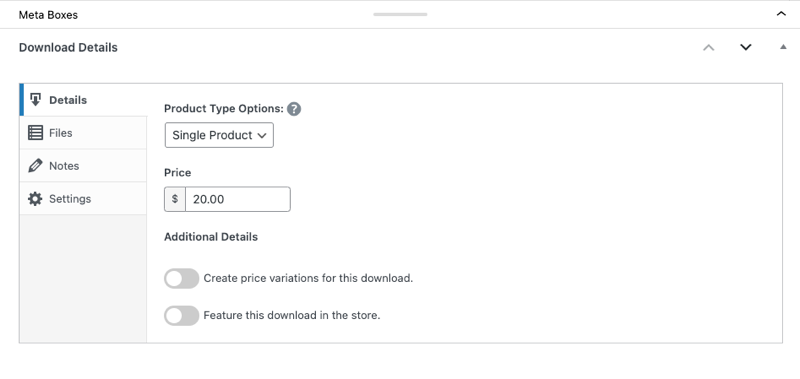
EDD also supports variable pricing if you want to offer multiple tiers (for example, a personal license at one price and a commercial license at a higher price).
Download files. Under the Files tab, upload your file directly from your computer or paste in a URL.
You can attach multiple files to a single product if needed. EDD handles secure delivery automatically after every purchase.
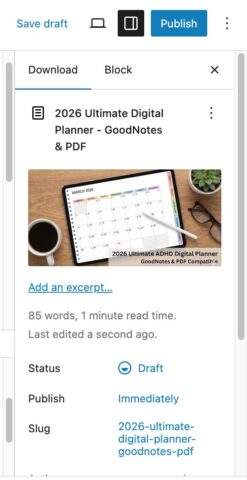
Product image. Within the right-side panel, click on Set Download Image.
Choose and upload an image that gives your product a professional look in your store and on product pages.
When you’re ready, click Save draft or Publish. Easy Digital Downloads automatically creates a checkout page and a purchase confirmation page for your store.
You can find and edit both under Downloads » Settings » Pages.
Step 6: Customize Your Store and Checkout
A few additional settings make your store more polished and easier to manage.
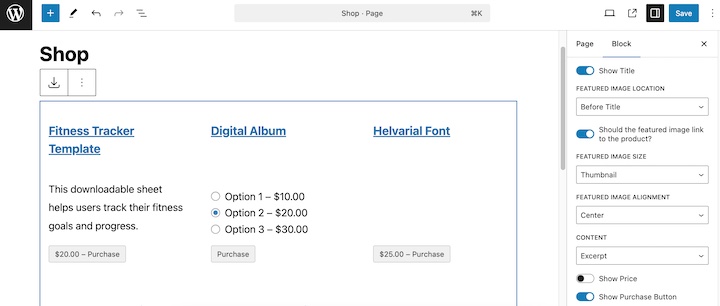
Store display settings. Easy Digital Downloads uses the EDD Products block to display your products on any page. You can control the number of columns, sort order, and more by adjusting the block settings directly on the page where your shop is displayed.
Discount codes. Creating coupons is straightforward. Go to Downloads » Discounts » Add Discount.
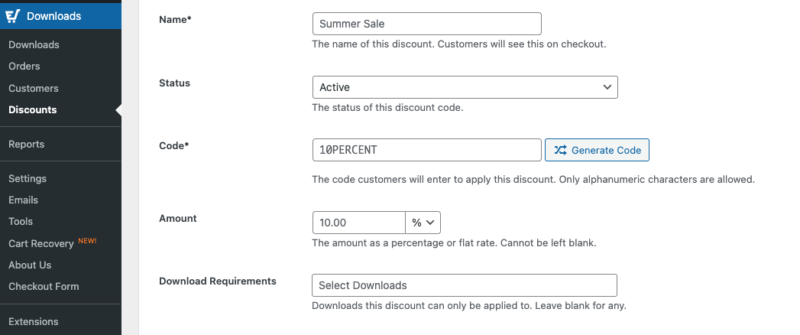
Set a percentage or flat-rate discount amount, an optional expiration date, and a usage limit if you want the offer to expire after a set number of uses. Discount codes are useful for launch promotions, email subscriber offers, or rewarding repeat customers.
Download link expiration. By default, EDD’s purchase confirmation emails include a secure download link. You can set those links to expire after a number of days or after a set number of downloads.
Find this setting under Downloads» Settings » Misc » File Downloads.
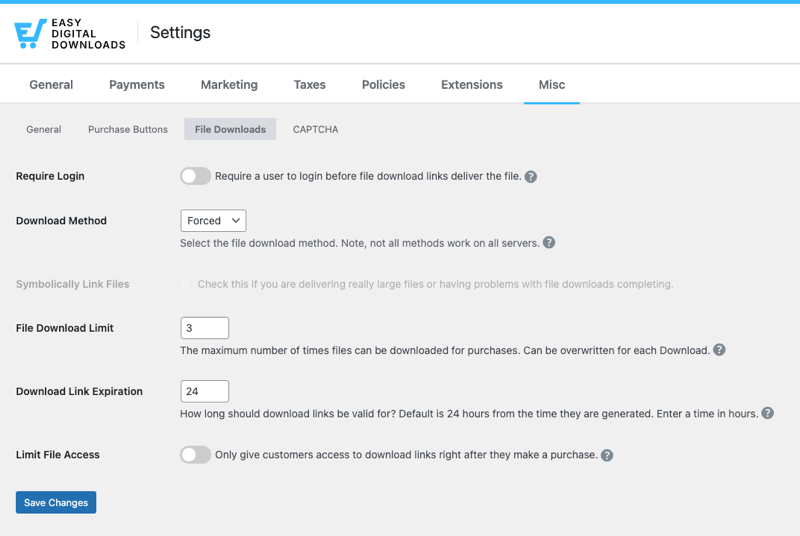
Limiting download access helps protect your files from being shared beyond the original buyer.
Purchase receipt emails. Easy Digital Downloads sends a purchase confirmation email to every buyer automatically. Customize the subject line, sender name, and email body under Downloads » Emails.
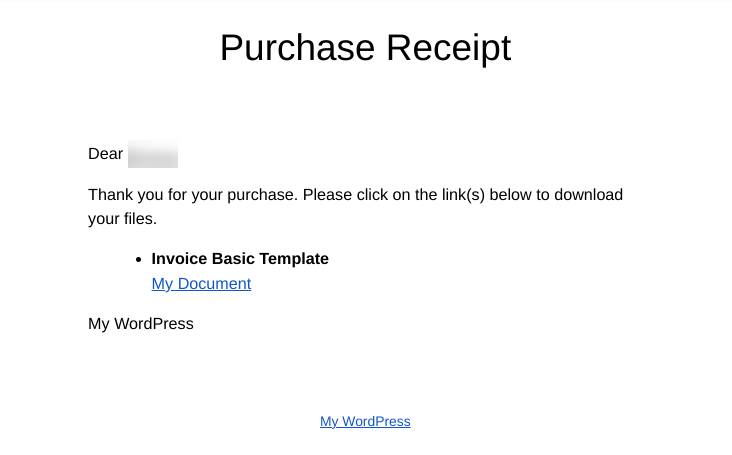
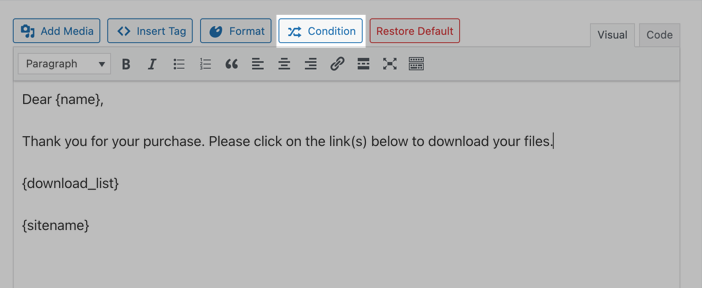
EDD includes built-in template tags you can insert to personalize each receipt with the buyer’s name and their specific purchase details.
Click Insert Tag in the email editor to see all available options. You can also add a condition tag to customize the message certain customers get based on the criteria you set.
⚙️ Learn how to personalize your purchase emails.
Step 7: Promote Your Digital Download Store
Building your store is only half the work. Here’s how to get it in front of buyers.
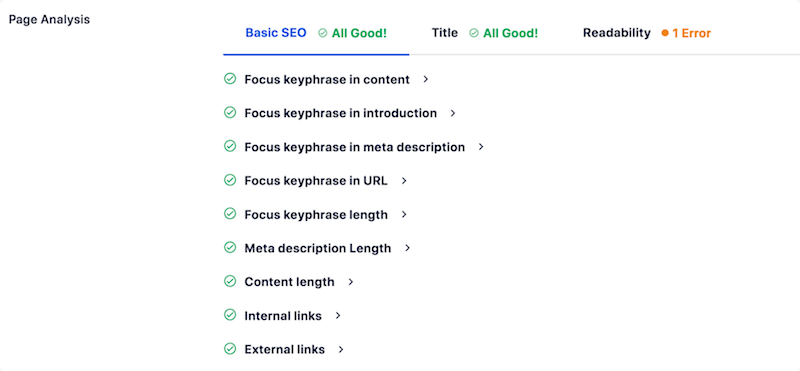
Every product page on your store is an opportunity to rank in search results. Install an SEO plugin like AIOSEO (All in One SEO) to add meta titles and descriptions to your product pages, generate an XML sitemap, and get visibility into how your pages are performing.
Your email list is one of the most valuable assets you can build as a digital seller.
Connect EDD to an email marketing service like Mailchimp or ConvertKit to automatically add customers to your list after they make a purchase. Use your list to announce new products, run exclusive promotions, and bring past buyers back for repeat purchases.
Unlike social media followers, your email list belongs to you. No algorithm changes can cut you off from your audience.
AffiliateWP integrates directly with Easy Digital Downloads and lets you recruit affiliates to promote your products in exchange for a commission you set. It’s one of the most cost-effective ways to drive new sales because you only pay for results.
🔎 How to start an affiliate program
Content and social media
Publishing blog posts, tutorials, or short-form videos related to your niche builds long-term organic traffic and helps you establish credibility with your audience.
Share new products and behind-the-scenes content on the social platforms where your buyers spend their time. Consistency matters more than perfection here.
FAQs About Creating a Digital Download Store
Let’s wrap up with some frequently asked questions.
Is Easy Digital Downloads free?
Yes. The Easy Digital Downloads core plugin is free to download and use from WordPress.org. It includes everything you need to build a store, add products, and accept payments through Stripe or PayPal. Advanced features like Software Licensing, Recurring Payments, and priority support are available through EDD’s paid pass tiers.
What’s the best plugin for selling digital downloads in WordPress?
Easy Digital Downloads is the best plugin for selling digital downloads in WordPress. It’s built specifically for digital products, so there’s no extra complexity from physical goods features. It handles secure file delivery automatically, supports all major payment gateways, and has a full library of features for sellers who need advanced functionality like subscriptions or license key management.
Can I sell digital downloads for free on WordPress?
Yes. You can launch a store using the free Easy Digital Downloads plugin. You’ll still need to pay for domain registration and web hosting, but the plugin itself costs nothing. Standard payment processing fees from Stripe or PayPal apply to each transaction, but Easy Digital Downloads does not charge any platform or transaction fees on top of those.
Do digital download links expire in EDD?
Yes, and you control the settings. Go to Downloads » Settings » Misc » File Downloads to set link expiration by number of days or number of allowed downloads. Setting an expiration limit helps protect your files from being shared beyond the original buyer without restricting legitimate access.
How are digital downloads delivered to customers?
After a customer completes checkout, Easy Digital Downloads automatically sends a purchase confirmation email with a secure download link. The link takes them directly to their file. No manual action is needed on your end. Customers can also log in to their account page on your site to access their purchases at any time.
Is Easy Digital Downloads better than WooCommerce for digital products?
For digital-only stores, yes. Easy Digital Downloads is designed exclusively for digital goods, so the feature set is more relevant and the setup is more straightforward. WooCommerce includes shipping, inventory, and physical product management tools that add unnecessary complexity when you’re only selling files. If you plan to sell physical and digital products side by side, WooCommerce may be a better fit.
How much does it cost to build a digital download store in WordPress?
Expect to pay around $10 to $15 per year for a domain name and $5 to $15 per month for web hosting. The Easy Digital Downloads core plugin is free. Advanced features like Software Licensing or Recurring Payments are available through EDD’s paid pass tiers, which start at an affordable annual rate. Payment processors like Stripe charge a standard per-transaction fee, but there are no platform fees added on top of that.
Start Selling Your Digital Products Today
Creating a digital download store in WordPress is more straightforward than most people expect. With the right hosting, the Easy Digital Downloads plugin, and a bit of initial configuration, you can have a professional store accepting payments today.
The biggest advantage of owning your store goes beyond saving on marketplace fees. It’s the direct relationship you build with your customers. You control your pricing, your branding, and your data. No platform policy change can take that away.
Over 50,000 businesses already sell their digital products with Easy Digital Downloads. Install the free plugin and launch your store today.
If you’re ready to start selling with more advanced features, explore our passes to see which fits your needs best!
📣 P.S. Be sure to subscribe to our newsletter and follow us on Facebook, Twitter/X, or LinkedIn for more WordPress resources!








